
dma9551
Inspiring
June 14, 2022
Question

How do I turn a drawing from grayscale to a color range?

  • June 14, 2022
  • 4 replies
  • 591 views

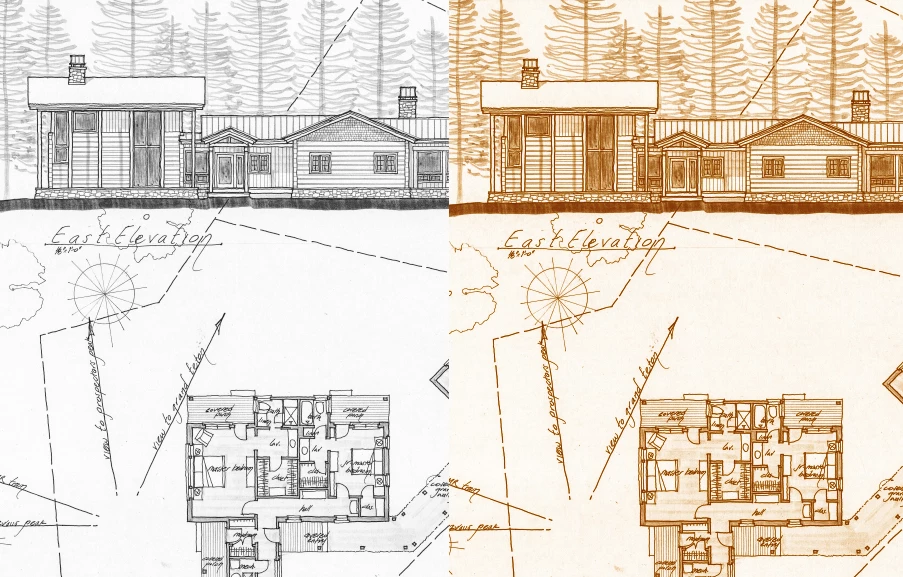
What is the best way to turn a black and white scan into an orange-sepia toned one? I've tinkered with many options, Duotone, Hard light, etc., but didn't write the many steps, and I'm sure one of you, experts, would have an easy solution. 

Thanks ahead.
 

4 replies

Ryan Whisler
Participating Frequently
June 17, 2022

Or... you can do this the easy way:

1- convert your grayscale image to RGB

2- go to Image / Adjust / Balck&White

3- At the bottom of the Black&White box you just brought up check the "Tint" box then simply adjust the color to your liking. Done...

dma9551
dma9551Author
Inspiring
June 17, 2022

Another great option, thank you!

Zesty_wanderlust15A7
Known Participant
June 17, 2022

Yeah, that's probably the best or easiest one — sorry... 😜  You can add another B&W layer under it (NOT set to tint) and set layer to Luminosity. This way you can play with the "weights" of the image and totally match it, potentially..

dma9551
dma9551Author
Inspiring
June 14, 2022

Great, I can work with these settings and adjust to something really close. Thank you!

Conrad_C
Community Expert
Community Expert
June 14, 2022

If a single color doesn’t quite do it because you want more color variation between the dark and light tones, you can set up a gradient preset and apply it using Layer > New Adjustment Layer > Gradient Map (not to be confused with Gradient).

Chuck Uebele
Community Expert
Community Expert
June 17, 2022

Just to add to Conrad's excellent suggestion, using the gradient map allows you to control the color and tones of the very dark or black areas of the image and tje whites. Easier to sample an existing image to match tje color.

Zesty_wanderlust15A7
Known Participant
June 14, 2022

You could use a Hue/Sat adjustment layer and set it to "Colorize."  Using the Hue slider then becomes fun, but play with it all (and layer opacity). I couldn't exactly match it with just this layer though — only a lighter version.

Zesty_wanderlust15A7
Known Participant
June 14, 2022

Another one is to use a Solid Color... adjustment layer. Change blend mode to color, open its Color picker and click around 🙂 This one I can't get to match either though.