


In Windows Explorer, navigate to Program Files\Common Files\Adobe
Turn on suggestions
Auto-suggest helps you quickly narrow down your search results by suggesting possible matches as you type.
Exit
- Home
- Photoshop ecosystem
- Discussions
- How do I update my camera raw in Photoshop CS5 fro...
- How do I update my camera raw in Photoshop CS5 fro...
0
How do I update my camera raw in Photoshop CS5 from 7.0 to 9.1 so I upload my raw images I shot with my Nikon D7200?

New Here
,
/t5/photoshop-ecosystem-discussions/how-do-i-update-my-camera-raw-in-photoshop-cs5-from-7-0-to-9-1-so-i-upload-my-raw-images-i-shot-with/td-p/7870194
Dec 14, 2015
Dec 14, 2015
Copy link to clipboard
Copied
How do I update my camera raw in Photoshop CS5 from 7.0 to 9.1 so I upload my raw images I shot with my Nikon D7200?
!
Community guidelines
Be kind and respectful, give credit to the original source of content, and search for duplicates before posting.
Learn more


Explore related tutorials & articles
 49
Replies
49
49
Replies
49


Community Expert
,
/t5/photoshop-ecosystem-discussions/how-do-i-update-my-camera-raw-in-photoshop-cs5-from-7-0-to-9-1-so-i-upload-my-raw-images-i-shot-with/m-p/7870221#M49111
Dec 17, 2015
Dec 17, 2015
Copy link to clipboard
Copied
You need to use the DNG Converter first. You downloaded that, just search for it.
Nikon NEFs in a Folder >>> Adobe DNG Converter.exe >>> DNGs >>> open in Adobe Camera Raw 7.1 to read and process your Nikon photos.
At least I want you to access your raws, the rest can wait  Happy Holidays!
Gene

Community guidelines
Be kind and respectful, give credit to the original source of content, and search for duplicates before posting.
Learn more
mcmhm31
AUTHOR
New Here
,
/t5/photoshop-ecosystem-discussions/how-do-i-update-my-camera-raw-in-photoshop-cs5-from-7-0-to-9-1-so-i-upload-my-raw-images-i-shot-with/m-p/7870222#M49112
Dec 17, 2015
Dec 17, 2015
Copy link to clipboard
Copied
I don’t understand your suggestion. I installed the converter last week, but it did not recognized Nikon’s NEF. Isthere a way to “make” it work?
Community guidelines
Be kind and respectful, give credit to the original source of content, and search for duplicates before posting.
Learn more
Community Expert
,
/t5/photoshop-ecosystem-discussions/how-do-i-update-my-camera-raw-in-photoshop-cs5-from-7-0-to-9-1-so-i-upload-my-raw-images-i-shot-with/m-p/7870223#M49113
Dec 17, 2015
Dec 17, 2015
Copy link to clipboard
Copied
I think the NEFs have to be in a folder and you select the folder, not the NEFs in them.
Check the video I linked you to, it is very thorough.
Community guidelines
Be kind and respectful, give credit to the original source of content, and search for duplicates before posting.
Learn more
mcmhm31
AUTHOR
New Here
,
/t5/photoshop-ecosystem-discussions/how-do-i-update-my-camera-raw-in-photoshop-cs5-from-7-0-to-9-1-so-i-upload-my-raw-images-i-shot-with/m-p/7870228#M49118
Dec 17, 2015
Dec 17, 2015
Copy link to clipboard
Copied
I selected the folder that has the NEFs and not individual NEFs
Community guidelines
Be kind and respectful, give credit to the original source of content, and search for duplicates before posting.
Learn more

LEGEND
,
/t5/photoshop-ecosystem-discussions/how-do-i-update-my-camera-raw-in-photoshop-cs5-from-7-0-to-9-1-so-i-upload-my-raw-images-i-shot-with/m-p/7870224#M49114
Dec 17, 2015
Dec 17, 2015
Copy link to clipboard
Copied
Be sure you have installed the very latest version of the DNG converter. Also, remember to select a folder of raw files, not a raw file itself. Adobe - Adobe Camera Raw and DNG Converter : For Windows
One note I should make, Lightroom has a built in version of Camera Raw and is not affected by the version which Photoshop and Bridge are running. Lightroom 6 should support your D7200's raw files fine. Just got to Help>Updates to make sure you have the latest version.
WIthin Photoshop, go to About>Plugin>Camera Raw and verify which version is shown as installed. If ACR 9 is installed but you are still unable to open your raw files, I would start to wonder if your raw files have become corrupted (especially since it sounds as if LR and DNG won't open either). Do you use Nikon software to transfer the files from your camera or card? If the Nikon software touches the raw files, they can become partially corrupted for use in other programs due to unreadable information being added.
Community guidelines
Be kind and respectful, give credit to the original source of content, and search for duplicates before posting.
Learn more
mcmhm31
AUTHOR
New Here
,
/t5/photoshop-ecosystem-discussions/how-do-i-update-my-camera-raw-in-photoshop-cs5-from-7-0-to-9-1-so-i-upload-my-raw-images-i-shot-with/m-p/7870230#M49120
Dec 17, 2015
Dec 17, 2015
Copy link to clipboard
Copied
I have downloaded the convertor it did not work.
Community guidelines
Be kind and respectful, give credit to the original source of content, and search for duplicates before posting.
Learn more
mcmhm31
AUTHOR
New Here
,
/t5/photoshop-ecosystem-discussions/how-do-i-update-my-camera-raw-in-photoshop-cs5-from-7-0-to-9-1-so-i-upload-my-raw-images-i-shot-with/m-p/7870218#M49108
Dec 17, 2015
Dec 17, 2015
Copy link to clipboard
Copied
Gene,
I forgot to talk about my Lightroom 6 program. If we can install camera raw 9.1 I can convert the files to DNG files.
Community guidelines
Be kind and respectful, give credit to the original source of content, and search for duplicates before posting.
Learn more
mcmhm31
AUTHOR
New Here
,
/t5/photoshop-ecosystem-discussions/how-do-i-update-my-camera-raw-in-photoshop-cs5-from-7-0-to-9-1-so-i-upload-my-raw-images-i-shot-with/m-p/7870229#M49119
Dec 17, 2015
Dec 17, 2015
Copy link to clipboard
Copied
Do I have to uninstall CS6 before I download Creative Suite? And will my CS6 serial number acticate the Creative Suite?
Community guidelines
Be kind and respectful, give credit to the original source of content, and search for duplicates before posting.
Learn more
Community Expert
,
/t5/photoshop-ecosystem-discussions/how-do-i-update-my-camera-raw-in-photoshop-cs5-from-7-0-to-9-1-so-i-upload-my-raw-images-i-shot-with/m-p/7870231#M49121
Dec 17, 2015
Dec 17, 2015
Copy link to clipboard
Copied
Yes, uninstall
The serial number only works for the standalone Photoshop CS6, that's what you download.
Use the Cleaner Tool Use the Adobe Creative Cloud Cleaner Tool to solve installation problems to remove any remnants
If you see a folder named Plug-Ins in the Adobe folder, delete it.
Install Photoshop CS6
Community guidelines
Be kind and respectful, give credit to the original source of content, and search for duplicates before posting.
Learn more
Community Expert
,
/t5/photoshop-ecosystem-discussions/how-do-i-update-my-camera-raw-in-photoshop-cs5-from-7-0-to-9-1-so-i-upload-my-raw-images-i-shot-with/m-p/7870232#M49122
Dec 17, 2015
Dec 17, 2015
Copy link to clipboard
Copied
If you are not sure this going to work, take it to a knowledgeable friend or repair shop to be safe.
My advice does not come with a warranty and your PC seems to have a great deal of problems.
Community guidelines
Be kind and respectful, give credit to the original source of content, and search for duplicates before posting.
Learn more
mcmhm31
AUTHOR
New Here
,
/t5/photoshop-ecosystem-discussions/how-do-i-update-my-camera-raw-in-photoshop-cs5-from-7-0-to-9-1-so-i-upload-my-raw-images-i-shot-with/m-p/7870233#M49123
Dec 17, 2015
Dec 17, 2015
Copy link to clipboard
Copied
I already uninstalled it once should I do it again? And I don’t have the standalone link for CS6 to reinstall. By the way the video did not help.
Community guidelines
Be kind and respectful, give credit to the original source of content, and search for duplicates before posting.
Learn more
Community Expert
,
/t5/photoshop-ecosystem-discussions/how-do-i-update-my-camera-raw-in-photoshop-cs5-from-7-0-to-9-1-so-i-upload-my-raw-images-i-shot-with/m-p/7870234#M49124
Dec 17, 2015
Dec 17, 2015
Copy link to clipboard
Copied
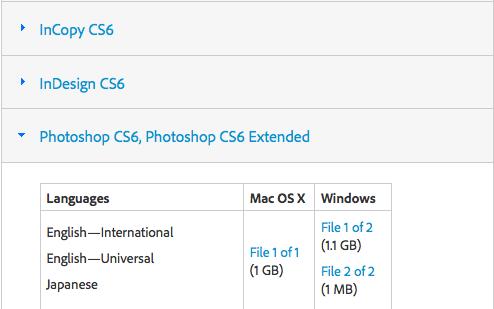
It's in this link. Download Creative Suite 6 applications
Click the triangle next to Photoshop. Download the two files. One is an .exe the other is a .7z
Run the exe, and it will create the installer for you.
Community guidelines
Be kind and respectful, give credit to the original source of content, and search for duplicates before posting.
Learn more
Community Expert
,
/t5/photoshop-ecosystem-discussions/how-do-i-update-my-camera-raw-in-photoshop-cs5-from-7-0-to-9-1-so-i-upload-my-raw-images-i-shot-with/m-p/7870235#M49125
Dec 17, 2015
Dec 17, 2015
Copy link to clipboard
Copied
Do you have CS6 already installed, btw?
Community guidelines
Be kind and respectful, give credit to the original source of content, and search for duplicates before posting.
Learn more
Community Expert
,
/t5/photoshop-ecosystem-discussions/how-do-i-update-my-camera-raw-in-photoshop-cs5-from-7-0-to-9-1-so-i-upload-my-raw-images-i-shot-with/m-p/7870236#M49126
Dec 17, 2015
Dec 17, 2015
Copy link to clipboard
Copied
If you already have CS6 installed, then no, don't uninstall until you check with someone local to you.
Community guidelines
Be kind and respectful, give credit to the original source of content, and search for duplicates before posting.
Learn more
mcmhm31
AUTHOR
New Here
,
/t5/photoshop-ecosystem-discussions/how-do-i-update-my-camera-raw-in-photoshop-cs5-from-7-0-to-9-1-so-i-upload-my-raw-images-i-shot-with/m-p/7870238#M49128
Dec 17, 2015
Dec 17, 2015
Copy link to clipboard
Copied
To check what?
Community guidelines
Be kind and respectful, give credit to the original source of content, and search for duplicates before posting.
Learn more
mcmhm31
AUTHOR
New Here
,
/t5/photoshop-ecosystem-discussions/how-do-i-update-my-camera-raw-in-photoshop-cs5-from-7-0-to-9-1-so-i-upload-my-raw-images-i-shot-with/m-p/7870237#M49127
Dec 17, 2015
Dec 17, 2015
Copy link to clipboard
Copied
Yes. Couple of days ago per your suggestion I uninstalled and reinstalled CS6. By the way what about my Lightroom? Should I go on the form with my question, or you can help?
Community guidelines
Be kind and respectful, give credit to the original source of content, and search for duplicates before posting.
Learn more
Community Expert
,
/t5/photoshop-ecosystem-discussions/how-do-i-update-my-camera-raw-in-photoshop-cs5-from-7-0-to-9-1-so-i-upload-my-raw-images-i-shot-with/m-p/7870239#M49129
Dec 17, 2015
Dec 17, 2015
Copy link to clipboard
Copied
Ok, it's important that CS6 at least functions. I suspect something is not quite right since you've been having a bad time with Camera Raw.
So for now don't reinstall. I don't want you to end up in the hole with no CS6
I don't know enough about Lightroom, so I would like you to go to that forum and talk to them about Lr 6 and getting that in order. If you can fix that at least you can process your raws there.
Since you are having problems I've never seen before, hold off reinstalling until you can get someone local to you who knows computers help you with the CS6 and Camera Raw reinstall.
Just being safe.
Community guidelines
Be kind and respectful, give credit to the original source of content, and search for duplicates before posting.
Learn more
mcmhm31
AUTHOR
New Here
,
/t5/photoshop-ecosystem-discussions/how-do-i-update-my-camera-raw-in-photoshop-cs5-from-7-0-to-9-1-so-i-upload-my-raw-images-i-shot-with/m-p/7870240#M49130
Dec 17, 2015
Dec 17, 2015
Copy link to clipboard
Copied
My CS6 works fine, the only problem I have is with images from my new Nikon D7299 that I purchased two weeks ago. The JPG images from the camera are transferable to CS6, only the NEF images give me a problem.
Community guidelines
Be kind and respectful, give credit to the original source of content, and search for duplicates before posting.
Learn more
Community Expert
,
/t5/photoshop-ecosystem-discussions/how-do-i-update-my-camera-raw-in-photoshop-cs5-from-7-0-to-9-1-so-i-upload-my-raw-images-i-shot-with/m-p/7870241#M49131
Dec 18, 2015
Dec 18, 2015
Copy link to clipboard
Copied
And you tell me you can't upgrade from ACR 7.1 on CS6 so there's that problem. DNG converter doesn't work either.
If you can get Lightroom upgraded to 6.3, you can read those NEFs if they are not corrupted. The Lr forum can fix that.
Community guidelines
Be kind and respectful, give credit to the original source of content, and search for duplicates before posting.
Learn more
mcmhm31
AUTHOR
New Here
,
/t5/photoshop-ecosystem-discussions/how-do-i-update-my-camera-raw-in-photoshop-cs5-from-7-0-to-9-1-so-i-upload-my-raw-images-i-shot-with/m-p/7870242#M49132
Dec 18, 2015
Dec 18, 2015
Copy link to clipboard
Copied
I have camera raw vs 7.1 in Lightroom and it still does not recognize the NEF files
Community guidelines
Be kind and respectful, give credit to the original source of content, and search for duplicates before posting.
Learn more
Community Expert
,
LATEST
/t5/photoshop-ecosystem-discussions/how-do-i-update-my-camera-raw-in-photoshop-cs5-from-7-0-to-9-1-so-i-upload-my-raw-images-i-shot-with/m-p/7870243#M49133
Dec 19, 2015
Dec 19, 2015
Copy link to clipboard
Copied
It wouldn't. 9.0 is the minimum for a D7200. You can't upgrade past 7.1 and DNG Conversion doesn't work. A reinstall did not help. You may need to have someone locally look at your PC.
.
I've made a serious effort and put in a lot of time, but I'm out of ideas. I'm stopping while I'm behind.
As for Lightroom's camera raw, it's tied to the Lightroom version, you still need to check with that forum.
There is a chance your NEFs are corrupt as Ben pointed out, check this link: Fix Corrupted Nikon NEF Images
That's all I got. I'll leave the rest to better minds.
Gene
Community guidelines
Be kind and respectful, give credit to the original source of content, and search for duplicates before posting.
Learn more
mcmhm31
AUTHOR
New Here
,
/t5/photoshop-ecosystem-discussions/how-do-i-update-my-camera-raw-in-photoshop-cs5-from-7-0-to-9-1-so-i-upload-my-raw-images-i-shot-with/m-p/7870227#M49117
Dec 17, 2015
Dec 17, 2015
Copy link to clipboard
Copied
I tried that already. I uninstalled both CS6 and Lightroom 6 (I have no Elements), reinstalled them deleted the plug ins and run vs. 9.1.1, however lucky me, my vs. 7 does not want to leave me.
Community guidelines
Be kind and respectful, give credit to the original source of content, and search for duplicates before posting.
Learn more
mcmhm31
AUTHOR
New Here
,
/t5/photoshop-ecosystem-discussions/how-do-i-update-my-camera-raw-in-photoshop-cs5-from-7-0-to-9-1-so-i-upload-my-raw-images-i-shot-with/m-p/7870226#M49116
Dec 17, 2015
Dec 17, 2015
Copy link to clipboard
Copied
Sorry did not work, vs. 7 remained
Community guidelines
Be kind and respectful, give credit to the original source of content, and search for duplicates before posting.
Learn more
mcmhm31
AUTHOR
New Here
,
/t5/photoshop-ecosystem-discussions/how-do-i-update-my-camera-raw-in-photoshop-cs5-from-7-0-to-9-1-so-i-upload-my-raw-images-i-shot-with/m-p/7870225#M49115
Dec 17, 2015
Dec 17, 2015
Copy link to clipboard
Copied
Yes I meant CS6. I tried this vs. but it did not work for Nikon NEF formatted by D7200
Community guidelines
Be kind and respectful, give credit to the original source of content, and search for duplicates before posting.
Learn more


Adobe Employee
,
/t5/photoshop-ecosystem-discussions/how-do-i-update-my-camera-raw-in-photoshop-cs5-from-7-0-to-9-1-so-i-upload-my-raw-images-i-shot-with/m-p/7870196#M49086
Dec 14, 2015
Dec 14, 2015
Copy link to clipboard
Copied
Photoshop CS5 can be upgraded to Camera Raw 6.7
Refer : Camera Raw plug-in and Adobe application compatibility
In order to use the raw files from Nikon D7200, you need to convert the files using DNG converter.
For Windows : Adobe - Adobe Camera Raw and DNG Converter : For Windows
For Mac : Adobe - Adobe Camera Raw and DNG Converter : For Macintosh
Hope this helps.
~Mrinmay
Community guidelines
Be kind and respectful, give credit to the original source of content, and search for duplicates before posting.
Learn more

-
- 1
- 2
Resources
Quick links - Photoshop

Quick links - Photoshop on iPad
Troubleshoot & Learn new things
Get ready! An upgraded Adobe Community experience is coming in January.
Learn more
Copyright © 2025 Adobe. All rights reserved.
 AdChoices