
Answered
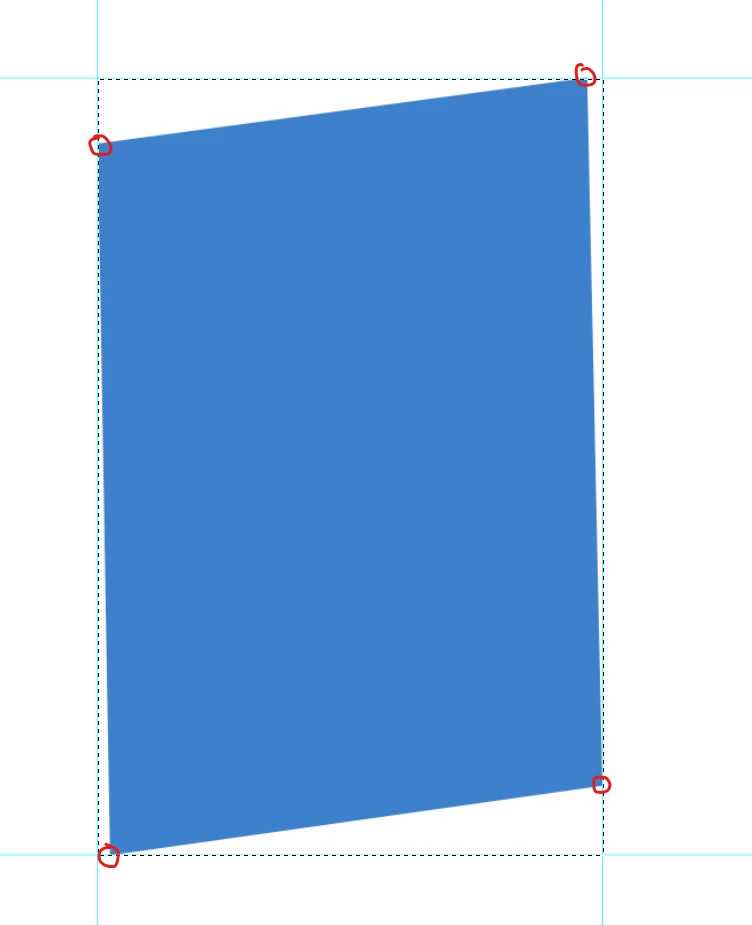
How do we to get the corner points value from Quadrilateral?
Hi EveryOne!,
Is this possible to get the corner points value from Quadrilateral?
Thanks in advance.
-yajiv

Hi EveryOne!,
Is this possible to get the corner points value from Quadrilateral?
Thanks in advance.
-yajiv
The problem may be if the shape is much smaller than the canvas.
If I change the canvas size to 8000 instead of the size of your file, I also got an error.
To avoid this, replace the line in the code
var from = scan(0, w/2, h, 50);
with
var from = scan(0, Math.min(w,h), h, 50);
var doc = activeDocument;
var tmp = "tmp"+Math.random();

var ok = true;

try { doc.selection.bounds; } catch (e) { alert("No selection"); ok = false; }

if (ok)
    {
    activeDocument.suspendHistory("script", "main()");
    }

/////////////////////////////////////////////////
function main()
    {
    try {
        app.preferences.rulerUnits = Units.PIXELS;

        save_selection(tmp);

        scan(scan());

        del_channel(tmp);

        doc.guides.add(Direction.VERTICAL, doc.selection.bounds[0])
        doc.guides.add(Direction.HORIZONTAL, doc.selection.bounds[1])
        }
    catch(e) { alert(e.line+"\n"+e); }
    }

/////////////////////////////////////////////////
function scan(from)
    {
    try {
        app.preferences.rulerUnits = Units.PIXELS;

        load_selection(tmp);

        var x0 = doc.selection.bounds[0].value;
        var y0 = doc.selection.bounds[1].value;

        var x1 = doc.selection.bounds[2].value;
        var y1 = doc.selection.bounds[3].value;

        var w = x1-x0;
        var h = y1-y0;

        var safe = 3;

        var beg = -w/2-h/2;
        var end =  w/2+h/2;
        var step = 20;

        if (from != undefined)
            {
            beg = from;
            end = from+step;
            step = 1;
            }

        for (var off = beg; off <= end; off+=step)
            {
            load_selection(tmp);

            doc.selection.select([[(x0+x1)/2-h/2+off, (y0+y1)/2-h/2-safe], [(x0+x1)/2-h/2+1+off, (y0+y1)/2-h/2-safe], [(x0+x1)/2+h/2+1+off, (y0+y1)/2+h/2+safe], [(x0+x1)/2+h/2+off, (y0+y1)/2+h/2+safe]], SelectionType.INTERSECT, 0, false);

            try { doc.selection.bounds; } catch (e) { continue; }

            return off-step;

            break;
            }
        }
    catch(e) { alert(e.line+"\n"+e); }
    }

/////////////////////////////////////////////////
function save_selection(name)
    {
    try {
        var d = new ActionDescriptor();
        var r = new ActionReference();
        r.putProperty(stringIDToTypeID("channel"), stringIDToTypeID("selection"));
        d.putReference(stringIDToTypeID("null"), r);
        d.putString(stringIDToTypeID("name"), name);

        executeAction(stringIDToTypeID("duplicate"), d, DialogModes.NO);
        }
    catch(e) { alert(e.line+"\n"+e); }
    }

/////////////////////////////////////////////////
function load_selection(name)
    {
    try {
        var d = new ActionDescriptor();
        var r = new ActionReference();
        r.putProperty(stringIDToTypeID("channel"), stringIDToTypeID("selection"));
        d.putReference(stringIDToTypeID("null"), r);
        var r1 = new ActionReference();
        r1.putName(stringIDToTypeID("channel"), name);
        d.putReference(stringIDToTypeID("to"), r1);
        executeAction(stringIDToTypeID("set"), d, DialogModes.NO);
        }
    catch(e) { alert(e.line+"\n"+e); }
    }

/////////////////////////////////////////////////
function del_channel(name)
    {
    try {
        var d = new ActionDescriptor();
        var r = new ActionReference();
        r.putName(stringIDToTypeID("channel"), name);
        d.putReference(stringIDToTypeID("null"), r);
        executeAction(stringIDToTypeID("delete"), d, DialogModes.NO);
        }
    catch(e) { alert(e.line+"\n"+e); }
    }
UPD: improved and accelerated.
Already have an account? Login
Enter your E-mail address. We'll send you an e-mail with instructions to reset your password.
 AdChoices