Exit
  • Global community
    • Language:
      • Deutsch
      • English
      • Español
      • Français
      • Português
  • 日本語コミュニティ
  • 한국 커뮤니티
5

How do you create a guide layout with set inner dimensions that is centered on the image?

Explorer ,
Oct 18, 2023 Oct 18, 2023

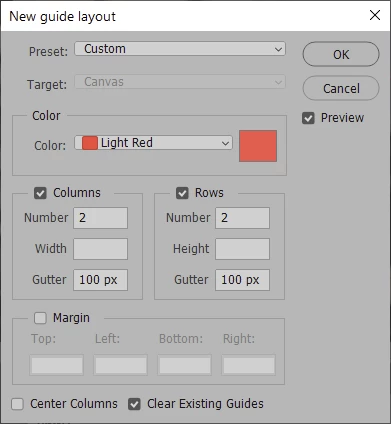
I want to define a 100x100 pixel square in the center of an images of arbitrary sizes using guides, and I'd like to do it through an action so I can use it with automate batch. How can I do this?

I feel like I should be able to do this with New Guide Layout, but for some reason it doesn't have an option to center rows.
TOPICS
Actions and scripting , Windows
692
Translate
Report
Community guidelines
Be kind and respectful, give credit to the original source of content, and search for duplicates before posting. Learn more
community guidelines

correct answers 2 Correct answers

Community Expert , Oct 18, 2023 Oct 18, 2023

Something like this?

2023-10-19_09-26-43.png

Otherwise, a scripted option that can be recorded into the action for batching:


#target photoshop;
//activeDocument.guides.removeAll();
var savedRuler = app.preferences.rulerUnits;        
app.preferences.rulerUnits = Units.PIXELS;
var hCentre = activeDocument.width/2;
var vCentre = activeDocument.height/2;
activeDocument.guides.add(Direction.HORIZONTAL, vCentre + 50);
activeDocument.guides.add(Direction.HORIZONTAL, vCentre - 50);
activeDocument.guides.add(Direction.VERTI
...
Translate
Community Expert , Oct 18, 2023 Oct 18, 2023

How about this:

Semaphoric_0-1697669809437.png


Translate
Adobe
Community Expert ,
Oct 18, 2023 Oct 18, 2023

@gregd 


Can you show a screenshot of your new guides layout panel? What are you trying to do that it's not doing?


Jane

Translate
Report
Community guidelines
Be kind and respectful, give credit to the original source of content, and search for duplicates before posting. Learn more
community guidelines
Explorer ,
Oct 18, 2023 Oct 18, 2023

Here you go. The 100x100 area isn't centered vertically. How do I fix that?2023-10-18_17-21-55_Photoshop_Untitled-1_@_66.7%_(RGB8).png

Translate
Report
Community guidelines
Be kind and respectful, give credit to the original source of content, and search for duplicates before posting. Learn more
community guidelines
Community Expert ,
Oct 18, 2023 Oct 18, 2023

Something like this?

2023-10-19_09-26-43.png

Otherwise, a scripted option that can be recorded into the action for batching:


#target photoshop;
//activeDocument.guides.removeAll();
var savedRuler = app.preferences.rulerUnits;        
app.preferences.rulerUnits = Units.PIXELS;
var hCentre = activeDocument.width/2;
var vCentre = activeDocument.height/2;
activeDocument.guides.add(Direction.HORIZONTAL, vCentre + 50);
activeDocument.guides.add(Direction.HORIZONTAL, vCentre - 50);
activeDocument.guides.add(Direction.VERTICAL, hCentre + 50);
activeDocument.guides.add(Direction.VERTICAL, hCentre - 50);
app.preferences.rulerUnits = savedRuler;    


https://prepression.blogspot.com/2017/11/downloading-and-installing-adobe-scripts.html

Translate
Report
Community guidelines
Be kind and respectful, give credit to the original source of content, and search for duplicates before posting. Learn more
community guidelines
Community Expert ,
Oct 18, 2023 Oct 18, 2023

How about this:

Semaphoric_0-1697669809437.png


Translate
Report
Community guidelines
Be kind and respectful, give credit to the original source of content, and search for duplicates before posting. Learn more
community guidelines
Community Expert ,
Oct 18, 2023 Oct 18, 2023

@Semaphoric – Even better!

Translate
Report
Community guidelines
Be kind and respectful, give credit to the original source of content, and search for duplicates before posting. Learn more
community guidelines
Community Expert ,
Oct 19, 2023 Oct 19, 2023
LATEST

@gregd – are you still out there?

Translate
Report
Community guidelines
Be kind and respectful, give credit to the original source of content, and search for duplicates before posting. Learn more
community guidelines