
Participant
October 25, 2012
Answered

how do you create this dithered pixel effect?

  • October 25, 2012
  • 2 replies
  • 33284 views

hey guys really need to figure out how this image was created...
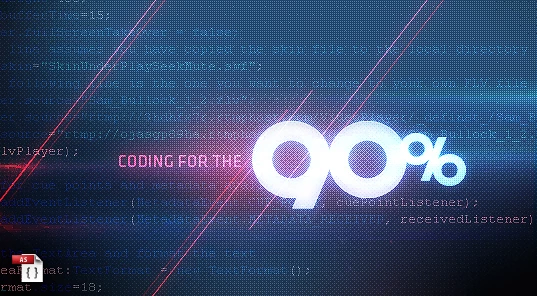
firstly was it done in photoshop? if so with what techniques? i tried using indexed colour in the image>mode, with palette>uniform, dither>pattern but still didnt get the high quality that these guys got. i tried saving as a gif/png with pattern option selected in photoshop and illustrator, still did'nt succeed. Was this done using pixelbender? or some type of plugin? anyhow, really need to figure this out. appreciate any help you guys can provide. thanks.

This topic has been closed for replies.
Correct answer Noel Carboni

It took some experimentation but I was able to emulate that look by working at 400% of final size, and using the Filter - Pixelate - Color Halftone filter applied on a grayscale layer, inverted, and mixed with the underlying layers using Overlay.

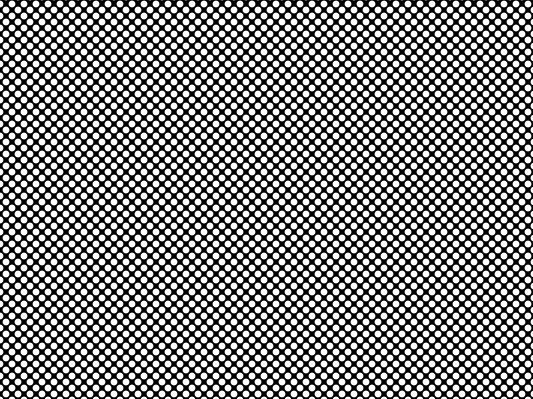
Here's a small part of what the Color Halftone Filter generated at 45 degrees, 6 pixels radius:

Here's a PSD file where you can see how I mixed it in detail:

http://Noel.ProDigitalSoftware.com/ForumPosts/ColorHalftoneDemo.psd

-Noel

2 replies

conroy
Participating Frequently
October 26, 2012

.

Here's an attempt at the dither pattern. The colour layer is overlayed with a black and white Bayer 8x8 dither in Overlay mode at 40% opacity. Click on the images to see the dither pattern without forum downsampling.

Link to the dither plug-in: http://www.ximagic.com/g_index.html

Edit: added link to the dither plug-in.

Noel Carboni
Noel CarboniCorrect answer
Legend
October 25, 2012

It took some experimentation but I was able to emulate that look by working at 400% of final size, and using the Filter - Pixelate - Color Halftone filter applied on a grayscale layer, inverted, and mixed with the underlying layers using Overlay.

Here's a small part of what the Color Halftone Filter generated at 45 degrees, 6 pixels radius:

Here's a PSD file where you can see how I mixed it in detail:

http://Noel.ProDigitalSoftware.com/ForumPosts/ColorHalftoneDemo.psd

-Noel

Participant
October 27, 2012

Hey Noel Carboni and conroy,

Thanks a million! It worked just fine! Your idea of using 2 layers - one in full colour and the other in halftone/dither with Overlay was spot on. I had kept thinking for some reason it was just the one layer when as it turned out, it was 2. Thanks so much for the time and trouble. Much appreciated!!!