

Dougefresh091
Known Participant
July 16, 2012
Question

How do you disable pen pressure?

  • July 16, 2012
  • 12 replies
  • 117221 views

I'm on a Mac, 10.6.8 and PS CS5 12.0.4 with a Wacom Intuos3.

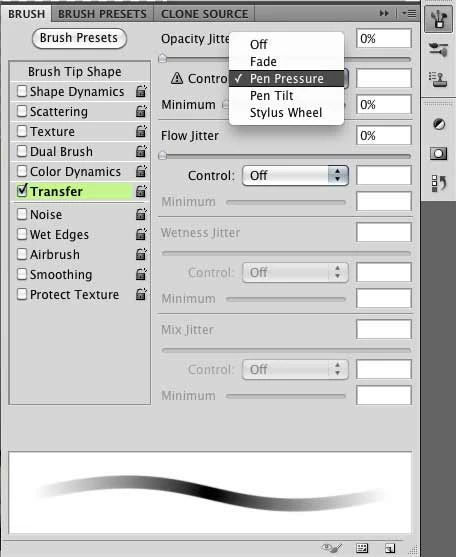
I select a hard round brush and turn off the Transfer > Opacity Jitter > 'pen pressure' option. However as soon as I thouch the tip of my pen down pen pressure turns back on. This is annoying when trying to do a detailed cutout in a layer mask as it leaves behind opaque areas that aren't always visible right away.

Even if I create a new preset with pen pressure off, it comes back on once saved. So how do I get around this? There must be a way to turn off pen pressure while using the Wacom tablet. Am I missing something?
12 replies

sharbear312
Participating Frequently
July 16, 2012

Did you try unchecking the Transfer category all together? Also do you have opacity and flow set to 100% in the brush settings on the top?

Dougefresh091
Known Participant
July 16, 2012

I did try unchecking it. It gets re-checked all by itself once the pen tip hits the canvas.

Turning the opacity to 100% is another good idea, but again, when I touch the pen tip to the canvas it goes back down to zero, and the pen pressure option is reactivated.

sharbear312
Participating Frequently
July 16, 2012

That is very strange; it's never happened to me. Did you try resetting the preferences on your photoshop and reinstalling the tablet?

markerline
Inspiring
July 16, 2012

On Windows the Wacom tablets have their own control panel.  Is this the case on MacOSX?

Dougefresh091
Known Participant
July 16, 2012

Yes there is a Wacom control panel on the Mac. There are options to change the tip feel from softer to harder, but nothing to disable it completely. Good idea though, I hadn't thought to check there.

I read somewhere else to uninstall the Wacom drivers, but doing that makes the tablet pretty much usless. i.e. the pen moves slooooooow, and on a 24" monitor it's practically unusable.