
Known Participant
January 5, 2021
Answered

How do you draw an arrow in Photoshop 22.1 ?

  • January 5, 2021
  • 3 replies
  • 5041 views

Have used Photoshop for almost 25 years and - with the latest UPGRADE - I find that I need to post this question...

Does anyone know how to draw a line?

It used to be, click on line tool, choose width, click for arrow at start or end and off you go

I do that now, and it draws 'something invisible' - normally with a big/bright outline (that makes it look liked it worked) - but as soon as you move off the layer, the line disappears...
Seriously: How do you draw a line in Photoshop?
This topic has been closed for replies.
Correct answer davescm


Your options bar show you have set a white stroke. On a white background you are not going to see much 🙂


Edit : c.pfaffenbichler was quicker than me (he must drink better coffee)


Dave

3 replies

przoneAuthor
Known Participant
January 5, 2021

This is the process I have used for 25 years - and it has never failed.
With the new version - it simply does not work for me.
Does the old dog need to learn a new trick?
I put a small (30MB) video of 'the problem' here...
https://www.dropbox.com/s/dtnv7udv868wt4h/Photoshop-Problem-Drawing-Lines.MOV?dl=0

c.pfaffenbichler
Community Expert
Community Expert
January 5, 2021

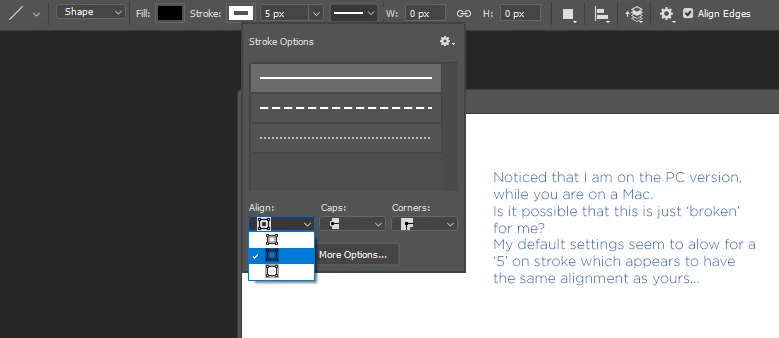
You need to set a Stroke (that is not aligned »Inside«, but »Center« or »Outside«). 

przoneAuthor
Known Participant
January 5, 2021

Chuck Uebele
Community Expert
Community Expert
January 5, 2021

The stroke needs to be set, as the line and line portion of the arrow no longer have a fill all done with the stroke.

przoneAuthor
Known Participant
January 5, 2021

Thanks Chuck (and everyone else)... I've uploaded a video of it (not) happening 🙂

c.pfaffenbichler
Community Expert
Community Expert
January 5, 2021

Could you please post screenshots with the pertinent Panels (Toolbar, Layers, Channels, Options Bar, …) visible? 

Have you set a Stroke in the Options Bar? 

c.pfaffenbichler
Community Expert
Community Expert
January 5, 2021

JJMack
Community Expert
Community Expert
January 5, 2021

It easy to see your arrow heads  pointing past the end of the line. Photoshop 2020 line tool works correctly,

JJMack