
dma9551
Inspiring
January 27, 2022
Answered

How do you even out a wooden texture?

  • January 27, 2022
  • 1 reply
  • 862 views

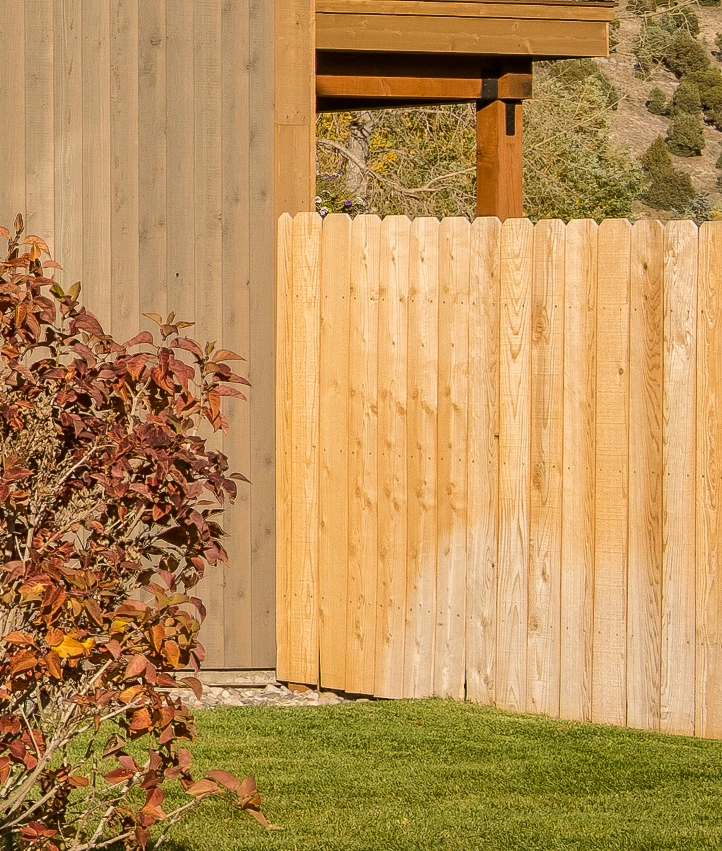
In the image below, the fence is all washed out in areas. I've been cloning parts of it to even it out, but it's tedious and I'm not getting the result I want. Is there a way to quickly even the whole texture/look? I work for an architecture firm, often retouch images, and this is a recurring situation on images so I'd really like to know once for all. 

The original image is very high res, this is just a screen shot:
 

This topic has been closed for replies.
Correct answer dma9551

Perfect, thank you!

1 reply

Stephen Marsh
Community Expert
Community Expert
January 28, 2022

Traditional methods would include using clone stamp or brush set to color blend or on a layer set to color blend, then perhaps another layer for the burn tool or using non-destructive layer blend based burn etc.


A good way to do this is via "frequency separation" so as to separate the hi-frequency detail/texture from the underlying low-frequency tone.


An action here:


https://www.dropbox.com/s/vhoal39t9ygl6tt/Frequency%20Splitter%20v4%20Conditional.atn?dl=0


This is pretty common today, but back in 2001 this blew my mind!


https://www.gamasutra.com/view/feature/3073/the_power_of_the_high_pass_filter.php


You will find plenty of tutorials or videos etc.

dma9551
dma9551AuthorCorrect answer
Inspiring
January 28, 2022

Perfect, thank you!