Exit
  • Global community
    • Language:
      • Deutsch
      • English
      • Español
      • Français
      • Português
  • 日本語コミュニティ
  • 한국 커뮤니티
0

How do you make a eclipse shape with a mask auto attached?

Contributor ,
Dec 18, 2017 Dec 18, 2017

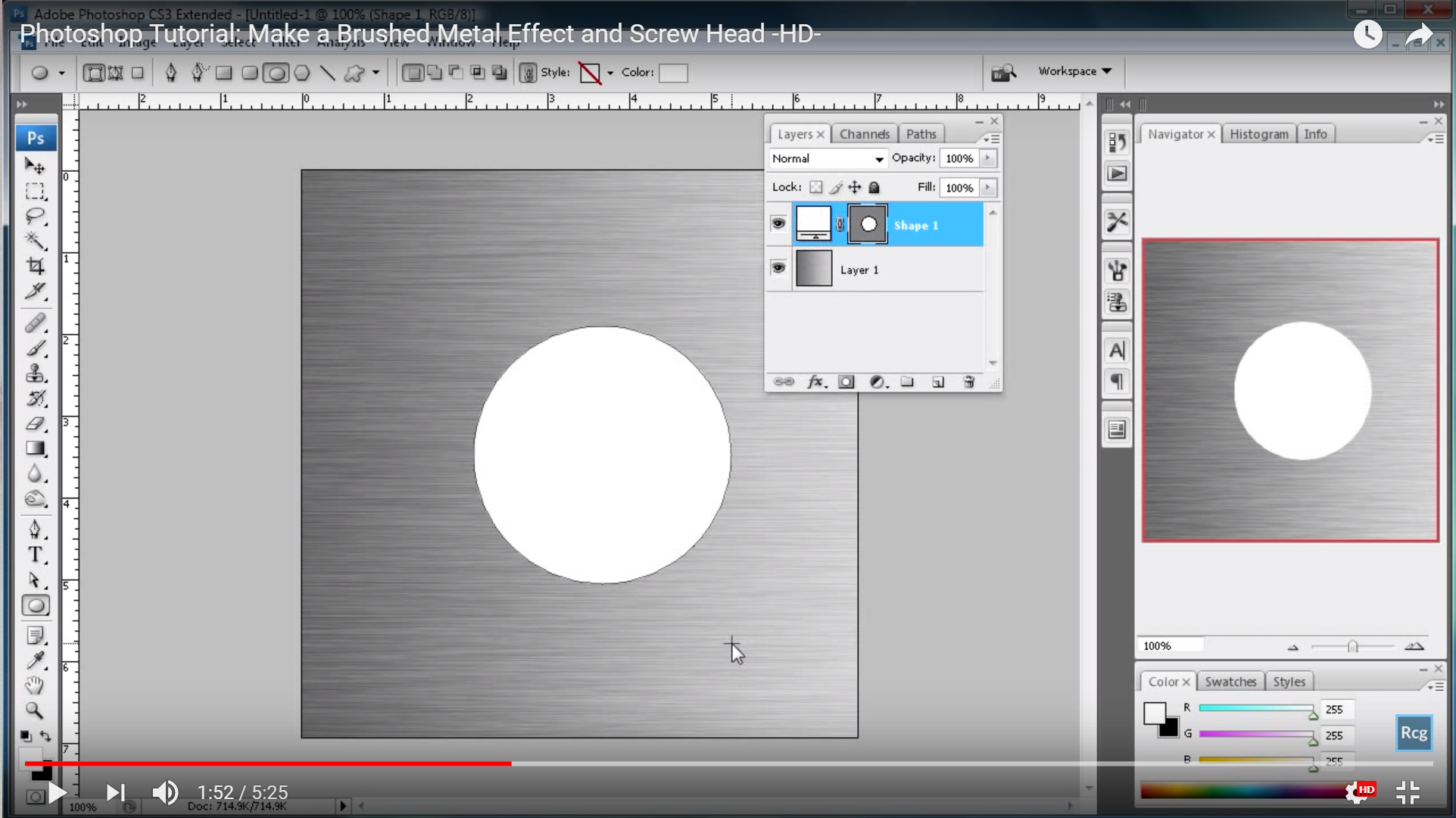
I watched several videos where they make an ellipse with the select tool then fill it in with the gradient effect. that then creates a mask on the same layer. I cannot do that. How do I do that?  the video in question is at https://www.youtube.com/watch?v=FH_LlR5WMZo at 1:45.

2.1K
Translate
Report
Community guidelines
Be kind and respectful, give credit to the original source of content, and search for duplicates before posting. Learn more
community guidelines

correct answers 1 Correct answer

Community Expert , Dec 18, 2017 Dec 18, 2017

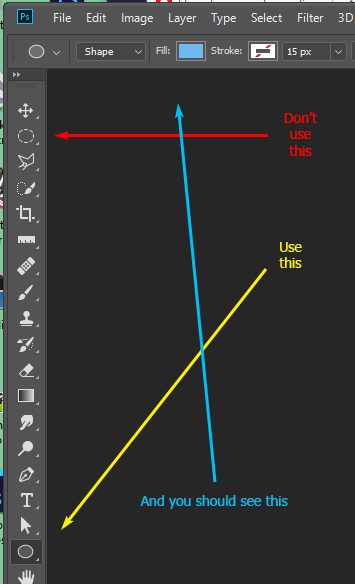
When you say you are using the Select tool, are you making an elliptical marquee? You should be using the Shape tool (Be sure to set it to "Shape" in the Option Bar):

    

Translate
Adobe
Community Expert ,
Dec 18, 2017 Dec 18, 2017

Could you please post a screenshot taken at View > 100% and with the pertinent Panels (Toolbar, Layers, Channels, Options Bar, …) visible?

Translate
Report
Community guidelines
Be kind and respectful, give credit to the original source of content, and search for duplicates before posting. Learn more
community guidelines
Contributor ,
Dec 18, 2017 Dec 18, 2017

The layers panel has the elipse along with, from what ged2016 says is a color swatch. I need to know how to do this in PS CC.

prtscr_ps.png

Translate
Report
Community guidelines
Be kind and respectful, give credit to the original source of content, and search for duplicates before posting. Learn more
community guidelines
Guest
Dec 18, 2017 Dec 18, 2017

If you want to change the color of the shape you need to click on the Set shape fill type icon

Untitled.jpg

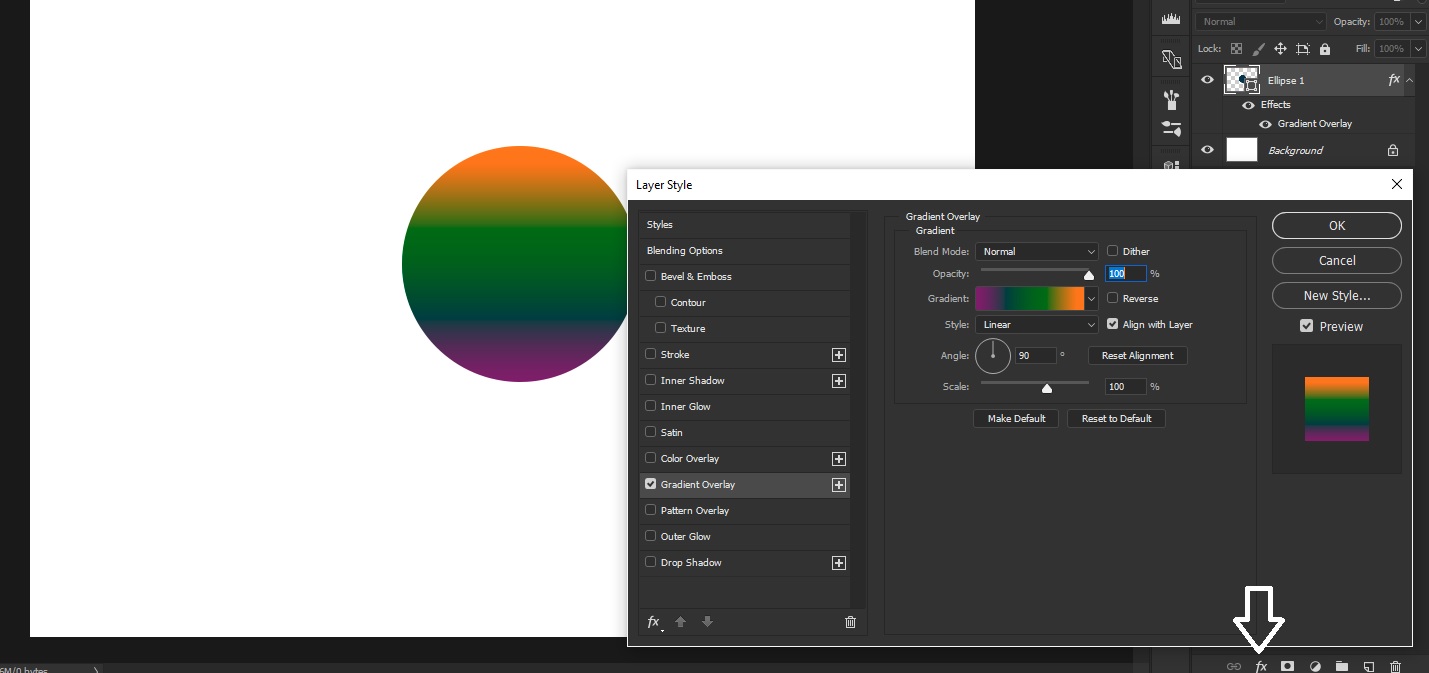
But you don't need to do that according to the tutorial just hit the fx icon to add your Gradient Overlay

Untitled1.jpg

Translate
Report
Community guidelines
Be kind and respectful, give credit to the original source of content, and search for duplicates before posting. Learn more
community guidelines
Community Expert ,
Dec 18, 2017 Dec 18, 2017

I meant a screenshot of your file in Photoshop.

After you created the elliptical Path what happens exactly?

Translate
Report
Community guidelines
Be kind and respectful, give credit to the original source of content, and search for duplicates before posting. Learn more
community guidelines
Guest
Dec 18, 2017 Dec 18, 2017

Hi

That in not a normal mask, it's a Color Swatch icon on the left and a Vector Mask icon on the right, this has changed in the most recent versions of PS

Translate
Report
Community guidelines
Be kind and respectful, give credit to the original source of content, and search for duplicates before posting. Learn more
community guidelines
Community Expert ,
Dec 18, 2017 Dec 18, 2017
LATEST

When you say you are using the Select tool, are you making an elliptical marquee? You should be using the Shape tool (Be sure to set it to "Shape" in the Option Bar):


Translate
Report
Community guidelines
Be kind and respectful, give credit to the original source of content, and search for duplicates before posting. Learn more
community guidelines