
Participating Frequently
February 3, 2020
Answered

How do you make a line with the pen tool?

  • February 3, 2020
  • 3 replies
  • 2649 views

The pen tool has changed so much with the latest update. I have no idea how to make a line with it. It seems I can only make a shape that's filled in. 


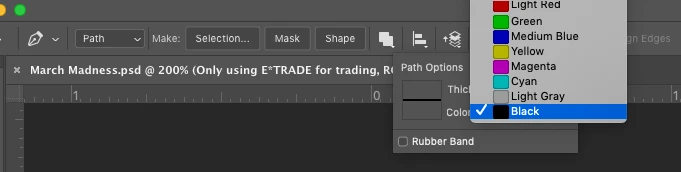
When I try to make a path with the pen, it gives me very limited color options and no place to change them. 


Please let me know your thoughts! 
 

This topic has been closed for replies.
Correct answer Semaphoric

In the Options for the Pen, select Shape. In the options, choose a solid color for the Stroke, and none for Fill:

3 replies

xuxiwoo
Participant
February 4, 2020

Use shift to kept a straight line with the pen tool.

Semaphoric
Community Expert
SemaphoricCommunity ExpertCorrect answer
Community Expert
February 3, 2020

In the Options for the Pen, select Shape. In the options, choose a solid color for the Stroke, and none for Fill:

jane-e
Community Expert
Community Expert
February 3, 2020

You have the Path mode and the Pen tool. Click and click again to make a line. Hold Shift to constrain to 45°. Don't drag, just click.


The color options are for viewing. Use the Paths panel to Stroke your path. The pixels will go on your current layer with your foreground color and will use the settings that are in the options bar for the tool that you select when you stroke your path.

~ Jane
