Inspiring
July 26, 2022
Answered

How keep creative cloud menu at top computer

  • July 26, 2022
  • 2 replies
  • 6404 views

creative cloud menulet used to stay at top computer, not just comes up when launch app and then vanishes. Where is the preferece for that? Can't find it, thanks.

This topic has been closed for replies.
Correct answer gener7

I have a much smaller screen and the CC Desktop App icon does show up in the Menu Bar:

 

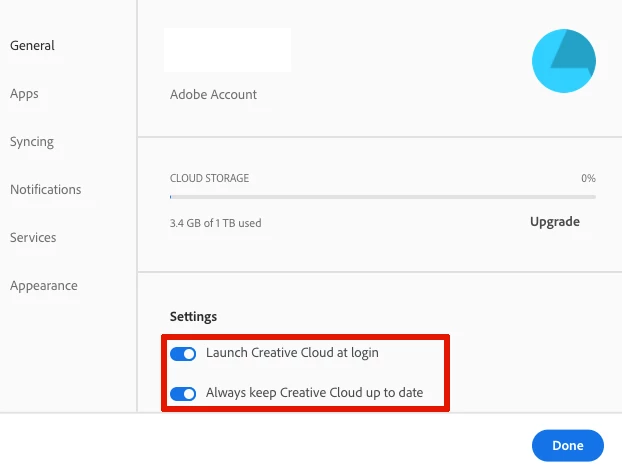
In your CC Desktop App Preferences, are these settings on?
2 replies

gener7
Community Expert
gener7Community ExpertCorrect answer
Community Expert
July 27, 2022

I have a much smaller screen and the CC Desktop App icon does show up in the Menu Bar:


In your CC Desktop App Preferences, are these settings on?

larry45Author
Inspiring
July 27, 2022

Thanks guys I think launch log in will solve it.

Conrad_C
Community Expert
Community Expert
July 26, 2022

If you mean the menu bar icon for the Creative Cloud apps, Mac menu bar icons are always visible unless they run out of space. The menu bar can run out of space if the menu bar already has many icons on it and then you open an application where the menus are wide enough to run into the icons. For example, the Photoshop menus take up roughly double the menu bar width of the Mac Finder or a web browser.


Also, if you are using a newer Mac notebook that has a camera notch at the top of the screen, that reduces available space even more, because menu bar icons can’t be in the notch and must stay out of it. So, on Macs with a display notch, there is a higher chance that some menu bar icons must be hidden, because the notch takes up menu bar space.


If you reduced the display resolution, the menu bar becomes shorter, so it becomes even harder to keep many menu bar items visible.


Which Mac model are you using, and what display resolution is it set to? Does it seem like the menu bar icons are getting crowded out?


If the problem is caused by not enough menu bar space for the number of icons, then you might solve it by some combination of:

  • Hiding any menu bar icons you don’t really need to see
  • Increasing display resolution so that the menu bar gets more pixels of width 
  • Using a utility such as Bartender to hide some menu bar icons except when you choose to temporarily reveal all of them, and to set which menu bar icons you want to stay visible when some need to be hidden.
larry45Author
Inspiring
July 27, 2022

Conrad thanks, answer I think to most of those is no.


Here is bar: It seems fine to me. Do I need Bartender?

Conrad_C
Community Expert
Community Expert
July 27, 2022

@larry45 wrote:

Here is bar: It seems fine to me. Do I need Bartender?


No, your picture means I might be wrong, because I thought the problem might be the menu bar getting too crowded. The picture you attached has plenty of room, so the real cause might be something else. Bartender probably won't help because it helps manage having too many icons in the menu bar, but that isn’t a problem in the picture.


I like gener7’s idea that maybe the Creative Cloud desktop app is not always running. Because its icon appears in the menu bar only when the Creative Cloud app is running.