Known Participant
March 24, 2018
Question

How to add text as a normal detail?

  • March 24, 2018
  • 4 replies
  • 5496 views

How would I add text in PS for something like this:
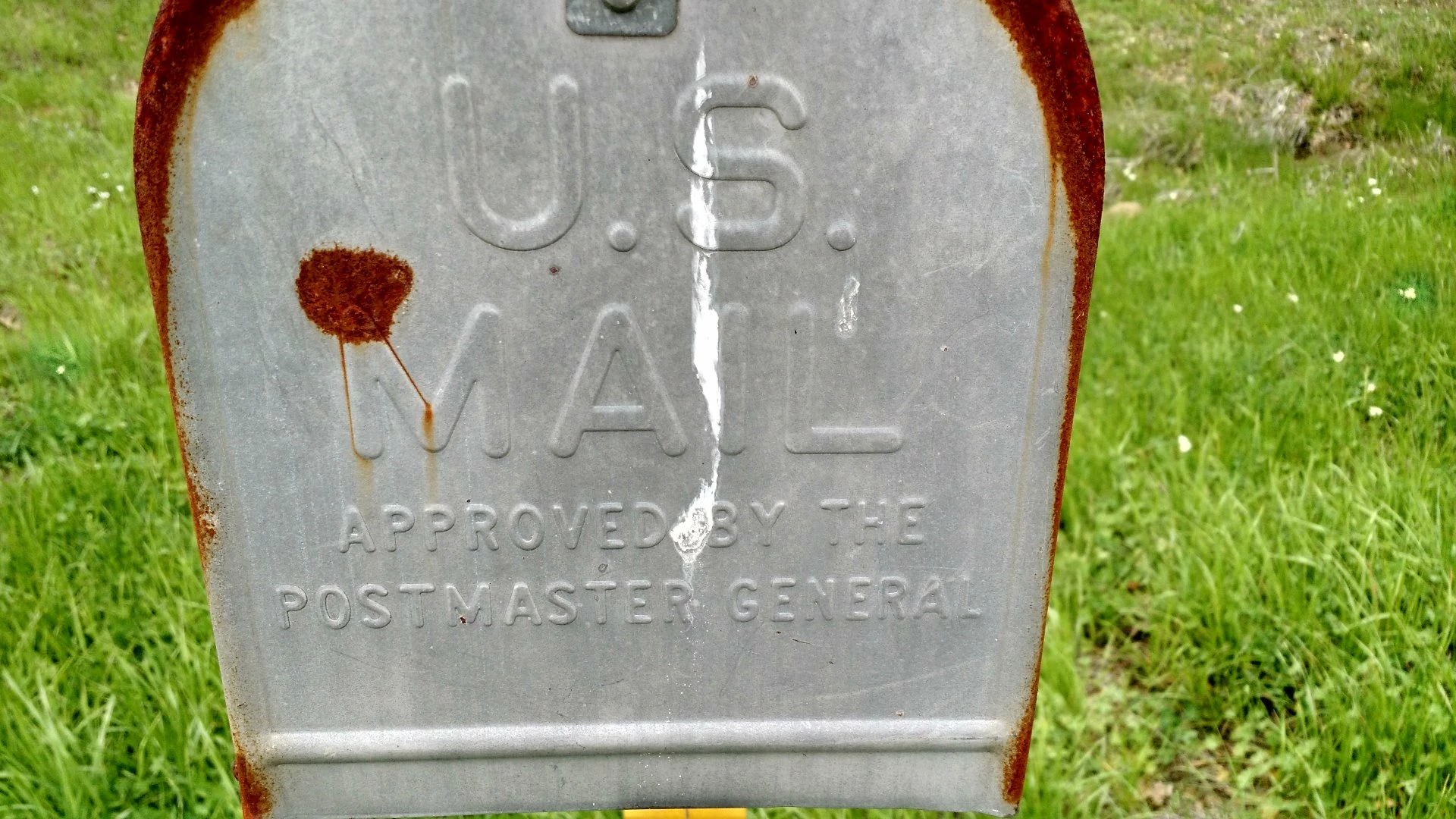
I will be doing it in normal details if that matters.

    This topic has been closed for replies.

    4 replies

    Norman Sanders
    Legend
    March 25, 2018

    You may consider a Displacement Map that distorts the letters in relation to the embossed metal.

    1. Open a file

    2. Choose Image > Duplicate. In the As: field enter file name as: filename_map.psd. (Example: mailbox_map.psd). This file, which will ultimately serve as the Displacement Map must be in psd format.

    3. Choose Image > Mode > Grayscale.  Increase the image contrast using Curves or Levels. Since each image is unique, there is no exact setting. You may choose more contrast than I did. Then choose Filter > Blur > Gaussian Blur. Once again, there is no set amount. The sample above is a useful guide.

    4. Save this file – filename_map.psd -- to the desktop.

    5. Open another file consisting of a pattern or type. In this case, with type for Layer 1, it must be rasterized. After typing, choose Layer > Rasterize > Type. Drag that image over the full color image. It will be Layer 1. I stretched the type a little.

    6. Choose Filter > Distort > Displace. The default numbers of 10 for Vertical and Horizontal Scale usually work very well. For greater displacement,15 is satisfactory, as well. Radio buttons should be set to Stretch to Fit and Repeat Pixel Edges. Click OK.

    7. Choose a Blend Mode of Overlay. Adjust the opacity of Layer 1 for the most pleasing effect.

    {EDIT} If I were to redo this example I might increase the displacement map contrast and blur a tad more and, at the end, given the type a gentle blur. You may try Multiply instead of Overlay, as well.

    Easton777Author
    Known Participant
    March 25, 2018

    Thanks everyone! I will have to try this tomorrow

    Would anyone know how you would add this detail:

    I would like to get a picture of the yellow reflective strip up close then take that and place it on the unwrapped UV of the model, essentially I just need to cut that detail out and then paste it on the modeled pole, I will get some more pictures tomorrow.

    Also, what about the numbers and letters of the address? same thing?

    davescm
    Community Expert
    Community Expert
    March 25, 2018

    Hi

    The same way as I showed in Post 4.  If you UV is already unwrapped then you can add the yellow texture to the Diffuse material and the lettering to the normal map and diffuse material (ensure they line up).

    Note : If your model is not yet unwrapped you may find it easier in a 3D program, such as Blender, where you have much more control over the process of unwrapping.

    Dave

    davescm
    Community Expert
    Community Expert
    March 24, 2018

    Hi

    1. Put your text and plain background in a smart object

    2. Go to filter 3D generate normal map and adjust the details as required

    3. After clicking OK save the document

    4. To use that normal map, create a new document and a 3D layer with a material ( I used a simple extrusion below).

    5. Then click on normal for the front material and load the normal map you made earlier

    The extrusion can of course be from a photograph - so same method, different image and the text was warped before creating the normal map:

    Dave

    Nancy OShea
    Community Expert
    Community Expert
    March 24, 2018

    Aaron Nace at PHLEARN  has a good tutorial using Vanishing Filter, Layer Effects and Blur filters. 

    How to Add Text to Anything in Photoshop - YouTube

    Nancy O'Shea— Product User & Community Expert
    Silkrooster
    Legend
    March 24, 2018

    Using blend modes, blend if slider, and styles it will be done. You can find quite a few tutorials on YouTube and on Adobe TV for adding text to an object. Also if the text needs to form around an object like a bottle then warping text may also be needed. Not to mention perspective.

    But for a flat door like a mail box, styles will do.

    Silkrooster
    Legend
    March 24, 2018