Participating Frequently
December 14, 2016
Answered

How to add wave like background curling with textured fabric-texture like background

  • December 14, 2016
  • 1 reply
  • 2378 views

Hi all.

I'm new on Photoshop and now learning from teacher.

My teacher gived me homework, that i can't do.

Trying, but failing.
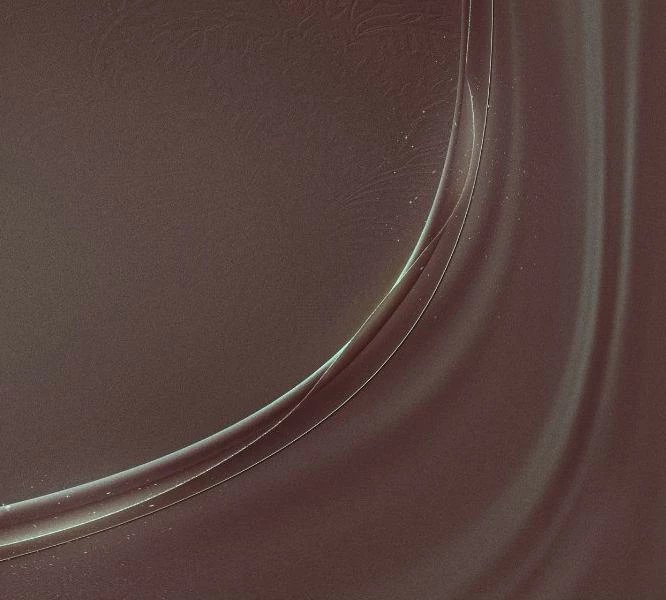
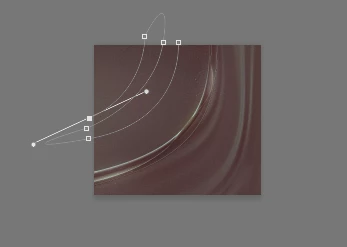
As you see on image it's very well made effect, so question is:

1. How to make 3D-like Curling line?

2. How to make Fabric (on RealDRAW name is Fabric, but RealDRAW is drawing tool, not a "professional photo-editor") like Background, it's too like Curled or 3D-like.

I will be happy if some can teach me, or have YouTube/Vimeo video-course.

Thanks.

Sorry for bad english
This topic has been closed for replies.
Correct answer davescm

Try this

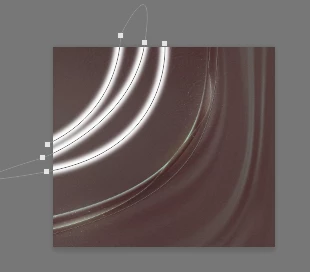
Make a new layer

Draw a path with the pen tool

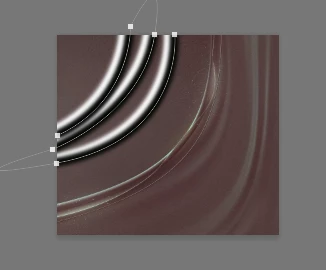
Stroke the path with a soft white brush (Select the brush then stroke the path using the symbol at the bottom of the paths panel)

Pick the path selection tool (black arrow) and move the path down and to the right slightly

The stroke with a soft black brush

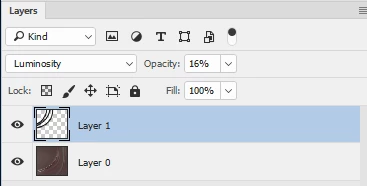
Set the blend mode to luminosity and reduce the opacity to around 16%

You can go on to put further shading on the new layers as required

Hope that helps

Dave

1 reply

Silkrooster
Legend
December 14, 2016

What makes that image is highlights and shadows.

If you take a mid grey image and add a darker color to one side and a lighter side to the other it will appear to push out.

Stop = Location

In the attachment I created a gradient with 5 stops. Stop 0 = 50% (B)rightness | Stop 33 = 33% B  | Stop 50 = 50% B | Stop 66=66% B | Stop 100 = 50% B

Because Stop 0 and stop 100 are the same as stop 50 I can use a short gradient. Photoshop assumes anything in front of stop 0 should be that color and anything after stop 100 should be that color. Therefore I can make it look like the entire page is a single color before and after that gradient.

If we add a blend mode to this layer, it can look like it is part of a texture or another solid color.

dalisoftAuthor
Participating Frequently
December 14, 2016

Thanks for reply.

But this not linear line as demo picture shows.

This line is like circular like.

I will be happy to see circed result.

Thanks again

dalisoftAuthor
Participating Frequently
December 16, 2016

Hi

Glad that helped

The next stage I referred to was to use a displacement map to curve the background image over the fold. A displacement map works by
shifting pixels one way for white the other for black (you can specify the shift in the dialogue). Anything 50% gray is left alone.

I’ve use a piece of leather in this demo as it started with a higher resolution and has more grain to show the effect clearly.

So starting with the image shaded as per my previous post

  1. Go to image duplicate and create a duplicate document from the current image file. That will have the two layers and the saved path
  2. Move the path so that it falls directly over the centre of each fold we made

3. Add a new layer and fill it with 50% gray

4.Stroke the path onto this layer with a white brush, the same as you did previously

5. Use filter Gaussian blur to blur this slightly

6. Flatten the layers and save this duplicate as a named file eg. Foldsmap.psd

7. Go back to the original image and select the layer with the image and duplicate that layer (we are going to alter the pixels so it is always good to keep the original intact)

8. With the duplicate layer selected go to Filter – Distort – Displace .

With my image I used values of 10 and 30 in scaling – this will vary by image and resolution

10. When you hit OK it will ask for a file name of the map – Select the map we created at step 6

If you look closely, you will now see that the grain in the material now folds up over each of the folds you made

100% view Before displacement (i.e. shadows only) :

100% view after displacement

I hope that helps you

Dave


Thanks again for amazing and very better work.

If you can, please can you make "PSD" for me.

Of course, i trying and i will get almooost result of folding bg.

But "Curled" object i can't make it work, can you help me for it?

You is best helped me to get work 3D-like background.

I very thankful to you.

Good luck for your all work and i wish to you all bests.

Sorry for bad english and thanks really big thanks again