
Participating Frequently
October 31, 2023
Question

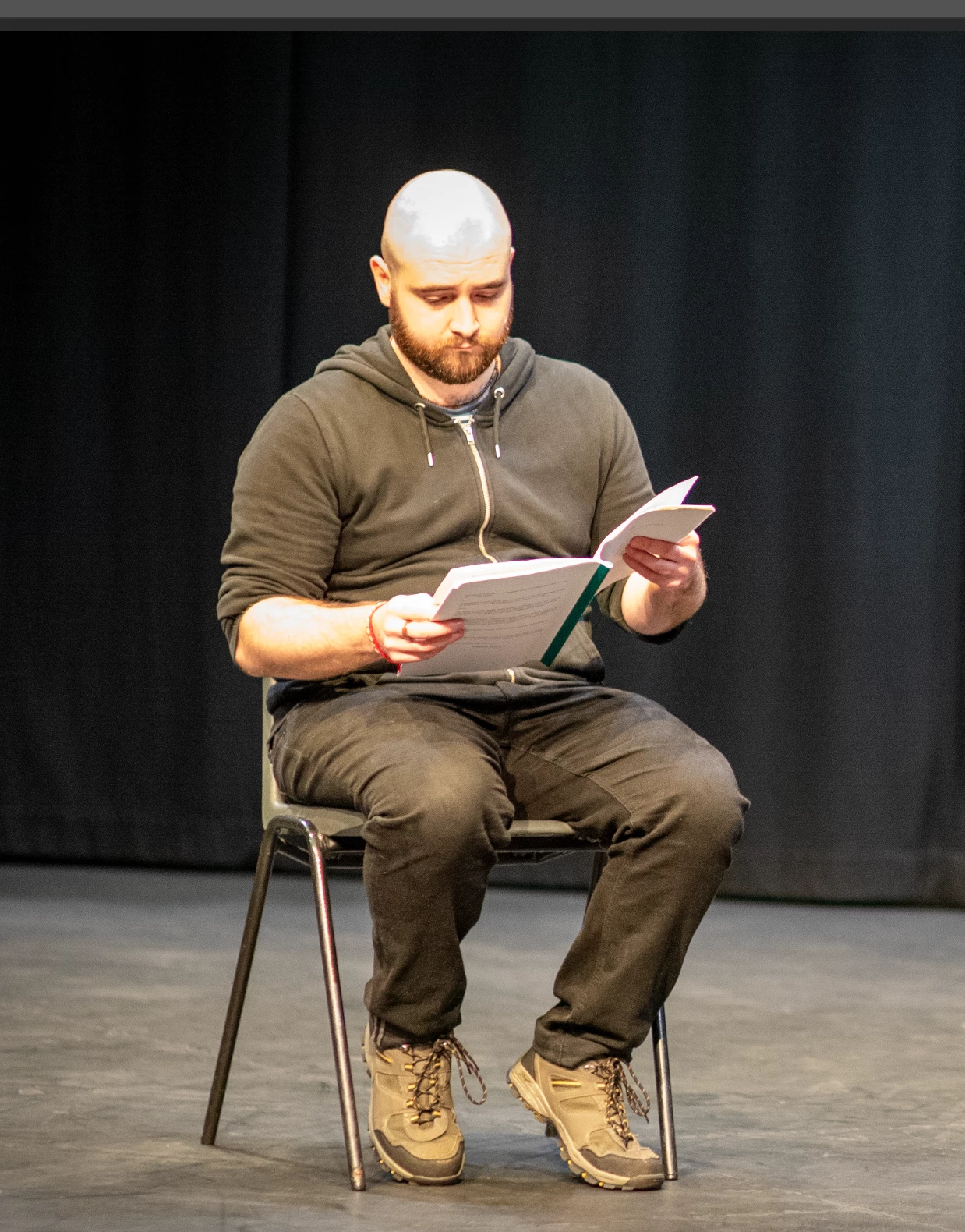
How to amend weird light glare on mans head!?

  • October 31, 2023
  • 3 replies
  • 1322 views

Hi there, Can anyone help? Shot in a theatre the other day and the lights were rotating red, blue and white, the pics have come out with a weird glare on bald mans head. I obviously had my Nikon on wrong setting but its usually set to P. I have tried all the usual in RAW like shadows, whites, blacks, contrast but I cannot remove it. See pic. Is there a quick fix anyone? 

Thanks so much. 

Anita
This topic has been closed for replies.

3 replies

Legend
November 1, 2023

Select the area with the Lasso, feathered a bit. Blur it slightly and then add a small amount of black and white gaussian noise. Sample the face with the brush tool set to color mode at maybe 30% fill, and brush over the top of the subject's head. This will give you the best looking result in a blown out area.

D Fosse
Community Expert
Community Expert
October 31, 2023

The short and blunt answer is that it's blown out and clipped in the sensor, so abandon all notions of "repair". There's nothing left to repair.


And there is certainly no "quick fix" as you say.


That's not to say it can't be fixed, but be clear that it needs to be rebuilt and reconstructed. There's a million ways to do that, and Myra posted one.


Participating Frequently
November 1, 2023

Thank you! i had to abandon. Not talented enough to fix. Some were OK with B&W. 

Myra Ferguson
Community Expert
Community Expert
October 31, 2023

One way to address the desaturation and glare on his head would be to apply a gradient to the area and use a combination of the Spot Healing Brush and the Blur tool. Here's how:

  1. Select the top of his head with any of the selection tools
  2. Set the Foreground color to a highlight skintone (try a highlight in his furrowed brow)
  3. Set the Background color to the darker skintone above his ear
  4. Select the Gradient tool and in the Options bar (Window > Options) set the gradient to Basics > Foreground to Background and the gradient type to Radial Gradient
  5. Draw a gradient from the center of his head outward and adjust as needed
  6. In the Layers panel, set the Blend Mode to Color
  7. Use the Spot Healing Brush and/or the Blur tool to blur the edges of the area on his head where the glare is most prominent
Participating Frequently
November 1, 2023

Thank you so much for all your expertese!