
Participant
May 18, 2019
Answered

How to apply a neon effect to this logo in Photoshop?

  • May 18, 2019
  • 4 replies
  • 1196 views

Hello everyone !

For some time now I have been trying to apply a neon effect to this logo to reinforce its Vaporwave aestheticism. I followed a lot of tutorials that mixed different techniques but the result never really satisfied me so I turn to you to see if you have a solution. I would like a result on a black background that is clearly visible but remains subtle.

I created this Logo on Illustrator if you need more files do not hesitate to contact me.

Thank you very much for your time and energy.

DjangoDjam

This topic has been closed for replies.
Correct answer davescm

Hi

You could try something like this.

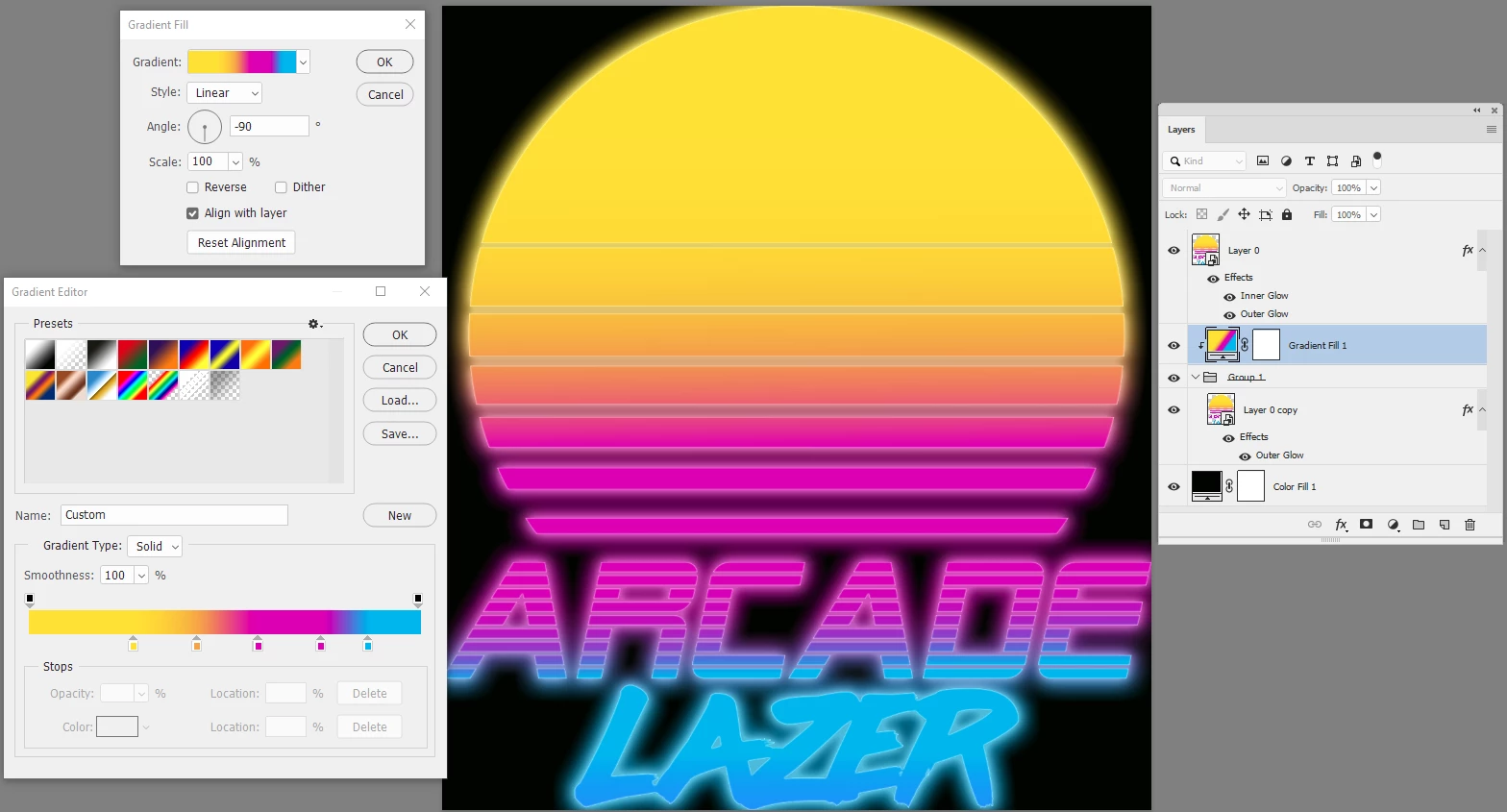
I duplicated your image and on the upper layer added a white inner and outer glow.

On the lower layer I also added a soft out glow but then put the layer in a group and clipped a gradient fill layer to the group. This meant that I could colour the glow with the gradient which I matched to the gradient on your logo.

Dave

4 replies

Participant
May 22, 2019

Thanks everyone !!!!

jane-e
Community Expert
Community Expert
May 18, 2019

djangodjam  wrote

For some time now I have been trying to apply a neon effect to this logo 

I created this Logo on Illustrator

Hi Django,

Did you try the Neon Effects Graphic Styles that come with Illustrator? They can be modified using the Appearance panel and Recolor Artwork if they don't work out of the box. Each of the styles is different, not just with the color.

Jane

davescm
Community Expert
davescmCommunity ExpertCorrect answer
Community Expert
May 18, 2019

Hi

You could try something like this.

I duplicated your image and on the upper layer added a white inner and outer glow.

On the lower layer I also added a soft out glow but then put the layer in a group and clipped a gradient fill layer to the group. This meant that I could colour the glow with the gradient which I matched to the gradient on your logo.

Dave

@mj
Community Expert
Community Expert
May 18, 2019

Check out this tutorial in Adobe create magazine.

Make It in a Minute: Neon Effect in Photoshop | Create

Remember that neon works best on dark colored backgrounds.

Also, Neon is more convincing if your work with the outlines of the logo.