
Participant
November 3, 2021
Answered

How to apply BitmapConversionOptions to Bitmap

  • November 3, 2021
  • 3 replies
  • 860 views

Hello there,

I was trying to convert a grayscale image to bitmap and can't move forward as couldn't find any documentation how to utilize BitmapConversionOption superclass.

This is what my script like.

#target photoshop

var doc = app.activeDocument;

doc.changeMode(ChangeMode.GRAYSCALE);

doc.changeMode(ChangeMode.BITMAP);


And from this point on I can't figure out to proceed with BtimapConversionOptions, to pass the parameters. Anyone can shed some light on this issue? It will be greatly appriciated
This topic has been closed for replies.
Correct answer Stephen Marsh

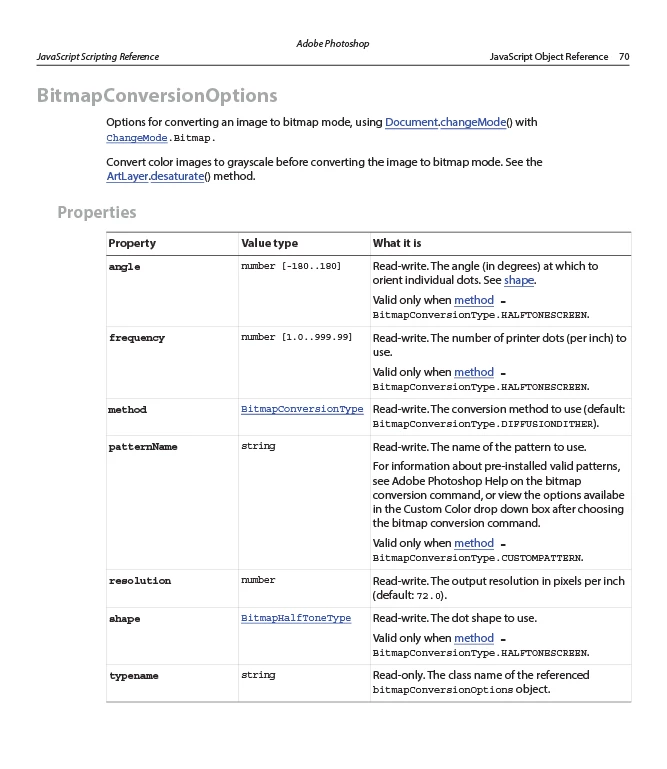
The bitmapConversionOptions are listed in the JavaScript Reference PDF for standard DOM coding. If the syntax is an issue, you could fast-track the process by recording AM code via the ScriptingListener plugin.


Edit - some searching came up with this DOM code:


var bitSaveOptions = new BitmapConversionOptions();
bitSaveOptions.method = BitmapConversionType.HALFTONESCREEN;
bitSaveOptions.angle = 45;
bitSaveOptions.frequency = 55;
bitSaveOptions.resolution = 300;
bitSaveOptions.shape = BitmapHalfToneType.ROUND;

app.activeDocument.changeMode(ChangeMode.BITMAP,bitSaveOptions);


3 replies

Legend
November 3, 2021

Stephen Marsh
Community Expert
Stephen MarshCommunity ExpertCorrect answer
Community Expert
November 3, 2021

The bitmapConversionOptions are listed in the JavaScript Reference PDF for standard DOM coding. If the syntax is an issue, you could fast-track the process by recording AM code via the ScriptingListener plugin.


Edit - some searching came up with this DOM code:


var bitSaveOptions = new BitmapConversionOptions();
bitSaveOptions.method = BitmapConversionType.HALFTONESCREEN;
bitSaveOptions.angle = 45;
bitSaveOptions.frequency = 55;
bitSaveOptions.resolution = 300;
bitSaveOptions.shape = BitmapHalfToneType.ROUND;

app.activeDocument.changeMode(ChangeMode.BITMAP,bitSaveOptions);


artmelkonAuthor
Participant
November 4, 2021

Thanks a lot, it solved my issue. I did read the documentation, but wasn't quire sure how to implement it.

Stephen Marsh
Community Expert
Community Expert
November 4, 2021

@artmelkon wrote:

Thanks a lot, it solved my issue. I did read the documentation, but wasn't quire sure how to implement it.


Yes, it can be hard to get the syntax right without an example, which is why I suggested taking the easy way out and using AM code recorded via the ScriptingListener plugin:


var idconvertMode = stringIDToTypeID( "convertMode" );
    var desc180 = new ActionDescriptor();
    var idto = stringIDToTypeID( "to" );
        var desc181 = new ActionDescriptor();
        var idresolution = stringIDToTypeID( "resolution" );
        var iddensityUnit = stringIDToTypeID( "densityUnit" );
        desc181.putUnitDouble( idresolution, iddensityUnit, 300.000000 );
        var idmethod = stringIDToTypeID( "method" );
        var idmethod = stringIDToTypeID( "method" );
        var idhalftoneScreen = stringIDToTypeID( "halftoneScreen" );
        desc181.putEnumerated( idmethod, idmethod, idhalftoneScreen );
        var idfrequency = stringIDToTypeID( "frequency" );
        var iddensityUnit = stringIDToTypeID( "densityUnit" );
        desc181.putUnitDouble( idfrequency, iddensityUnit, 55.000000 );
        var idangle = stringIDToTypeID( "angle" );
        var idangleUnit = stringIDToTypeID( "angleUnit" );
        desc181.putUnitDouble( idangle, idangleUnit, 45.000000 );
        var idshape = stringIDToTypeID( "shape" );
        var idshape = stringIDToTypeID( "shape" );
        var idround = stringIDToTypeID( "round" );
        desc181.putEnumerated( idshape, idshape, idround );
    var idbitmapMode = stringIDToTypeID( "bitmapMode" );
    desc180.putObject( idto, idbitmapMode, desc181 );
executeAction( idconvertMode, desc180, DialogModes.NO );


JJMack
Community Expert
Community Expert
November 3, 2021

Have you looked at Adobe conditional mode change script.  Menu File>Automate>Conditional Mode Change?  I do not know how it works and  do not even see a .changeMode() in the script but it does seem to change the document mode. It may have  the code you want. 

JJMack