
Participant
August 1, 2017
Question

How to apply this "3D" Effect in Photoshop 64 Portable

  • August 1, 2017
  • 1 reply
  • 395 views

Please, can someone tell me how to do this effect:
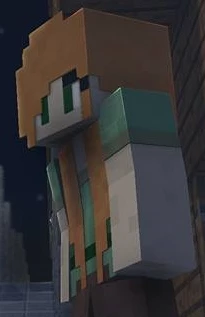
.. How to add the effect ( Like brighter or darker, reflections ) ( On the red lines 😞
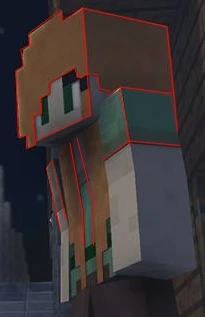
It looks 3d, the original picture is totally FLAT.

Can someone tell me how?

- Sorry IF this topic is at the wrong place, well I'm register only for this -

    This topic has been closed for replies.

    1 reply

    davescm
    Community Expert
    Community Expert
    August 1, 2017

    The effect is easy to do with a bit of masking and blending, but before we try and give instructions for a specific version. Can you clarify what you mean by Photoshop 64 portable? Adobe do not make such a product.

    To help us to help you, please go to Help System Info and click copy. Then paste into this thread.

    Dave

    rayek.elfin
    Legend
    August 1, 2017

    Dave, just google "Photoshop 64 Portable", and you will have your (expected) answer.

    Young ones will be young... (and naughty).

    davescm
    Community Expert
    Community Expert
    August 1, 2017

    I did earlier - hence my tactful answer

    Dave