Exit
  • Global community
    • Language:
      • Deutsch
      • English
      • Español
      • Français
      • Português
  • 日本語コミュニティ
  • 한국 커뮤니티
3

How to apply variable data to different template?

New Here ,
Oct 28, 2023 Oct 28, 2023

hi

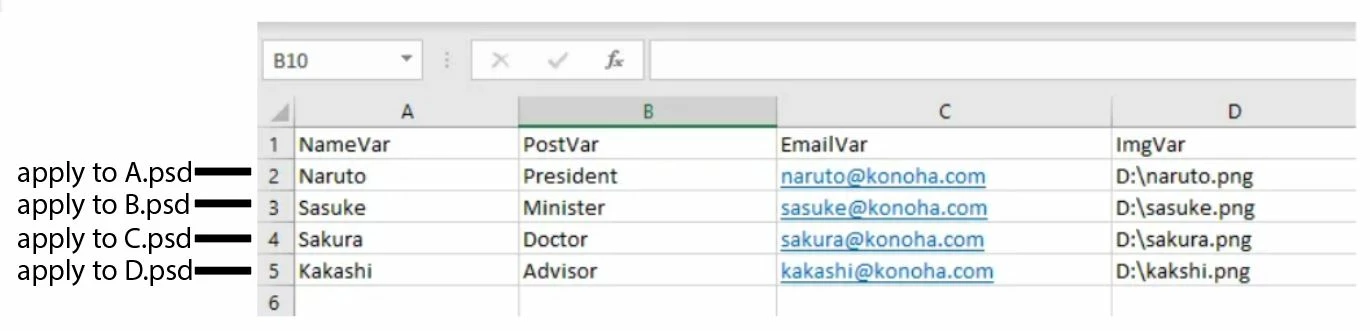
how i can apply variable data in one csv file to different template ? For example as below
AUTO.JPG


TOPICS
Actions and scripting , Windows
249
Translate
Report
Community guidelines
Be kind and respectful, give credit to the original source of content, and search for duplicates before posting. Learn more
community guidelines
Adobe
Community Expert ,
Oct 28, 2023 Oct 28, 2023

I'm guessing this would need scripting.  These guys will help you out

@Stephen Marsh 

@Jeff Arola 

Translate
Report
Community guidelines
Be kind and respectful, give credit to the original source of content, and search for duplicates before posting. Learn more
community guidelines
Engaged ,
Oct 29, 2023 Oct 29, 2023

I'm not exactly sure what you mean by apply the data to different templates. This would require a script and most likely can be done but we would need a bit more info and maybe an example of how you're applying the data and to where.

Translate
Report
Community guidelines
Be kind and respectful, give credit to the original source of content, and search for duplicates before posting. Learn more
community guidelines
LEGEND ,
Oct 30, 2023 Oct 30, 2023

Just setup the new template (base image) the same way you setup the original.

Translate
Report
Community guidelines
Be kind and respectful, give credit to the original source of content, and search for duplicates before posting. Learn more
community guidelines
Community Expert ,
Oct 30, 2023 Oct 30, 2023

I have no idea about scripting "Data-driven Graphics ".


Looking at your screenshot, you have four separate PSD templates, but only 1 data source which contains 4 rows.


So one way of looking at this would be to dupe the spreadsheet 3 times and remove each other row, then assign the appropriate data set to each template.


Translate
Report
Community guidelines
Be kind and respectful, give credit to the original source of content, and search for duplicates before posting. Learn more
community guidelines
Community Expert ,
Oct 30, 2023 Oct 30, 2023
LATEST

Create new PSD template and define variables from the first column sorry, I meant raw, that will link content with layers in your template.


It works like this, here sample data set:


Variable 5

"Text to replace content on type layer"


Any PSD that contains type layer with defined variable named Variable 5 can use data set to replace existing text with "Text to replace content on type layer"


Apply to A.psd, apply to B.psd is not clear, you can use single template with multiple data sets what will create multiple PSD files with same layout, for example, but with different content. You need only one PSD template and data sets. Are you sure you fully understand how data drive graphics work?

Translate
Report
Community guidelines
Be kind and respectful, give credit to the original source of content, and search for duplicates before posting. Learn more
community guidelines
