Answered
How to automate save multiple layers as a PNG with transparency?
Using Photoshop CS6 How to automate save multiple layers as a PNG with transparency?
File> Scrips> Layers to Files = NO TRANSPARENCY (PNG24, TGA, TIF) it flattens every layer.

Using Photoshop CS6 How to automate save multiple layers as a PNG with transparency?
File> Scrips> Layers to Files = NO TRANSPARENCY (PNG24, TGA, TIF) it flattens every layer.
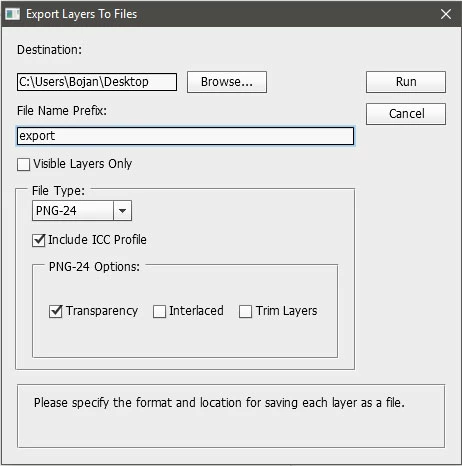
I just checked with Ps CS6 on Windows machine. Exporting to PNG or PSD will save files with transparency. Check settings in Export Layers To Files dialog. You have option Transparency for PNG format which should be checked.
Already have an account? Login
Enter your E-mail address. We'll send you an e-mail with instructions to reset your password.
 AdChoices