skylinehenrry
Participating Frequently
July 2, 2019
Question

How to blur the boundary between two selected color

  • July 2, 2019
  • 5 replies
  • 6045 views

Is there any automated plugin or any built in function in Photoshop to make the boundary between different colors smoother, as can be achieved by OLM Blur in Adobe After Effects? That plugin is only for AE on windows, but unfortunately I'm a Mac user so I'm interested if there is any way to achieved the same effect using photoshop. Applying gaussian blur directly doesn't work here because that's also going to blur the boundary between, say, the outline and the skin color, so is there anyone who knows how to do this, preferably in an automated manner?
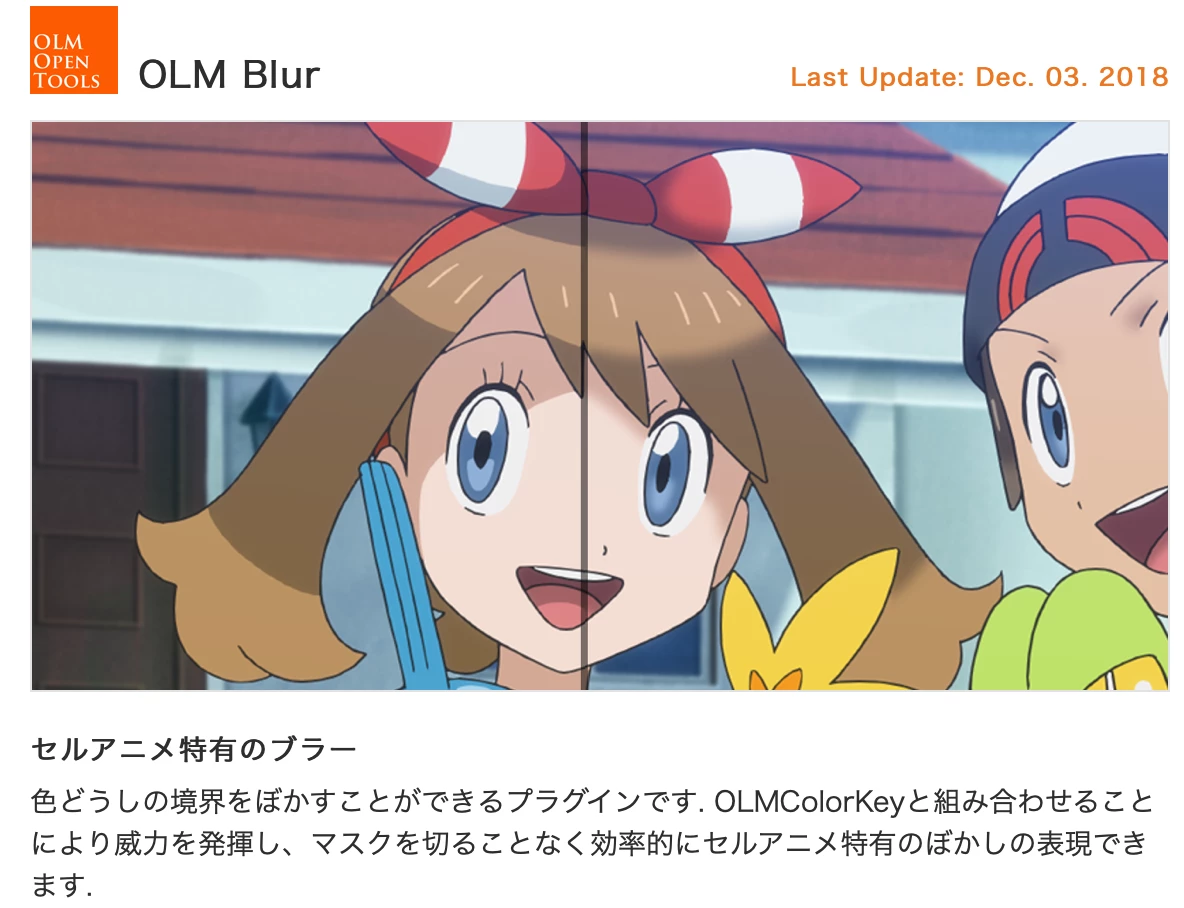
    This topic has been closed for replies.

    5 replies

    Norman Sanders
    Legend
    July 3, 2019

    Consider a blur layer with mask if you are working with art that is a composite.

    In comparison to the Blur tool, this method of applying the contents of a blurred layer provides consistency blur.

    skylinehenrry
    Participating Frequently
    July 4, 2019

    Thanks, I will give it a try.

    Chuck Uebele
    Community Expert
    Community Expert
    July 2, 2019

    From your example and description, it looks like you don't want the character outlines blurred. It would be best if the outline and the colors were on separate layers, so that you could blur the colors easier without blurring the lines. If they are on one layer, using color range to select the black lines then creating a mask to protect them might work. You could then use lens blur, which will not make the black bleed into the other colors. You could also then paint over various color transitions with varying shades of gray to control how much blur various areas get.

    skylinehenrry
    Participating Frequently
    July 3, 2019

    Right, but then I think the sample photo I provided was not a very illustrative one because the shape of the boundary was still relatively simple so there are easy technics that can be applied. But when coloring more complicated parts like the eyes it was much more difficult and the process becomes painstakingly time consuming, so I was wondering if there was a plugin that works in photoshop for Mac because I don't really think there's a significant technical difficulty to derive that result. Though I personally don't have much knowledge about Adobe AE, what could be done in AE which was primarily  for video editing and compositing should also be possible in PS since there's only a single frame to deal with.

    Norman Sanders
    Legend
    July 5, 2019

    These are the step-by-step instructions that accompany my solution shown above (Post #7):

    1. Add a duplicate layer (Cmd+J)

    2. Filter > Blur > Gaussian Blur set to  7.5 or more. It governs the amount of feathering

    3. Add a black mask (Hold down the Opt key and click on the Mask symbol jin the Layers panel)

    4. Paint on the mask with vertical strokes across the color-difference dividing line with a soft edged brush.

    jane-e
    Community Expert
    Community Expert
    July 2, 2019

    Which application was used to create the artwork?

    Semaphoric
    Community Expert
    Community Expert
    July 2, 2019

    You might be able to do this with a combination of Select > Color Range and Find Edges to make a mask for Gaussian Blur, but it would likely involve lots of trial and erro, and manual touch-up.

    skylinehenrry
    Participating Frequently
    July 3, 2019

    Thanks for the comment. I've tried the blur tool previously but the problem with that is that it's kind of hard to get a coherent result, and usually the boundary is not nearly as neat as I want it to be. I was thinking about whether it was possible to use a gradation tool that keeps the shape of the boundary line instead of using the linear shaped (or other preset offered in Photoshop) to smooth out transition between colors, but as far as my knowledge is concerned I could find no such way/tool. It's really too bad these Japanese Anime specific plugins are only offered in Aftereffects on Windows.

    Bojan Živković11378569
    Community Expert
    Community Expert
    July 2, 2019

    If I can understand what exactly you want then Blur Tool is your friend. Perhaps and Smudge Tool can do some job there. For now I do not have idea how to automate that task.