leonardeprio
Known Participant
May 5, 2018
Answered

How to bring a line to all sides of an image quickly?

  • May 5, 2018
  • 1 reply
  • 395 views

Hi all,

For details, I want to add a thin line (black W 3px) to all sides of the image that has various shapes.

I need to know how to do it quickly..? Thanks in advance.

    This topic has been closed for replies.
    Correct answer davescm

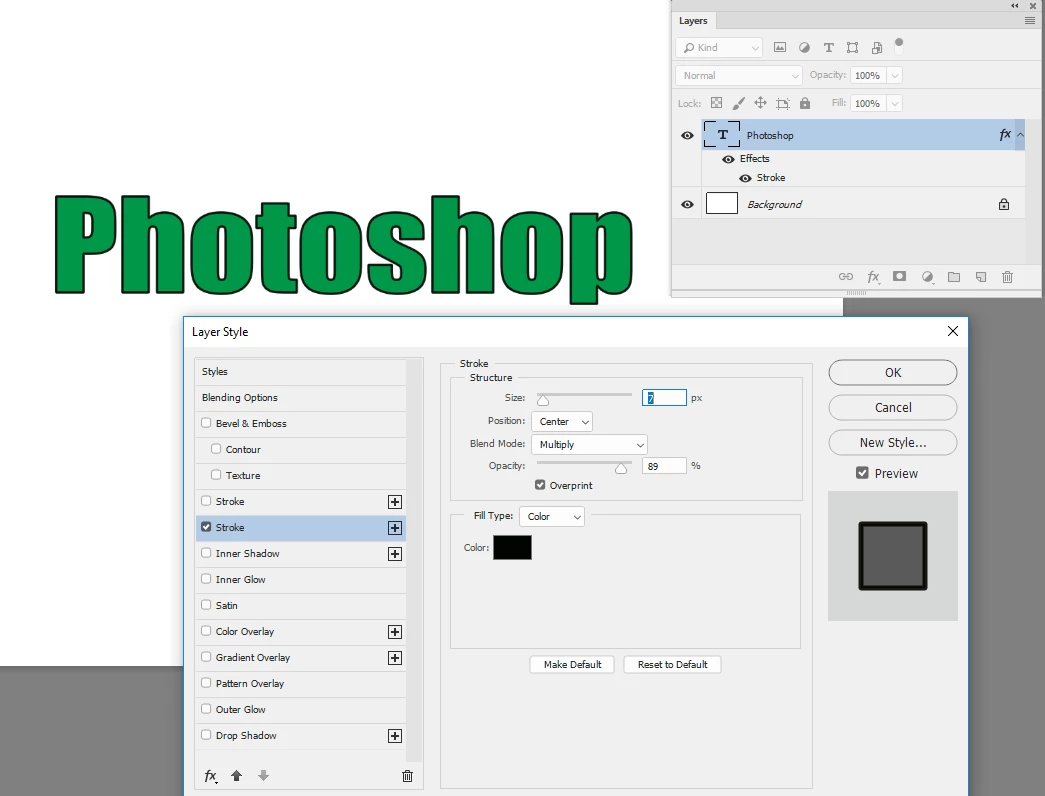
    Do you mean like the image below. If so right click on the layer and in Blending Options choose Layers Style - Stroke :
    Dave

    1 reply

    JohanElzenga
    Community Expert
    Community Expert
    May 5, 2018

    Use the Rectangular shape tool. Set it to 3 pixels Line width, and no fill.

    -- Johan W. Elzenga
    leonardeprio
    Known Participant
    May 6, 2018

    So, I want to give a line on each side, I don't know what the term in English.. Borderline or Line edge perhaps? Please sorry for my bad English that makes you misunderstand my point.

    In the above capture, it appears a black line on the letter "h", this is what I meant earlier. So, how can be done that at once quickly to all..?

    Oh my bad.. As you see, I cannot draw lines neatly and equally thick at all especially at the point of curves, I have to do it manually on each curve with a bad result instead..

    davescm
    Community Expert
    davescmCommunity ExpertCorrect answer
    Community Expert
    May 6, 2018

    Do you mean like the image below. If so right click on the layer and in Blending Options choose Layers Style - Stroke :

    Dave