
New Participant
March 7, 2020
Answered

How to change default bit depth

  • March 7, 2020
  • 2 replies
  • 4885 views

A while back I was messing with some settings in photoshop and must have accidently done something wrong.  Whenever I create a new file it automatically creates it in 16 bit depth, and I never think about it until I either go to use filter gallery or transfer my sketches to illustrator to refine and I cannot import it as layers. (figured this one out the hard way lol)  

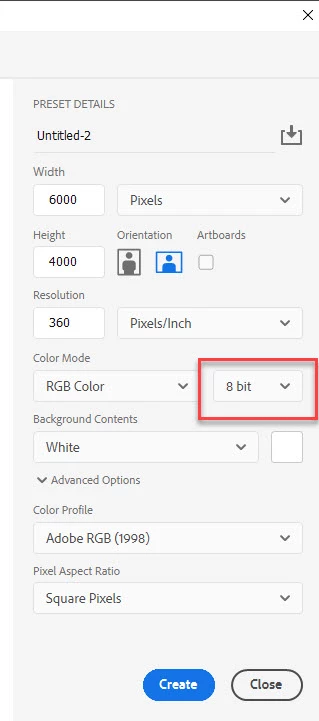
For the life of me I cannot figure out where the setting is to change the default back to 8 bit, where can I change that?  Thank you!
    This topic has been closed for replies.
    Correct answer davescm

    In File > New

    Dave


    2 replies

    davescm
    davescmCorrect answer
    Community Expert
    March 7, 2020

    In File > New

    Dave


    New Participant
    March 7, 2020

    that was IT! I have several Saved presets that are my go to and i never use what ADOBE has listed, all my presets somehow had 16 bit to them! THANK YOU

    davescm
    Community Expert
    March 7, 2020

    You're welcome 🙂

    Dave

    Derek Cross
    Community Expert
    March 7, 2020

    Did you change it in RAW?

    New Participant
    March 7, 2020

    Honestly I am NOT sure - I did open the "camera raw" setting under edit >preference> camera raw but didnt see a setting there unless I missed something. (and I may have)  I did this quite a while ago and honestly forget exactly where I changed it at,  I usually end up manually changing it back when i am in photoshop and remember it (like filter gallery not working) or reopen and save the file properly when trying to import layers to photoshop.