


Ivan Zajats
Inspiring
May 18, 2023
Answered

How to collapse a group from the keyboard?

  • May 18, 2023
  • 1 reply
  • 1799 views

Is there any shortcut to collapse a group from the keyboard?

It could be useful for creating actions (and for regular workflow as well).

Correct answer Stephen Marsh

Adobe only provide a native method to collapse all groups (not the selected group), so yes, a keyboard shortcut can be applied to this default command:
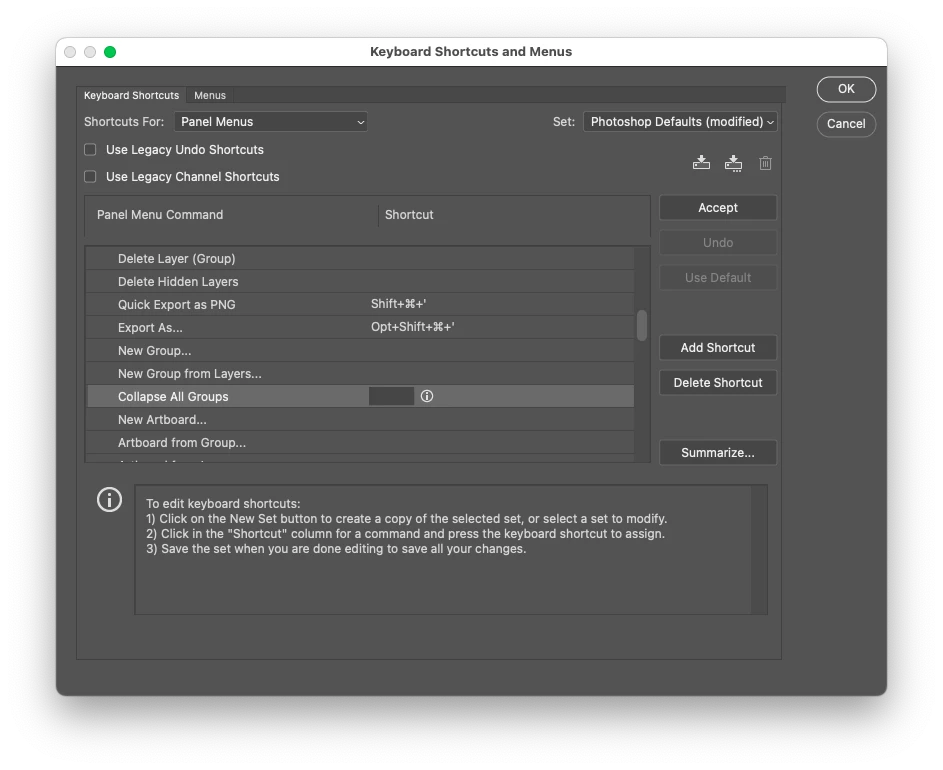


To collapse a single selected group, or the parent group of a contained layer, a script is required. Installed scipts can have a custom keyboard shortcut applied.

1 reply

Stephen Marsh
Community Expert
Stephen MarshCommunity ExpertCorrect answer
Community Expert
May 18, 2023

Adobe only provide a native method to collapse all groups (not the selected group), so yes, a keyboard shortcut can be applied to this default command:


To collapse a single selected group, or the parent group of a contained layer, a script is required. Installed scipts can have a custom keyboard shortcut applied.

Ivan Zajats
Inspiring
May 18, 2023

Thanks. Now I'm thinking if I should post it as a feature request (& also adding to the main window as a command). It could be really helpful for making actions. Now I'm using a "trick" - make internal groups first, then combine them into the main one 🙂


Stephen Marsh
Community Expert
Community Expert
May 18, 2023

I'd vote for the ability to collapse a single active layer group without losing clipping mask layers attached to the group, or losing colour labels or blending options etc.