
analytical_Solace0D4C
Participant
September 20, 2012
Question

How to combine more Paths into One Layer Path? can you help me out?

  • September 20, 2012
  • 3 replies
  • 25334 views

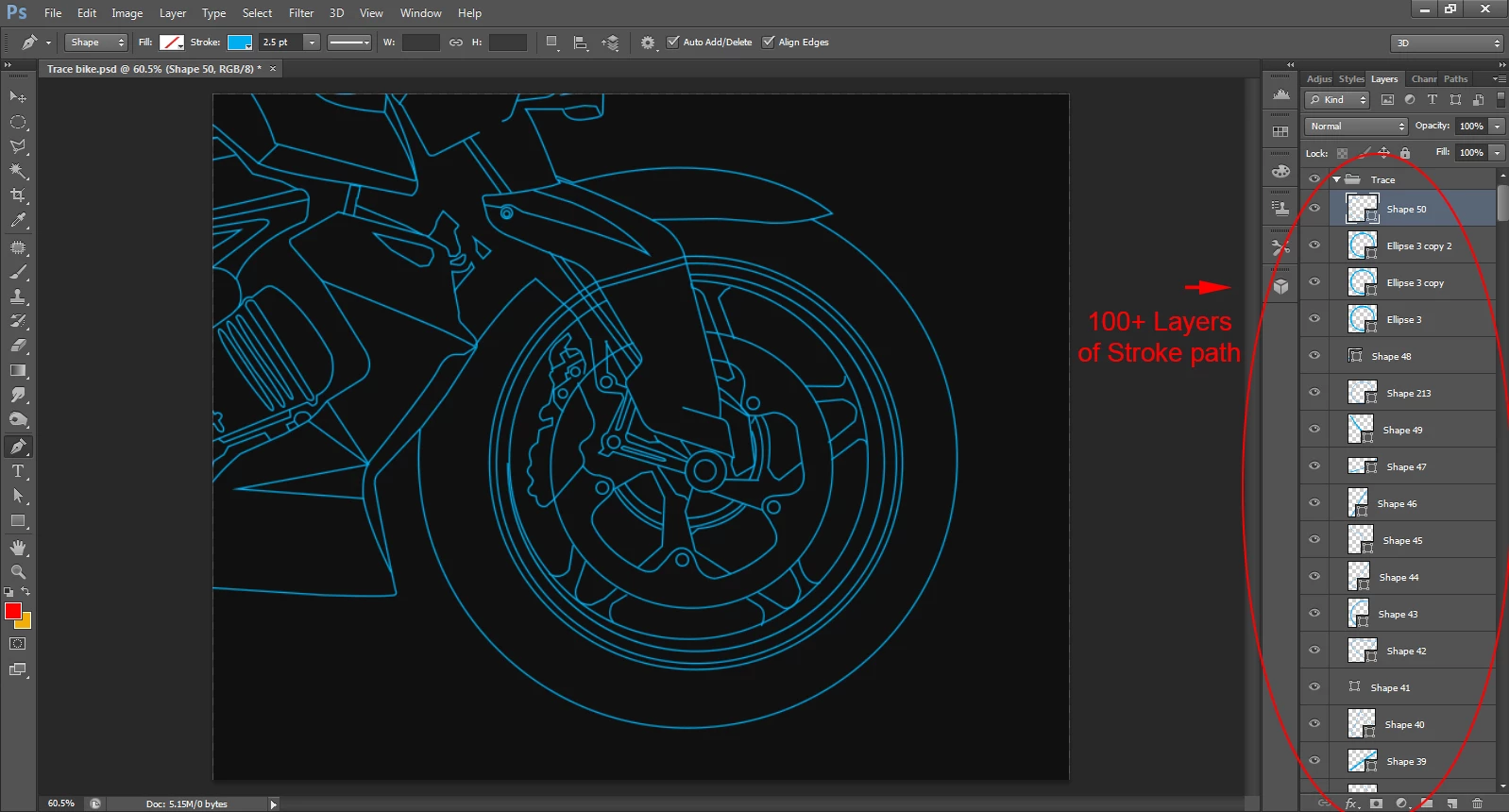
I have traced below image (bike). Using PEN tool stroke path.
Path is around 100 layers or +.
So, how to combine this all Stroke paths to one layer Path?
can you help me out?
    This topic has been closed for replies.

    3 replies

    JJMack
    Community Expert
    Community Expert
    September 24, 2012

    An othe way is to combine them as you create them. Create the first shape. Use the pull doen menu to check combine shape. Here is a screen capture where I 'm adding lines with arrow heads to the current shape layer.

    JJMack
    analytical_Solace0D4C
    Participant
    September 29, 2012

    Dear Sir,

    you are talking abt shape. I know it can be merge on 1 layer. if you seen my image there is Stroke path (not a shape).

    sudarshan.t
    Inspiring
    September 29, 2012

    In your image, the stroke color is highlighted. But look at your Pen Mode - It's in 'Shape', not 'Path'. Shapes with stroke outline can exist and can be merged with the solution that was already posted earlier.

    conroy
    Participating Frequently
    September 24, 2012

    You have a choice:

    Layer > Merge Shapes to merge into one Shape layer

    or

    Layer > Merge Visible to merge into one pixel layer

    See keyboard shortcuts in menu. These items are at bottom of Layer menu. Combining Option/Alt key with these commands will result in the layers being retained in addition to the new merged layer being added to the document.

    sudarshan.t
    Inspiring
    September 24, 2012

    Layer > Merge Shapes

    Layer > Merge Visible

    Use 'Merge Shapes' if you want your shapes to still be editable. Merge Visible flattens the layers, rendering them non-editable.

    chinarabbit
    Participating Frequently
    October 13, 2012

    thanks conroy

    the best I can do is select a Paths Palette Channel/Layer I have made, then click the vector mask icon in the masks palette, to load that Path as a vector

    but i cant find a way to add another path from the path palette into the same vector, i have to create a new layer, select the path palette layer i want, then click the vecor mask icon again to create a separate vector mask with the second path loaded

    if i drag one vector to the other, it just replaces it

    the icons for add, intersect etc dont seem to do anything at all for anything in the paths palette

    whats more, the vector masks behave EXACTLY like the paths palette layer, in that you cant even view them both at the same time.

    are you able to view any paths on separate layers at the same time, without them loading as a selection?

    or does anyone know of any way to get multiple paths palette channels loaded into the same vector mask or somehow get them combined, or even viewed in any way simultaneously,

    thanks


    no matter how many shapes you stick into a vector mask, they are all contained in a single Path Palette Layer-Channel

    and every time you Make a Work Path from a Selection it throws you back out of everything into a new Paths Layer, with no way to combine them.. this works exactly the opposite of the Channels Palette, where combining multiple selections into one object is the most important function

    in the Paths Palette, its exactly the opposite, combining multiple paths to create a new path is prohibited. outlawed, and forbidden

    this is pretty frustrating.. and it seems outright intentional by adobe to make things much more difficult, limit functionality, prevent people from doing certain things, or to promote their other products, like illustrator..

    anyone know if illustrator can do what PS has been intentionally designed not to be able to do, against all common sense.. i mean. u can even select multiple paths in the paths palette at the same time.

    neither can you in any way combine or even view multiple paths

    WTF?  do we need 15 more editions of adobe to get this to function semi-normally, or is this one of those infamous & uber-lame adobe shanghais that undercuts and undermines creativity for a perceived bolsetering of some mythical societal brain-law enforcing

    thanks for the brain shackles, adobe, i hope your kudos by the 3 psychotic deviants that percieve this as beneficial or necessary is worth it for you there..

    Community Manager
    September 24, 2012

    Moving to the Photoshop CS general forum to help you get a response.