

Jack Brannen
Known Participant
May 1, 2024
Answered

How to create a field of dots that clusters tighter together toward the center

  • May 1, 2024
  • 2 replies
  • 2757 views

I'm trying to build a very specific texture in Photoshop, and I'm a little stumped. Anyone know if this is possible?


I want a field of dots that meets these 4 criteria:

  1. Dots are packed together tighter toward the center and looser toward the edges
  2. Dots don't overlap
  3. Dots are not distorted into ovals (as would happen if I use Distort filters to spread them out)
  4. Dots are in a semi-random organic pattern
  5. Dots are all the same size [EDIT: Added this. Forgot to put this in originally—apologies.]


I can do this in Illustrator with the Symbol Sprayer tool up to a certain point (see attached image), but then the program slows to a crawl. I need something I can do on a much larger scale.


Thanks in advance!
Correct answer Semaphoric

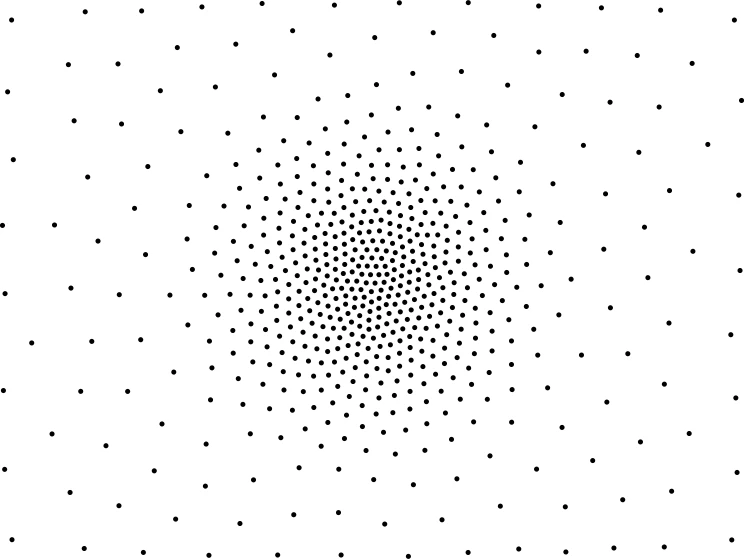
There is a program you can download called StippleGen, which generates points using Voronoi diagrams. If you run it on a radial gradient, you get something like so:

The result is saved as an SVG file. You can open it in Photoshop,but the paths for the individual points have a stroke but no fill, and can have little hollow white dots in their centers. If you open the file in a Vector editor like Illustrator, you can add fills and remove the strokes, and then copy and paste as a Shape into Photoshop (as I did here).

2 replies

Semaphoric
Community Expert
SemaphoricCommunity ExpertCorrect answer
Community Expert
May 2, 2024

There is a program you can download called StippleGen, which generates points using Voronoi diagrams. If you run it on a radial gradient, you get something like so:

The result is saved as an SVG file. You can open it in Photoshop,but the paths for the individual points have a stroke but no fill, and can have little hollow white dots in their centers. If you open the file in a Vector editor like Illustrator, you can add fills and remove the strokes, and then copy and paste as a Shape into Photoshop (as I did here).

Stephen Marsh
Community Expert
Community Expert
May 2, 2024

@Semaphoric – thanks, you saved me the work of finding the link!

Semaphoric
Community Expert
Community Expert
May 2, 2024

Doing this in a vector program would be better than Photoshop, since each dot is an object, and there are commands like "Transform Each". 


Another possibility for the OP could be some sort of Phylotaxis type pattern, like in the center of a daisy. There were a few extensive discussions about achieving this on the Illustrator Forum several years ago. I've done it to a limited degree in Photoshop, but it's hit or miss to set up for good results, and the elements get smaller towards the center, which is not desired.


Myra Ferguson
Community Expert
Community Expert
May 1, 2024

You could try the free Comic Kit plugin on Adobe Exchange (https://exchange.adobe.com/apps/cc/13159).


After you install it, do the following

1. Choose Edit > Fill
2. Choose Content: Pattern
3. Check the check box next to Script: under Options
4. Choose Screen_Pattern_ex from the script dropdown menu
5. Click OK


Then in the Screen Pattern dialog, select the following:

  1.  In the Basic tab, set Pattern Gradation to Radial
  2. Increase the Randomize Patterns amount as desired
  3. Modify the other settings as desired
  4. Click OK


You may need to test various settings to make the dots not overlap.

Stephen Marsh
Community Expert
Community Expert
May 2, 2024

Great reply @Myra Ferguson !

Myra Ferguson
Community Expert
Community Expert
May 2, 2024

@Stephen Marsh Thanks! 🙂