
Participant
May 2, 2019
Question

How to create rainy light reflection effect ?

  • May 2, 2019
  • 2 replies
  • 2032 views

Hello,

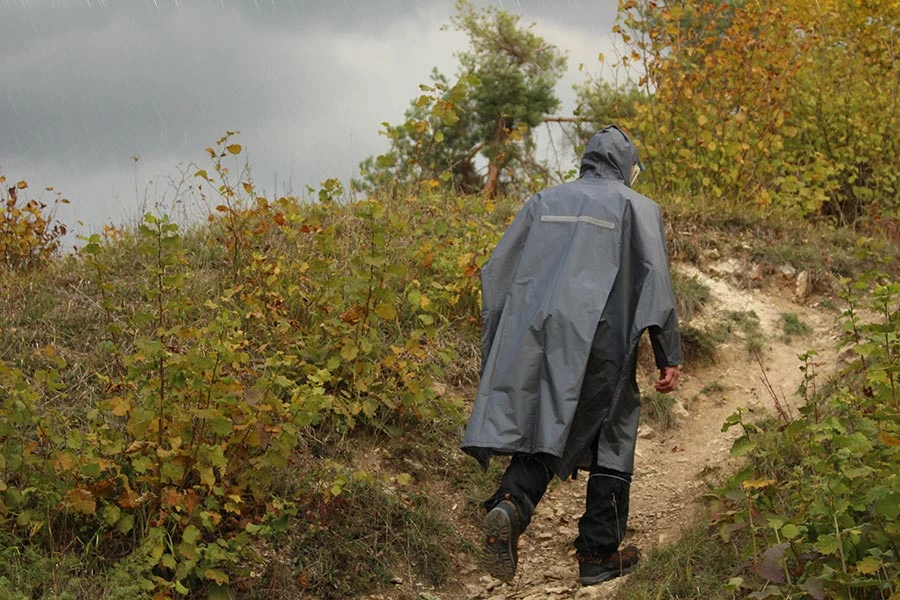
I want to edit this image so it looks like it's raining. I figured out the rain part however I can't find information on how to create the light reflection on the jacket. Or how can I make things look more wet in general ? Thanks in advance
This topic has been closed for replies.

2 replies

davescm
Community Expert
Community Expert
May 2, 2019

Hi

If you want to make things look wet - then remember that wet surfaces darken and become more glossy. You can achieve this with curves then add puddles, by flipping and transforming parts of the image to simulate reflection.

Dave

Trevor.Dennis
Community Expert
Community Expert
May 2, 2019

Very effective Dave.   Would the coat be reflective enough to show a hint of those bushes? It would be very feint with such a dark coat, and obscured by the rain.  Maybe the top of the shoulders might be lighter reflecting that grey sky?

davescm
Community Expert
Community Expert
May 2, 2019

Hi

Nice touches Trevor

Dave

Sahil.Chawla
Adobe Employee
Adobe Employee
May 2, 2019

Hi Zaelle,

As you're looking to create a stormy clouds atmosphere in Photoshop, could you please have a look at this video and let us know if it helps?

Photoshop: Creating a dark and stormy sky | lynda.com - YouTube

Regards,
Sahil

joanH
Inspiring
May 2, 2019

Hi, I also use a layer to show the rain. Photos of raindrops and rain at 50% in shades of gray and play with the look reducing the % and color of gray. Lighter in some areas. Reflections can go on the raincoat with another layer and clone color from surrounding colors - just a touch here, I fade it and lighten it as I go. Regards, JH

ZaelleAuthor
Participant
May 2, 2019

Sorry I am still a beginner. Could you maybe elaborate the reflection part ?