

How to create rose gold dots on jpeg image
Hi there
I'm a complete newbie to photoshop but am trying it out to help me retro-engineer a place card for my wedding after 2 people are attending late (after all my place cards are created). I don't want these guests to feel like they've been forgotten, but it's too late for me to order new place cards.
It's probably not a great solution but I've managed to create a copy of the place card (attached) but the dots are all real rose gold pressed from the stationery provider. Because I can't get back to the printers, I'm trying to create more realistic looking rose gold dots on top of the image in photoshop, they don't print realistically at the moment.
I've watched so many youtube videos on gold textures and vectors and masks in the last 2 days trying to figure it out. I'm sure it's really easy but I just don't have much experience in photoshop, and only have a day or two to figure it out.
Attached is the jpeg place card - I'm wondering if someone would be kind enough to tell me how I'd make those rose gold dots look more realistic in photoshop? I've downloaded a rose gold texture, but I'm not sure if that's how to do it!
Thanks so much in advance,
Eliza.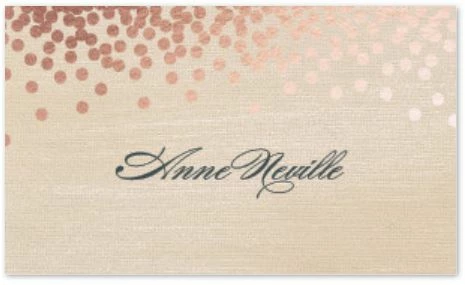
 AdChoices