Participant
January 14, 2021
Answered

How to create this effect?

  • January 14, 2021
  • 2 replies
  • 689 views

Hello, 


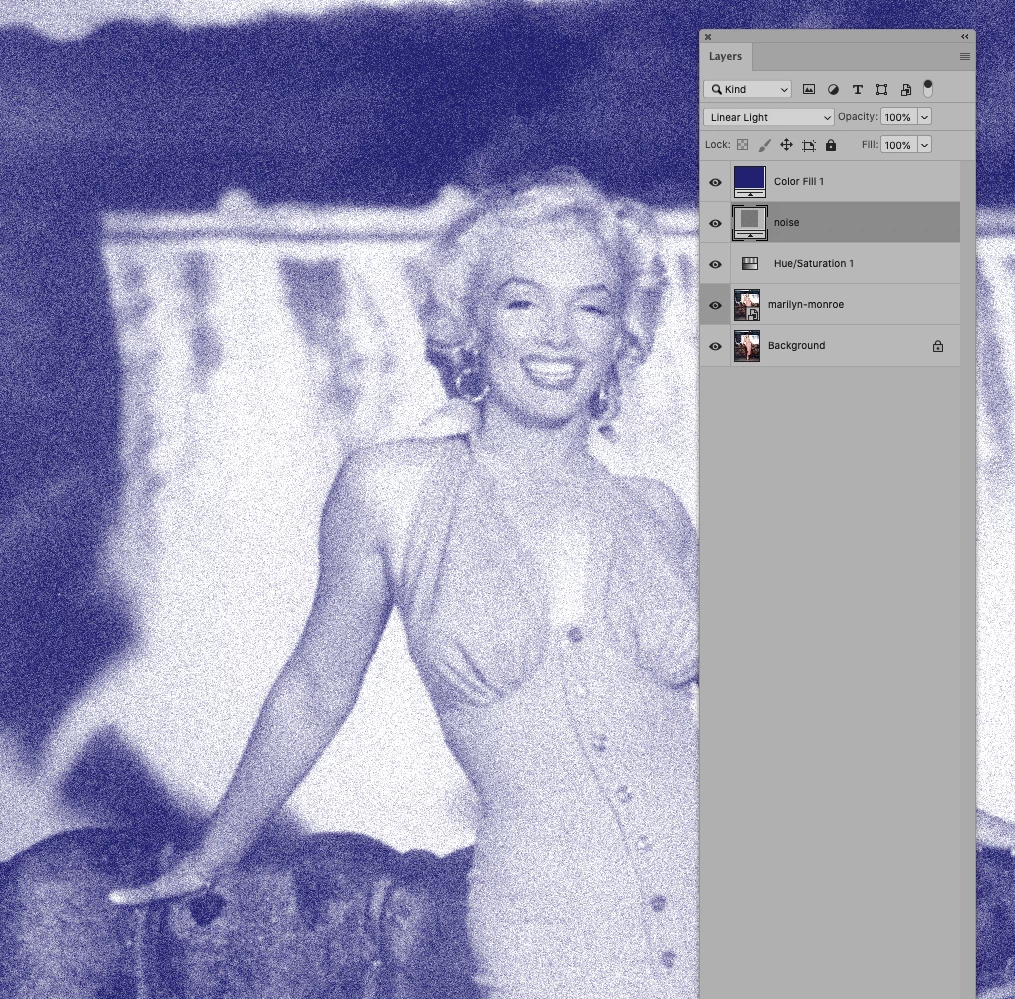
I was wondering if I can create this sort of effect on photoshop. It almost looks like a render but I am curious if this can be done in photoshop. 


Thanks.

This topic has been closed for replies.
Correct answer c.pfaffenbichler

2 replies

c.pfaffenbichler
Community Expert
c.pfaffenbichlerCommunity ExpertCorrect answer
Community Expert
January 14, 2021

Participant
January 14, 2021

Hello,


Yes! Thank you. So it should just be a simple hue/saturation and noise effect? 

c.pfaffenbichler
Community Expert
Community Expert
January 14, 2021

Super. 

thank you!


If you plan to use this technique frequently you may want to create a few Patterns with different Add Noise-values, so you can use them as Pattern Layers and don’t have to create a new Layer, fill it with 50% gray, etc. each time. 

Known Participant
January 14, 2021

could you post the before picture as well to see what the effect actually does?

It's hard to establish what an effect does without a before/after...

Participant
January 14, 2021

Sorry this isn't personal work so I don't have a before picture. But the solution that c.pfaffenbichler seems to be what I'm looking for. Looks like it can be done with hue/saturation and noise effects? Thank you!