Answered
how to dehaze in Photoshop cc.
In the latest versions of Photoshop cc the dehaze slider has disappeared. How can a photo be dehazed on Photoshop?

In the latest versions of Photoshop cc the dehaze slider has disappeared. How can a photo be dehazed on Photoshop?
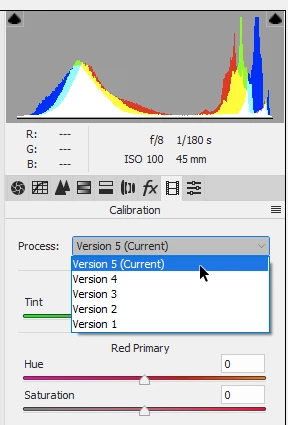
Dehaze is still there. But the process version has to be 3 or higher for Dehaze to appear.
Go to the calibration tab in Camera raw, and set the process version to 5 (latest).
Already have an account? Login
Enter your E-mail address. We'll send you an e-mail with instructions to reset your password.
 AdChoices