Beantwortet
How to disable ink panel popping up in Photoshop?
It's super annoying . Evry time I want to input some values an ink panel or something appears . How can I disable it entirely and for good ? I use Wacom tablet and win 10

It's super annoying . Evry time I want to input some values an ink panel or something appears . How can I disable it entirely and for good ? I use Wacom tablet and win 10
Thank you for trying to help . It's a third computer I use during last couple years and it have been same on each of them . Two desktops and now a fresh new laptop. I think I alredy tried this registry hack before on one of desktops with zero sucsses.
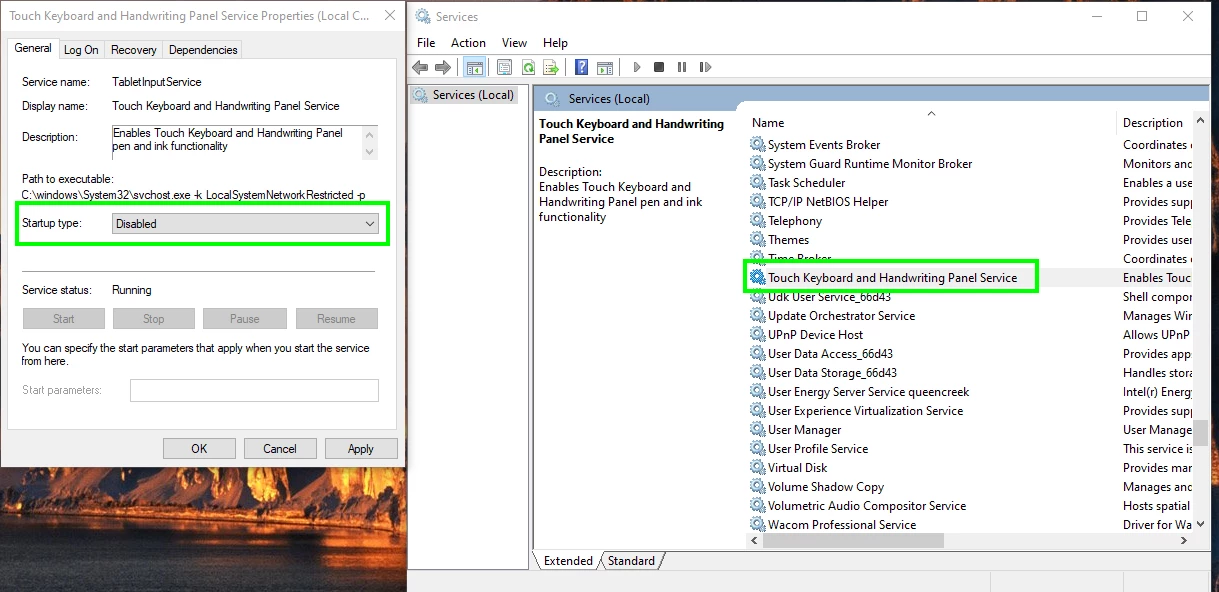
Do you have a Wacom tablet by any chance, have you tried disabling the service, you'll need to restart your PC after making the change.
If that doesn't help, I'm all out of ideas, it's a Windows issue and not a Photoshop issue.
Enter your E-mail address. We'll send you an e-mail with instructions to reset your password.
 AdChoices