

Participant
September 3, 2018
Answered

How to disable layers automatically fitting to content.

  • September 3, 2018
  • 1 reply
  • 346 views

All of my layers  automatically resize to fit the content . How do I set it back to default.

    This topic has been closed for replies.
    Correct answer davescm

    I think I now undertand what you mean. Is it the thumbnail icons in the layer panel that have changed?

    If so, go to the drop down menu at the top right of the panel. In the menu choose "Panel Options"

    Then choose Thumbnail Contents - Entire Document
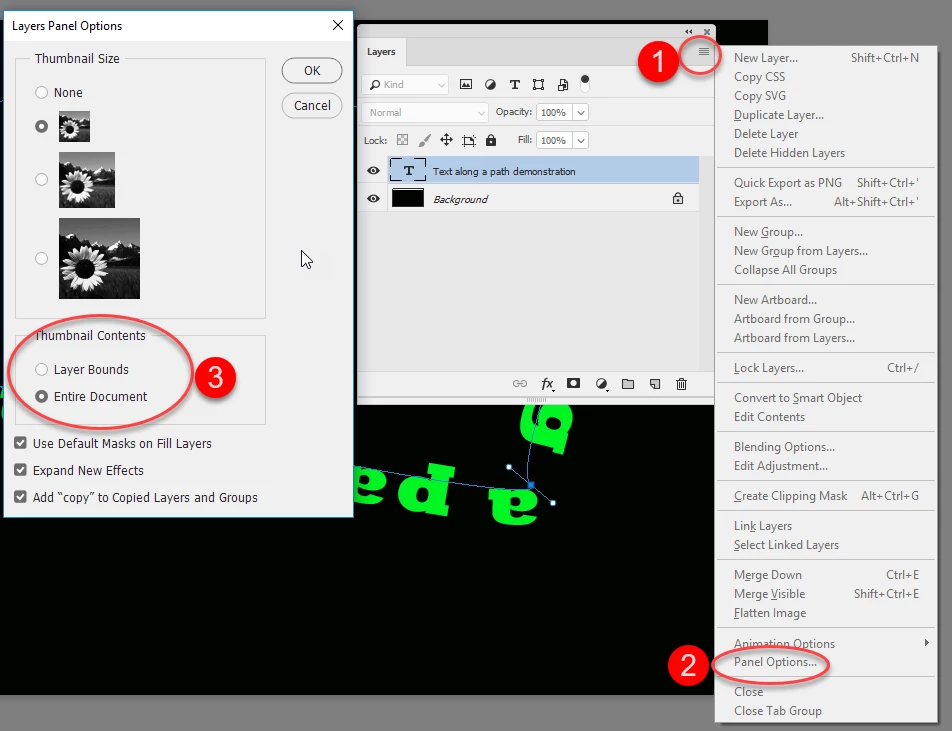
    If that is not your issue - please add a screenshot to explain further

    Dave

    1 reply

    davescm
    Community Expert
    Community Expert
    September 3, 2018

    Hi

    Do you mean when placing an image?

    If so, go to Preferences >General and uncheck "Resize Image During Place"

    Dave

    Participant
    September 3, 2018

    I checked "Resize image during place" in Preferences and it was unchecked. All of my layers on the bottom right before used to show the whole canvas but I think I accidental hit something and now all the layers all changed to only show the the content of that layer and I can only edit and draw on that content.

    davescm
    Community Expert
    davescmCommunity ExpertCorrect answer
    Community Expert
    September 3, 2018

    I think I now undertand what you mean. Is it the thumbnail icons in the layer panel that have changed?

    If so, go to the drop down menu at the top right of the panel. In the menu choose "Panel Options"

    Then choose Thumbnail Contents - Entire Document

    If that is not your issue - please add a screenshot to explain further

    Dave