
How to edit/crop a smart object?
I have two images, lower (A) and upper (B) portions of a website screen grab, that I want to join together.
I opened the bottom image (A) in photoshop CC, and then read where the old Place is now Place Embedded, so Place Embedded the top portion of the web page (B) into that same file created by opening the first file (A).
I need to crop some of the bottom off image B, but when I use the rectangle selection tool to select and cut that portion, I get the following Error Message:
Could not complete your request because the smart object is not directly editable.
I was able to select and cut parts of image A, so not sure why image B isn't letting me do that. Also, I didn't realize image B was imported or placed as a smart object, which I'm not familiar with. I've been searching for information on smart objects and how to work with them, but not seeing anything specific to what I'm doing.
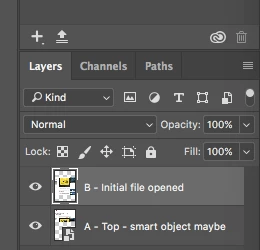
Is it the way I placed the image B into the file created by opening the first image (A)? There's a small icon on image B's thumbnail in the Layers window, which I assume is a smart object indicator, although when I control-click on the layer, it shows an option to make the image a smart object.
Below is a screen grab of the layers window. The image in the highlighted layer is image B, the one I'm having trouble cropping.
Thanks for any help.
 AdChoices