
Question
How to embed one layer over another in the PS layers pallet?
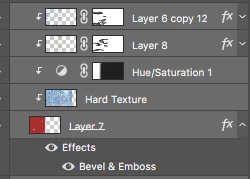
I received a file with a set of layers looking like my snapshot. I have no idea how this is done. I'm not sure if I've used the correct terminology to embed one layer over the other. I need to recreate this for an adjoining piece that is on a much larger scale because it achieves a certain effect. So how do you get those top four layers to embed into the bottom one?
 AdChoices