


Participating Frequently
March 3, 2020
Answered

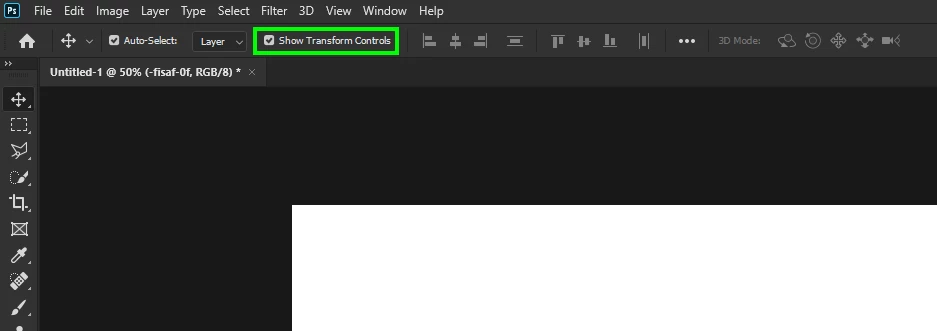
How to enable back Move to Transform option?

  • March 3, 2020
  • 2 replies
  • 593 views

In Photoshop I used to be able just to click on object  (i.e. text in some layer) while move tool was selected and it automaticaly show me bounding box around object and let me move and transform it right there. Now when I click I don't see bounding box but I can still move it but not resize (or other transform functions). I'm not sure at which point it changed, but I'd like to get it back. How can I do that?
This topic has been closed for replies.
Correct answer

Hi

As suggested check the options bar

2 replies

Correct answer
March 4, 2020

Hi

As suggested check the options bar

bratan007Author
Participating Frequently
March 4, 2020

Awesome, that's exactly what I was looking for. Thank you guys!!!

Chuck Uebele
Community Expert
March 4, 2020

I don't have PS open, bit I think it's in the menu bar" "Show Transform Controls."