Participant
April 14, 2020
Answered

How to export paths to AI in action / batch

  • April 14, 2020
  • 3 replies
  • 4717 views

Hi,


Ive recorded an action to export paths from adobe photoshop to Illustrator (ai files). It is working pretty well, but the action is exporting always to the exactly same filename. So if I use the action in batch mode for many files, I only get one ai file in the end because it is always overwriting the same file.


How can I set a dynamic filename for the export paths to illustrator function?


Any ideas?


Thanks alot!

This topic has been closed for replies.
Correct answer Stephen Marsh

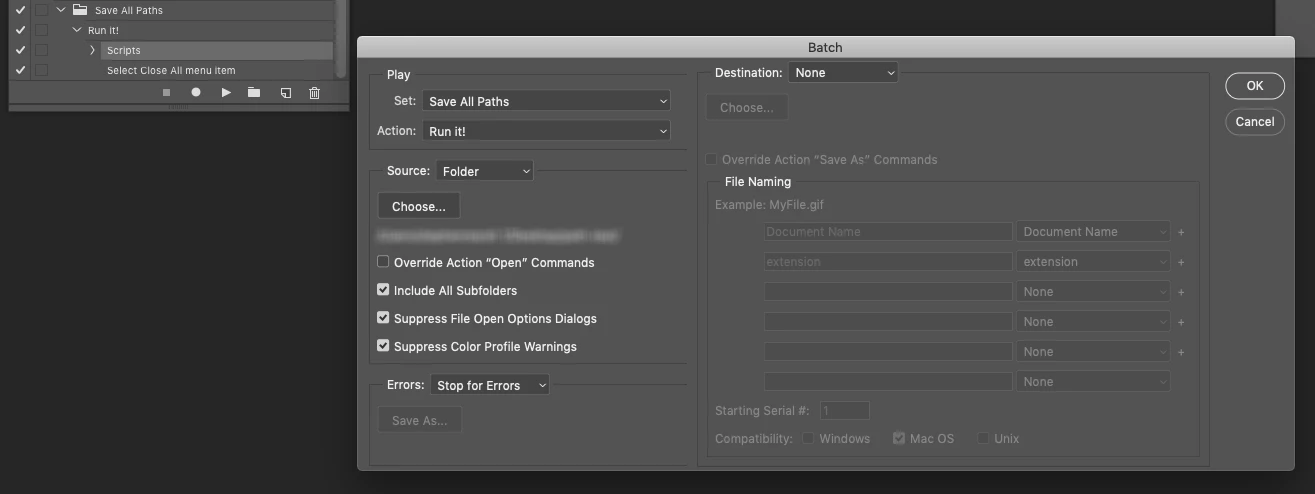
Try this script. It can be recorded as an action step and then used in File > Automate > Batch command. Files must be saved, exported files will be saved in the same folder as the original file using the same variable document name with suffix of "_Paths" and the ".ai" filename extension.


Such as:

Original Image Name.psd

Original Image Name_Paths.ai

(this suffix is easy to remove from the script if you don't like it)


Downloading and Installing Adobe Scripts


// Export All Paths to Illustrator Using Variable Document Name.jsx

#target photoshop

/*
Export all paths to Illustrator format using the current document name
This script is suitable for use in the File > Automate > Batch command
https://community.adobe.com/t5/photoshop/how-to-export-paths-to-ai-in-action-batch/m-p/11049923 
How to export paths to AI in action / batch
*/

/* Start Unsaved Document Error Check - Part A: Try */
unSaved();

function unSaved() {
    try {
        activeDocument.path;
        /* Finish Unsaved Document Error Check - Part A: Try */

        /* Main Code Start */

        /* Based on the following topic thread:
        https://community.adobe.com/t5/photoshop/exporting-all-paths-to-illustrator-error/m-p/8796143 */

        var doc = app.activeDocument;
        var docPath = doc.path;
        var docName = doc.name.replace(/\.[^\.]+$/, '');
        var newFile = File(docPath + '/' + docName + '_Paths' + '.ai');
        var expOptions = new ExportOptionsIllustrator;
        expOptions.path = IllustratorPathType.ALLPATHS;
        doc.exportDocument(newFile, ExportType.ILLUSTRATORPATHS, expOptions);
        // alert('All Photoshop paths have been exported as a single Illustrator file in:' + '\r' + docPath);

        /* Main Code Finish */

        /* Start Unsaved Document Error Check - Part B: Catch */
    } catch (err) {
        alert('An image must be both open and/or saved before running this script!')
    }
}
/* Finish Unsaved Document Error Check - Part B : Catch */



3 replies

Stephen Marsh
Community Expert
Stephen MarshCommunity ExpertCorrect answer
Community Expert
April 15, 2020

Try this script. It can be recorded as an action step and then used in File > Automate > Batch command. Files must be saved, exported files will be saved in the same folder as the original file using the same variable document name with suffix of "_Paths" and the ".ai" filename extension.


Such as:

Original Image Name.psd

Original Image Name_Paths.ai

(this suffix is easy to remove from the script if you don't like it)


Downloading and Installing Adobe Scripts


// Export All Paths to Illustrator Using Variable Document Name.jsx

#target photoshop

/*
Export all paths to Illustrator format using the current document name
This script is suitable for use in the File > Automate > Batch command
https://community.adobe.com/t5/photoshop/how-to-export-paths-to-ai-in-action-batch/m-p/11049923 
How to export paths to AI in action / batch
*/

/* Start Unsaved Document Error Check - Part A: Try */
unSaved();

function unSaved() {
    try {
        activeDocument.path;
        /* Finish Unsaved Document Error Check - Part A: Try */

        /* Main Code Start */

        /* Based on the following topic thread:
        https://community.adobe.com/t5/photoshop/exporting-all-paths-to-illustrator-error/m-p/8796143 */

        var doc = app.activeDocument;
        var docPath = doc.path;
        var docName = doc.name.replace(/\.[^\.]+$/, '');
        var newFile = File(docPath + '/' + docName + '_Paths' + '.ai');
        var expOptions = new ExportOptionsIllustrator;
        expOptions.path = IllustratorPathType.ALLPATHS;
        doc.exportDocument(newFile, ExportType.ILLUSTRATORPATHS, expOptions);
        // alert('All Photoshop paths have been exported as a single Illustrator file in:' + '\r' + docPath);

        /* Main Code Finish */

        /* Start Unsaved Document Error Check - Part B: Catch */
    } catch (err) {
        alert('An image must be both open and/or saved before running this script!')
    }
}
/* Finish Unsaved Document Error Check - Part B : Catch */


Participating Frequently
June 16, 2021

I am struggling to get this to work. Simply paste into TextEdit, save as a .JS file ... then place file into Scripts folder. But nothing shows up and the script doesn't run. Using Apple Script Editor, the code breaks right away. What am I doing wrong?!

Stephen Marsh
Community Expert
Community Expert
July 9, 2021

Hi Stephen,

Thanks for helping out, it has been very frustrating


Ok, I guess I didn't comprehend that part on making the .JXS file into a action step. 

I read up on how to manual run a JXS script  (file->scripts-> jxs)


I realize I needed to have my action record this critical step... just ran the action , and yes, you are correct. Everything worked perfectly.  Sorry for my confusion and thanks for the clarity!


No worries, the script could be altered so that it can perform the batch operation itself, without the hack of recording the script into an action and then batching the action... I just used that hack as it is flexible and quick, without having to write and test more code for the batch processing.

Stephen Marsh
Community Expert
Community Expert
April 15, 2020

This is due to how the action records the export, I don't believe that you have any control over this with an action. 


It is probably scriptable using exportDocument with ExportOptionsIllustrator and appropriate properties, variables etc.


I'll see if I have time to come up with something later.

JJMack
Community Expert
Community Expert
April 14, 2020

If you have a problem with an action you want help with  you need to post the Action's  ActionSet.atn file so we can see exactly how he action has been created.  


It sound like you are using a save as step and have recorded a file name into the action step.  You should not record a name you should just let Photoshop default to the current  document's name.

JJMack
Stephen Marsh
Community Expert
Community Expert
April 15, 2020

Unlike saving a file, exporting the paths always seems to hard-code the same document name: