
Inspiring
May 4, 2018
解決済み

How to fill in the white dots in a scanned image

  • May 4, 2018
  • 返信数 4.
  • 2431 ビュー

Hi all. I scanned some letters but the image has those tiny white dots inside the letters. Is there a way to get rid of those dots at once? Filling in them one by one is very time-consuming.
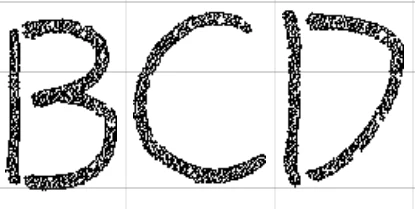
Thank you very much!

    このトピックへの返信は締め切られました。
    解決に役立った回答 adoberocks

    I finally solved this. I actually didn't use PS at all, but Ai. Ai has a very nice feature of auto-tracing and I finished the work within like 2 clicks. I think this is because I'm processing some fonts. For real images though, the methods below in PS should be better than Ai.

    返信数 4

    adoberocks作成者解決!
    Inspiring
    May 5, 2018

    I finally solved this. I actually didn't use PS at all, but Ai. Ai has a very nice feature of auto-tracing and I finished the work within like 2 clicks. I think this is because I'm processing some fonts. For real images though, the methods below in PS should be better than Ai.

    Trevor.Dennis
    Community Expert
    Community Expert
    May 5, 2018

    If this is noise from the scan, then another approach would be to make multiple scans with the same settings, and use the old layer stacking and median blending trick.  The down side is that it would take some time.

    https://petapixel.com/2013/05/29/a-look-at-reducing-noise-in-photographs-using-median-blending/

    Omar.Fathy
    Community Expert
    Community Expert
    May 5, 2018

    Selecting it by Select>Color Range and select the White area and delete it.

    Then Select the layer that contains the black area then from Layer Styles in the layer panel or Layer>Layer Style you can add a black stroke and increase it till your white spaces filled.

    I hope it may help you!

    Chuck Uebele
    Community Expert
    Community Expert
    May 5, 2018

    You can also trying gaussian blue, then adding a threshold adjustment layer.

    JJMack
    Community Expert
    Community Expert
    May 5, 2018

    In RGB Mode add an empty layer.  Use the curvature pen tool create a path for your characters convert the path to a selection and fill with black.

    JJMack