
Inspiring
September 16, 2017
Answered

How to find texture name in tool preset?

  • September 16, 2017
  • 2 replies
  • 433 views

Hi

Go to the tool presets panel, and select a preset which has a texture associated with it. To do so:

-open the Brush panel.

-next, open the Tool Presets panel.

-next, select a tool preset from the panel and keep an eye on the "Texture" check box in the Brush panel-- when you see a checkmark on the "Texture" checkbox in the brush panel after selecting a tool preset, you know that there is a texture associated with the preset

-next, click on the small texture thumbnail in the brush panel, which is located just to the left of the "Invert" checkbox. It should open up a list of texture thumbnails which you can scroll through

question:

how do you find the exact texture thumbnail inside that list that is associated with the current tool preset? in other words, one of those thumbnails should be highlighted in blue, which indicates the current texture that is being used for the current tool preset that you have selected. But whjen I scroll thrpough the list, none of the lines are highlighted, so I have no idea which of those textures are the active one being used in my current brush (tool preset).

does this make sense - or should I explain this better?
    This topic has been closed for replies.
    Correct answer Jeff Arola

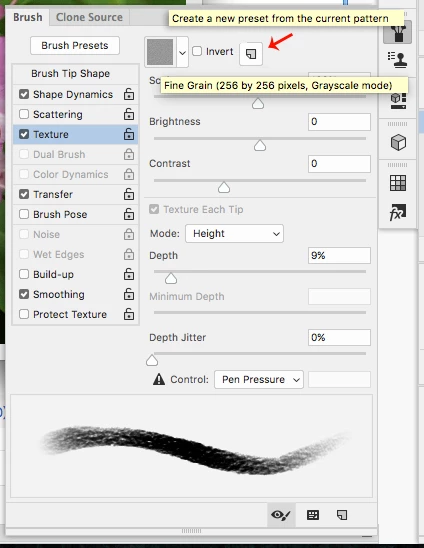
    You can hover your mouse over the texture and get the name.

    If you want to save the texture, there is a button to save the texture as a preset.

    The textures used in presets aren't necessarily textures that are in any of the pattern presets included in photoshop.

    They are saved in the tool/brush preset, so they probably won't show on any pattern list when you see one active with a certain preset.

    2 replies

    angie_taylor
    Legend
    September 16, 2017

    If you open the Brush Presets panel, instead of the Brushes panel, you can click on it's wing menu and choose to display the presets as a large List, this will show you the names as well as a small thumbnail.

    Please let us know if this helps by marking the correct answer for others who may experience the same issue. ;-)

    Jeff Arola
    Community Expert
    Jeff ArolaCommunity ExpertCorrect answer
    Community Expert
    September 16, 2017

    You can hover your mouse over the texture and get the name.

    If you want to save the texture, there is a button to save the texture as a preset.

    The textures used in presets aren't necessarily textures that are in any of the pattern presets included in photoshop.

    They are saved in the tool/brush preset, so they probably won't show on any pattern list when you see one active with a certain preset.