iwanr88516723
Participant
February 6, 2017
Answered

HOW TO FIX can't paste frame

  • February 6, 2017
  • 1 reply
  • 4290 views

I am making ANIMATED on TEXT .. I can't paste frame .. HOW TO FIX that problem ?

    This topic has been closed for replies.
    Correct answer italosan

    You can't copy and paste frames, what you want to do is select your frame and duplicate it, following this steps

    First, if you are on a timeline and you prefer to switch to a "frame by frame" you can do it by clicking this icon
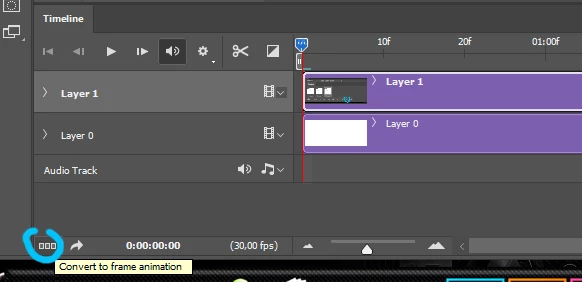
    than, you can duplicate your current frame by clicking this icon:
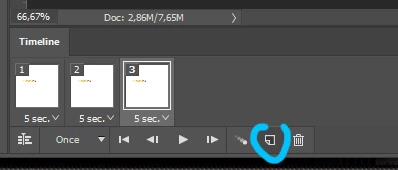
    1 reply

    italosan
    Community Expert
    italosanCommunity ExpertCorrect answer
    Community Expert
    February 6, 2017

    You can't copy and paste frames, what you want to do is select your frame and duplicate it, following this steps

    First, if you are on a timeline and you prefer to switch to a "frame by frame" you can do it by clicking this icon

    than, you can duplicate your current frame by clicking this icon:

    Participant
    February 24, 2021

    The "Paste Frames" command exists, but is grayed out and unusable. This is the problem I am having. I don't want to duplicate frames within an animation; I want to take frames from a GIF and add them to a JPG. According to this tutorial, I should be able to do this:
    https://www.youtube.com/watch?v=QasbR_4BMIc
    The instruction begins somewhere around 4:30-5:00. 


    I am attaching a screen shot showing the command that I am trying to use.

    Participant
    October 24, 2022

    Hey! I figured out a solution to this if you weren't able to figure this out / people found this through google like I did haha.


    What fixed it for me was checking if the color modes were the same between the gif and the still image you're trying to paste onto. One was CMYK for me and the other was RGB, switching the still image to RGB like the gif made the option to paste frames no longer grayed out.

    Changing the color mode through
    Image > Mode > ( select whatever color option)

    Hopefully this helps 🙂


    Hey,

    I was having the same issue too and I managed to fix it.

    Yeah the paste option to place the frames I have copied is greyed out, 

    I managed to fix it by checkin if both the files I'm workin on are in the same format ( Greyscale/RGB etc )

    So to fix it you need to go to the top left corner on-

    Image > Mode > then select RGB or whatever option you have available 

    If you keep RGB on both the files you have opened up you can copy paste frames ( It won't be greyed out anymore ) 

    Make sure they're in the same format

    Hope this helps,

    cheers