Known Participant
March 14, 2025
Answered

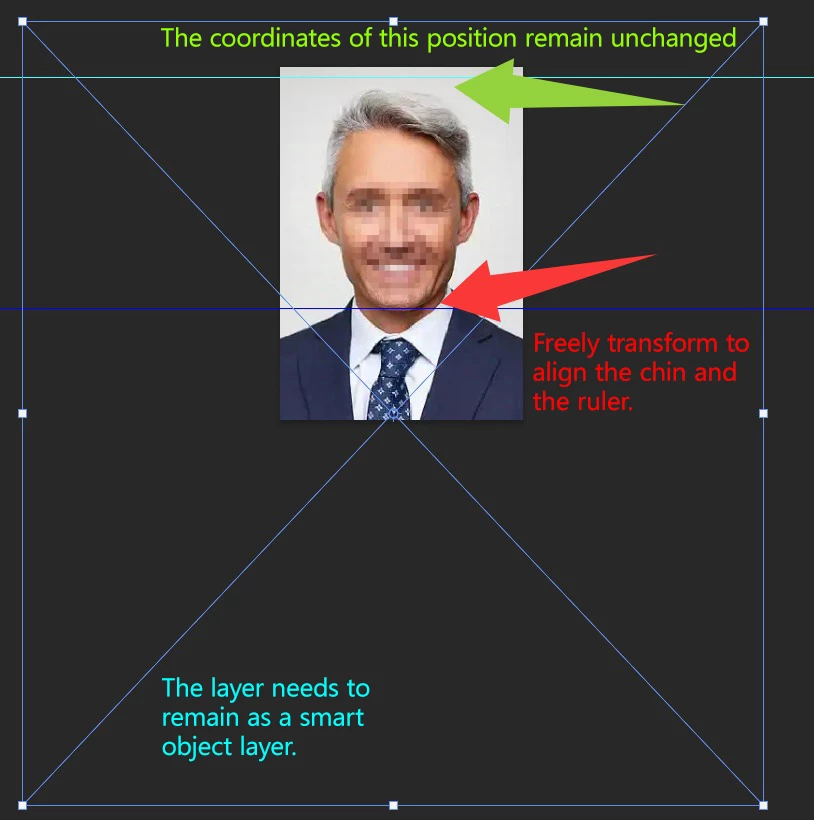
How to freely transform while keeping the top distance unchanged?

  • March 14, 2025
  • 2 replies
  • 2185 views

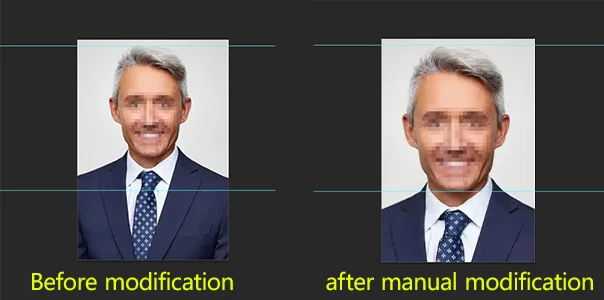
I want to use a JSX script to freely transform the image. My image has two horizontal reference lines: one at the top of the head and one at the chin. When I perform a free transform to the chin position, the distance between the top of the head and the top reference line creates a gap. How can I keep the top of the head aligned with the top reference line while also ensuring that the chin stays aligned with the bottom reference line?

Correct answer c.pfaffenbichler

Yes, semi-automation is achievable. However, obtaining an accurate chin position might be difficult. I have tried recording the Camera Raw filter as an action, but unfortunately, the recording still applies to the previous image.


One can assess the »Select People«-selections via Script now. 
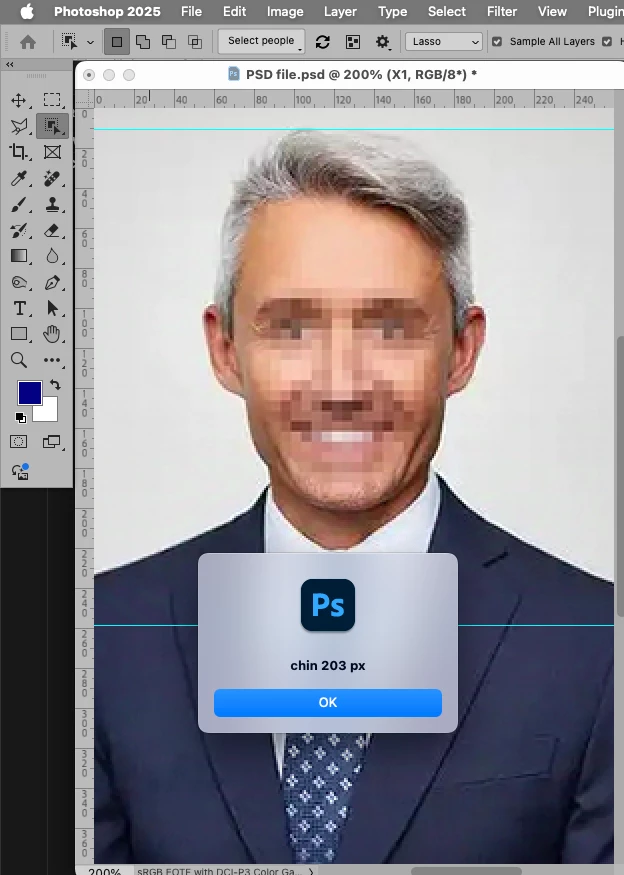
// 2025, use it at your own risk;
if (app.documents.length > 0) {
var desc232 = new ActionDescriptor();
desc232.putBoolean( stringIDToTypeID( "selectAllPeople" ), false );
var list4 = new ActionList();
list4.putInteger( 1 );
desc232.putList( stringIDToTypeID( "people" ), list4 );
var list5 = new ActionList();
list5.putString( "Facial skin" );
desc232.putList( stringIDToTypeID( "tagsV2" ), list5 );
var list6 = new ActionList();
list6.putInteger( 10 );
desc232.putList( stringIDToTypeID( "tagsIndices" ), list6 );
executeAction( stringIDToTypeID( "selectPeopleV2" ), desc232, DialogModes.NO );
// check for selection;
if (hasSelection() == true) {
var originalRulerUnits = app.preferences.rulerUnits;
app.preferences.rulerUnits = Units.PIXELS;
alert ("chin "+activeDocument.selection.bounds[3]);
activeDocument.selection.deselect();
app.preferences.rulerUnits = originalRulerUnits;
}
};

 

2 replies

c.pfaffenbichler
Community Expert
Community Expert
March 14, 2025

This would raise the transform with a custom Reference Point, so alt-dragging the handles would center there. 

// 2025, use it at your own risk;
if (app.documents.length > 0) {
var originalRulerUnits = app.preferences.rulerUnits;
app.preferences.rulerUnits = Units.PIXELS;
freeTransformWithRefernce ([750,750]);
app.preferences.rulerUnits = originalRulerUnits;
};
////// free transform //////
function freeTransformWithRefernce (thePoint) {
try {
    var idtransform = stringIDToTypeID( "transform" );
    var desc6 = new ActionDescriptor();
    var idfreeTransformCenterState = stringIDToTypeID( "freeTransformCenterState" );
    var idquadCenterState = stringIDToTypeID( "quadCenterState" );
    var idQCSIndependent = stringIDToTypeID( "QCSIndependent" );
    desc6.putEnumerated( idfreeTransformCenterState, idquadCenterState, idQCSIndependent );
    var idposition = stringIDToTypeID( "position" );
        var desc7 = new ActionDescriptor();
        var idhorizontal = stringIDToTypeID( "horizontal" );
        var idpixelsUnit = stringIDToTypeID( "pixelsUnit" );
        desc7.putUnitDouble( idhorizontal, idpixelsUnit, thePoint[0] );
        var idvertical = stringIDToTypeID( "vertical" );
        var idpixelsUnit = stringIDToTypeID( "pixelsUnit" );
        desc7.putUnitDouble( idvertical, idpixelsUnit, thePoint[1] );
    var idpaint = stringIDToTypeID( "paint" );
    desc6.putObject( idposition, idpaint, desc7 );
    var idoffset = stringIDToTypeID( "offset" );
        var desc8 = new ActionDescriptor();
        var idhorizontal = stringIDToTypeID( "horizontal" );
        var idpixelsUnit = stringIDToTypeID( "pixelsUnit" );
        desc8.putUnitDouble( idhorizontal, idpixelsUnit, -0.000000 );
        var idvertical = stringIDToTypeID( "vertical" );
        var idpixelsUnit = stringIDToTypeID( "pixelsUnit" );
        desc8.putUnitDouble( idvertical, idpixelsUnit, -0.000000 );
    var idoffset = stringIDToTypeID( "offset" );
    desc6.putObject( idoffset, idoffset, desc8 );
    var idwidth = stringIDToTypeID( "width" );
    var idpercentUnit = stringIDToTypeID( "percentUnit" );
    desc6.putUnitDouble( idwidth, idpercentUnit, 100 );
    var idheight = stringIDToTypeID( "height" );
    var idpercentUnit = stringIDToTypeID( "percentUnit" );
    desc6.putUnitDouble( idheight, idpercentUnit, 100 );
    var idreplaceLayer = stringIDToTypeID( "replaceLayer" );
        var desc9 = new ActionDescriptor();
        var idfrom = stringIDToTypeID( "from" );
            var ref2 = new ActionReference();
            var idlayer = stringIDToTypeID( "layer" );
            ref2.putIdentifier( idlayer, 3 );
        desc9.putReference( idfrom, ref2 );
        var idto = stringIDToTypeID( "to" );
            var ref3 = new ActionReference();
            var idlayer = stringIDToTypeID( "layer" );
            ref3.putIdentifier( idlayer, 3 );
        desc9.putReference( idto, ref3 );
    var idtransform = stringIDToTypeID( "transform" );
    desc6.putObject( idreplaceLayer, idtransform, desc9 );
executeAction( idtransform, desc6, DialogModes.ALL );
} catch (e) {}
};
Known Participant
March 14, 2025

First of all, thank you for your answer. Before this, I did try my own code, but there was a gap at the top position.


#target photoshop

// Get the active document and its guides
var doc = app.activeDocument;
var guides = doc.guides;

// Initialize arrays for vertical and horizontal guides
var verticalGuides = [];
var horizontalGuides = [];

// Loop through guides and separate them into vertical and horizontal
for (var i = 0; i < guides.length; i++) {
    var guide = guides[i];
    if (guide.direction == Direction.VERTICAL) {
        verticalGuides.push(guide.coordinate);
    } else {
        horizontalGuides.push(guide.coordinate);
    }
}

// Determine the left and right boundaries
var left = Math.min.apply(null, verticalGuides);
var right = Math.max.apply(null, verticalGuides);
var bottom = Math.max.apply(null, horizontalGuides);

// Calculate the selection height dynamically
var selectionHeight = doc.height - bottom; // Adaptive height
var selectionRegion = [
    [left, bottom],
    [right, bottom],
    [right, bottom + selectionHeight],
    [left, bottom + selectionHeight]
];

// Select the region
doc.selection.select(selectionRegion);

// Calculate JS_gaodu (height difference)
var X_gaodu = selectionHeight.toString().replace(' px', ''); // Get the selection height and remove 'px'
var JS_gaodu = 259 - parseFloat(X_gaodu); // Calculate the difference

doc.selection.deselect(); // Deselect the selection

// Get the layer's boundary information
var layer = doc.activeLayer;
var layerBounds = layer.bounds;
var layerWidth = layerBounds[2].value - layerBounds[0].value;
var layerHeight = layerBounds[3].value - layerBounds[1].value;

// Calculate the target height and the scale percentage
var targetHeight = layerHeight + JS_gaodu; // Calculate the target height
var scale = targetHeight / layerHeight * 100; // Calculate the scale percentage

// Resize the layer, maintaining the aspect ratio
layer.resize(scale, scale, AnchorPosition.TOPCENTER);


c.pfaffenbichler
Community Expert
Community Expert
March 14, 2025

Do sou want the Script to pause and manually transform the Layer or …? 

Known Participant
March 14, 2025

I hope to automatically adjust the layer through the script, not pause for manual transformation. Thank you

c.pfaffenbichler
Community Expert
Community Expert
March 14, 2025

I have already completed manually marking the top of the head and the chin, just left with the free transform.


@jazz-y provided a Script for face-recognition utilizing the Liquify Filter, not sure if it would be exact enough for the chin-position.