
drstir
Inspiring
August 8, 2021
Answered

How to get image to show through just on text?

  • August 8, 2021
  • 1 reply
  • 1617 views

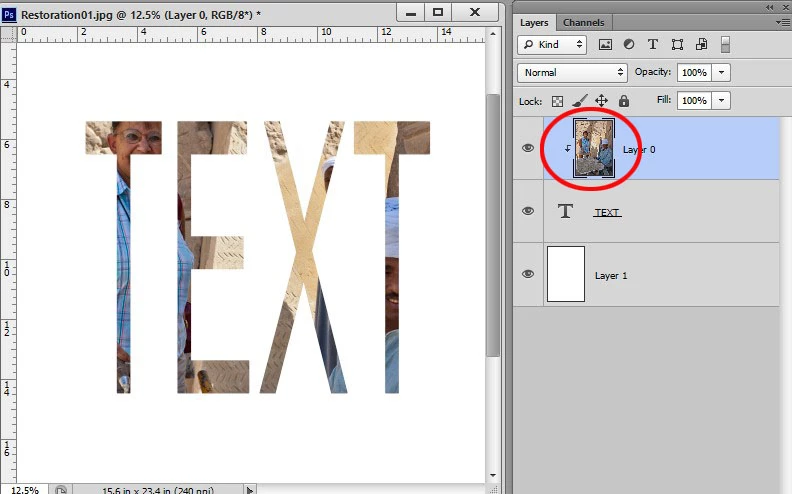
Does anyone know how to make text on a layer reveal the image below - so the image would only appear on the text? Difficult to explain, but I'm hoping someone may know how to do it - either in Photoshop or Illustrator. Thanks,
This topic has been closed for replies.
Correct answer edgrimley

Clip the image layer to the text layer. Alt+click the bottom edge of the image layer. A small down arrow will appear to indicate that it's clipped to the layer below.

1 reply

Ged_Traynor
Community Expert
Community Expert
August 8, 2021

Hi

Is this what your referring too

drstir
drstirAuthor
Inspiring
August 8, 2021

And Ged... if I'm not pushing my luck, could you explain the process in Illustrator as well?

Derek Cross
Community Expert
Community Expert
August 8, 2021