
How to get rid of PS palette.
Hi:
I have updated to the newer PS from CS6, which I long had. So there is a lot new here now. One issue I can't seem to resolve is that when I open a photo it opens in a big PS palette that blocks out the rest of my desktop. I don't want this big opaque palette. Before I lost CS 6 (because I had to update OS) my photos just opened by themselves on the desktop and very unobtrusive tool bars sat on the top and right side perimeters of the desktop when PS was open. No palette. Now I got this big honking palette in the way. Also, another big issue is that when I close out of a photo the palette stays on the screen and I have to get out of that. If not it's in the way of everything and I have to slide it aside to find the next photo to open and work on. It adds A LOT of work. It should disappear when I close out the photo I've been working on -- altho I don't want it in the first place. I can't even close it with keyboard shortcuts (like command+w). I have to go up to red dot and hit that. Super tedious. Here is a photo to show you what I mean. It may not seem like a big deal to have to close the palette each time but when you edit lots and lots of photos it's an extra step that ends of taking a lot of extra time. Is there a way to get rid of this palette? I looked thru the preference options and played around but nothing works. Thanks for any help you can offer me. 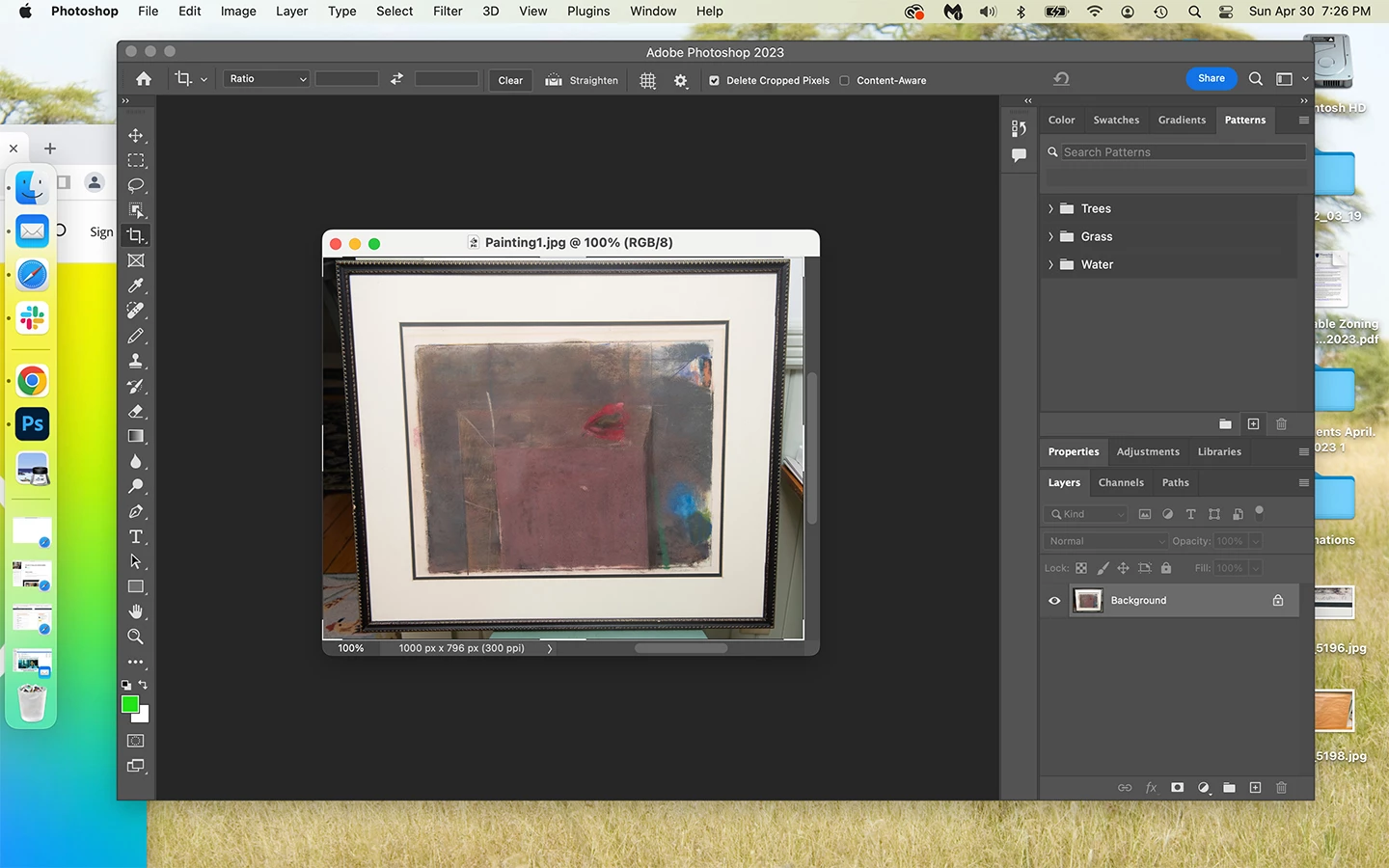
 AdChoices