
Inspiring
August 29, 2024
Question

How to get the bounds of the exported png

  • August 29, 2024
  • 3 replies
  • 1677 views

I use a script to export a layer as a png. This png does not contain transparent areas.  how can I get the bounds of the png relative to the canvas.


function quickExportPng() {
 
    var d = new ActionDescriptor();

    var r = new ActionReference();

    r.putEnumerated(stringIDToTypeID("layer"), stringIDToTypeID("ordinal"), stringIDToTypeID("targetEnum"));

    d.putReference(stringIDToTypeID("null"), r);

    d.putString(stringIDToTypeID("fileType"), "png");

    d.putInteger(stringIDToTypeID("quality"), 32);

    d.putInteger(stringIDToTypeID("metadata"), 0);

    d.putString(stringIDToTypeID("destFolder"), exportDir);

    d.putBoolean(stringIDToTypeID("sRGB"), true);

    d.putBoolean(stringIDToTypeID("openWindow"), false);

    executeAction(stringIDToTypeID("exportSelectionAsFileTypePressed"), d, DialogModes.NO);

}


 The red rectangle is the exported png content,The popup box is the bounds of the layer.
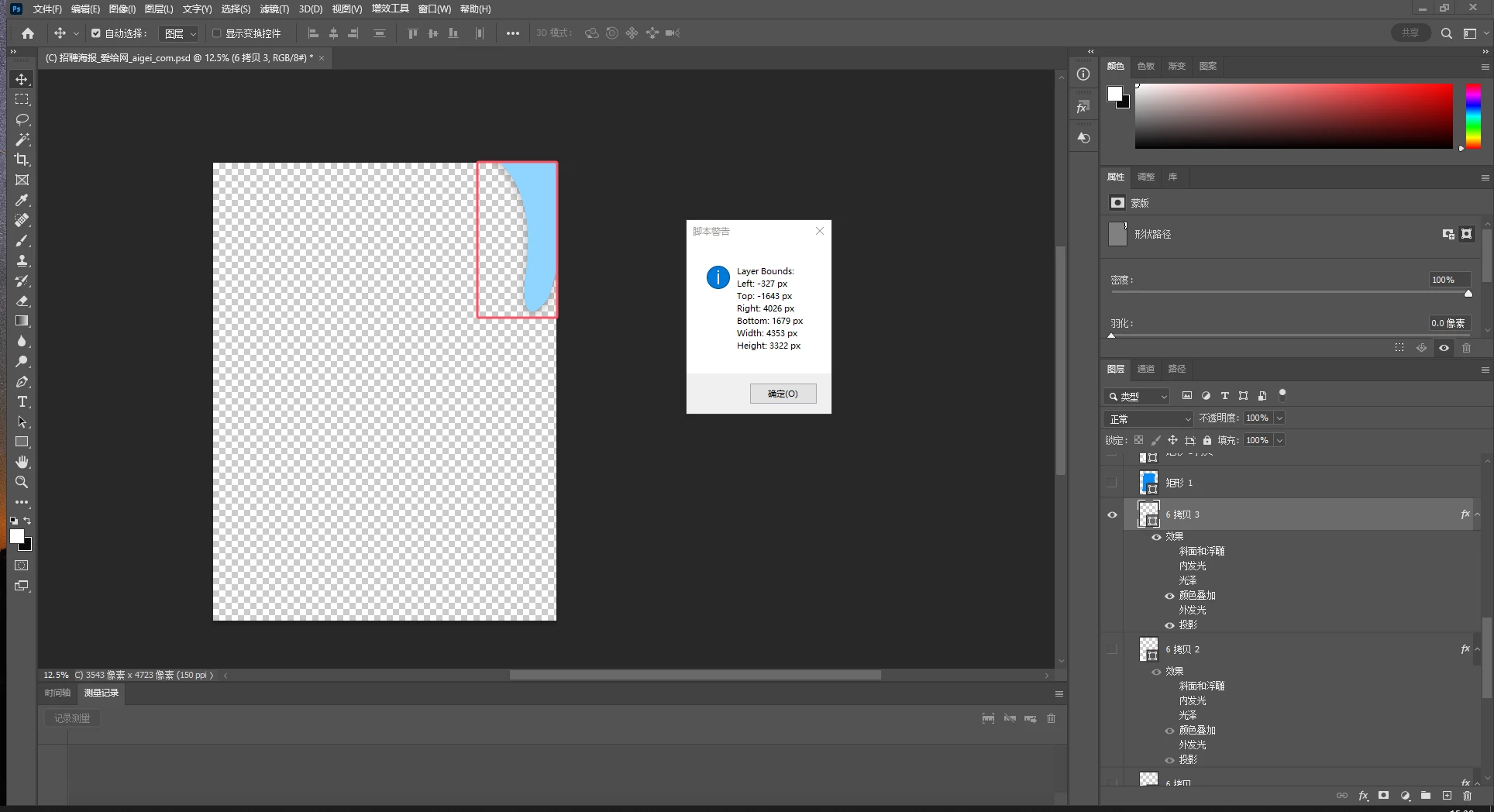
 Press ctrl+T on this layer to display the actual content and position of this layer.
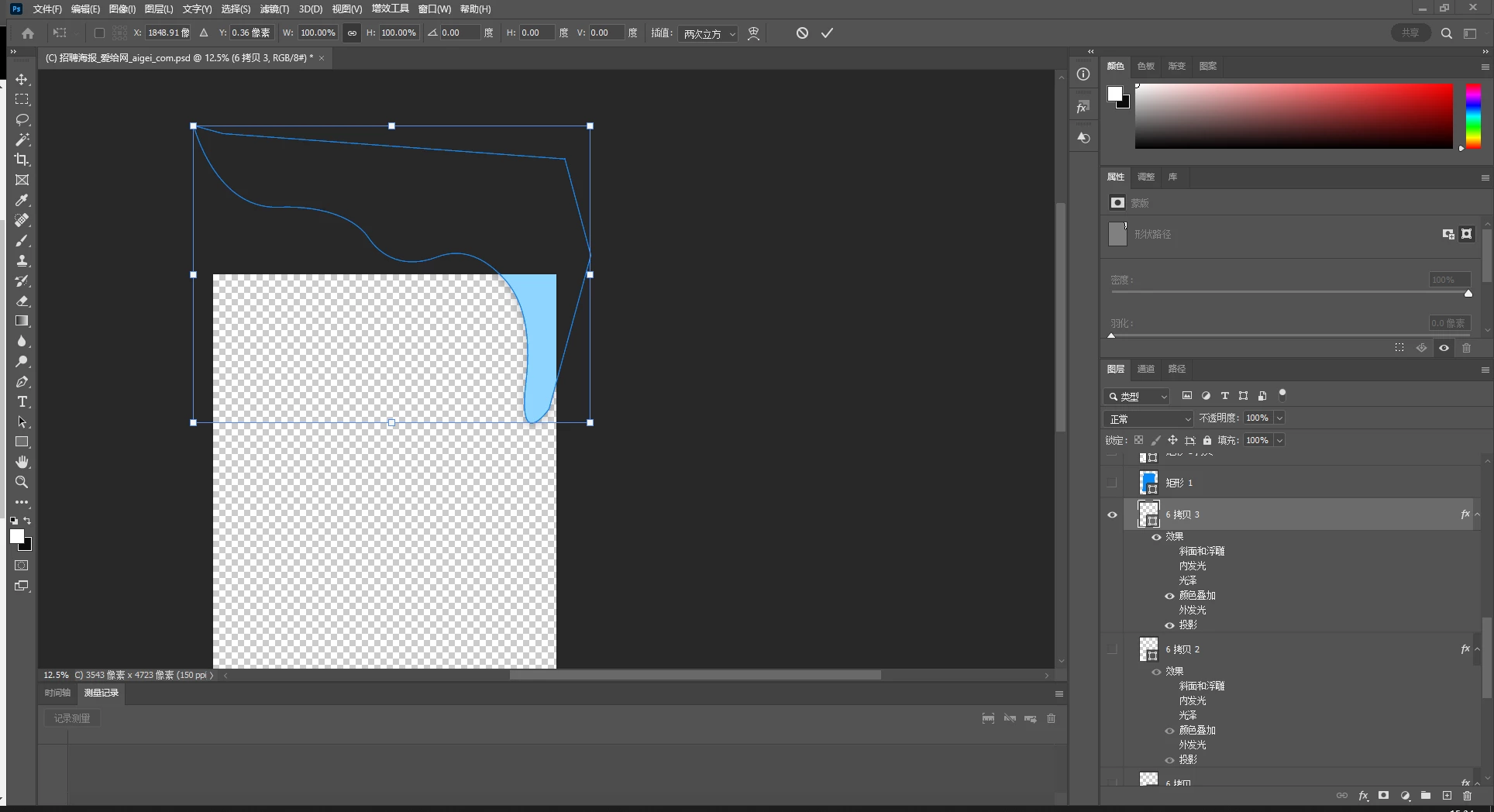
This topic has been closed for replies.

3 replies

c.pfaffenbichler
Community Expert
Community Expert
August 31, 2024

A possible work-around: 

// 2024, use it at your own risk;
if (app.documents.length > 0) {
var doc = app.activeDocument;
if (doc.activeLayer != null) {
var originalRulerUnits = app.preferences.rulerUnits;
app.preferences.rulerUnits = Units.PIXELS;
var theDup = doc.duplicate ("copy", true);
hideOthers();
var bounds = theDup.activeLayer.bounds;
//var bounds = layer.bounds;
var left = bounds[0].as('px');
var top = bounds[1].as('px');
var right = bounds[2].as('px');
var bottom = bounds[3].as('px');
var width = right - left;
var height = bottom - top;
theDup.close(SaveOptions.DONOTSAVECHANGES);
alert("Layer Bounds:\n" +
"Left: " + left + " px\n" +
"Top: " + top + " px\n" +
"Right: " + right + " px\n" +
"Bottom: " + bottom + " px\n" +
"Width: " + width + " px\n" +
"Height: " + height + " px");
app.preferences.rulerUnits = originalRulerUnits;
} else {
alert("No active layer selected.");
}
} else {
alert("No document open.");
};
////// toggle visibility of others //////
function hideOthers () {
var desc10 = new ActionDescriptor();
var list4 = new ActionList();
var ref7 = new ActionReference();
ref7.putEnumerated( charIDToTypeID( "Lyr " ), charIDToTypeID( "Ordn" ), charIDToTypeID( "Trgt" ) );
list4.putReference( ref7 );
desc10.putList( charIDToTypeID( "null" ), list4 );
desc10.putBoolean( charIDToTypeID( "TglO" ), true );
executeAction( charIDToTypeID( "Shw " ), desc10, DialogModes.NO );
};
Stephen Marsh
Community Expert
Community Expert
August 29, 2024

@javaer – If I am understanding your post (it's not exactly clear to me)...


1) Load layer transparency channel as a selection

2) Select > Inverse selection

3) Select > Inverse selection

4) Get selection bounds/co-ordinates

5) Deselect


Do you also need the bounds of the layer effects/style, such as drop shadow? That would take more work in ExtendScript. I believe that UXP has made advancements in this area though. Perhaps something like:


1) Dupe layer

2) Rasterize layer style

3) Load layer transparency channel as a selection

4) Select > Inverse selection

5) Select > Inverse selection

6) Get selection bounds/co-ordinates

7) Delete the temp layer

😎 Deselect

javaerAuthor
Inspiring
August 30, 2024

This is too complicated. Is there no way to get the bounds in the "Quick Export Png" operation?

javaerAuthor
Inspiring
August 30, 2024

And the way you suggest it now, the shadow part is not included.

c.pfaffenbichler
Community Expert
Community Expert
August 29, 2024

Please post the Script in question, the one you use to get the alert of the Bounds. 


Replacing negative values with 0 or values larger than the width/height with those would not be sufficient, so intersecting the transparency with the canvas would seem like an option. 

javaerAuthor
Inspiring
August 29, 2024

The script I posted is just a script for quickly exporting PNG. I don’t have a script that solves the problem.

c.pfaffenbichler
Community Expert
Community Expert
August 29, 2024

What problem? 

The png gets exported correctly, right?