Known Participant
January 12, 2024
Answered

How to hide brush icon when masking in Camera Raw

  • January 12, 2024
  • 1 reply
  • 664 views

Is there a way to hide the brush icon which displays while doing edits in Adobe Camera Raw after a mask was created with a brush? It sometimes sits directly over an area where I am trying to a critical edit, blocking my view.
Windows 10, PS 24.7.2, ACR 16.1.0.1728

Correct answer Jeff Arola

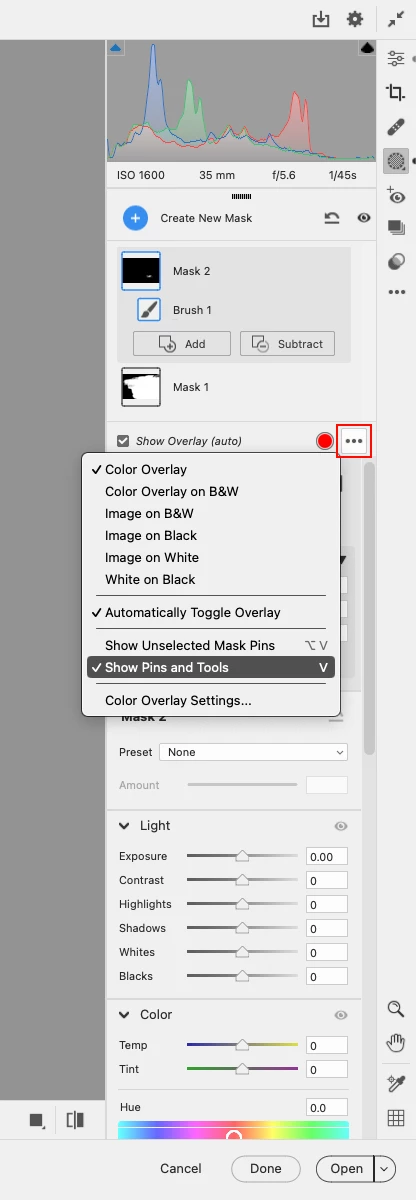
You can uncheck Show Pins and Tools in the Masking panel menu under the four little dots to the right of where it says

Show Overlay (auto) or Press V
 

1 reply

Jeff Arola
Community Expert
Jeff ArolaCommunity ExpertCorrect answer
Community Expert
January 12, 2024

You can uncheck Show Pins and Tools in the Masking panel menu under the four little dots to the right of where it says

Show Overlay (auto) or Press V


Bruce ABAuthor
Known Participant
January 16, 2024

Thank you, Jeff Arola! It's easy when you know how it's done!
