
LosFX
Participant
April 16, 2019
Answered

How to include commas in a Data Set - Photoshop

  • April 16, 2019
  • 2 replies
  • 3810 views

I am successfully using the Data Set to import a csv or tab document and generate the sequence of items in my list. I managed to use the double quotes to get them around my quote text.   "It works!" she said

BUT

there are missing commas as part of the text in my text quotes.

If I use the CSV and I include the extra comma (whether commenting it first or not with regular expression  \,   ) it fails to import.

If I import the tab-delimited txt, the commas do not show up at all.

HOW do I include commas in the values of my Data Sets?
This topic has been closed for replies.
Correct answer davescm

Hi

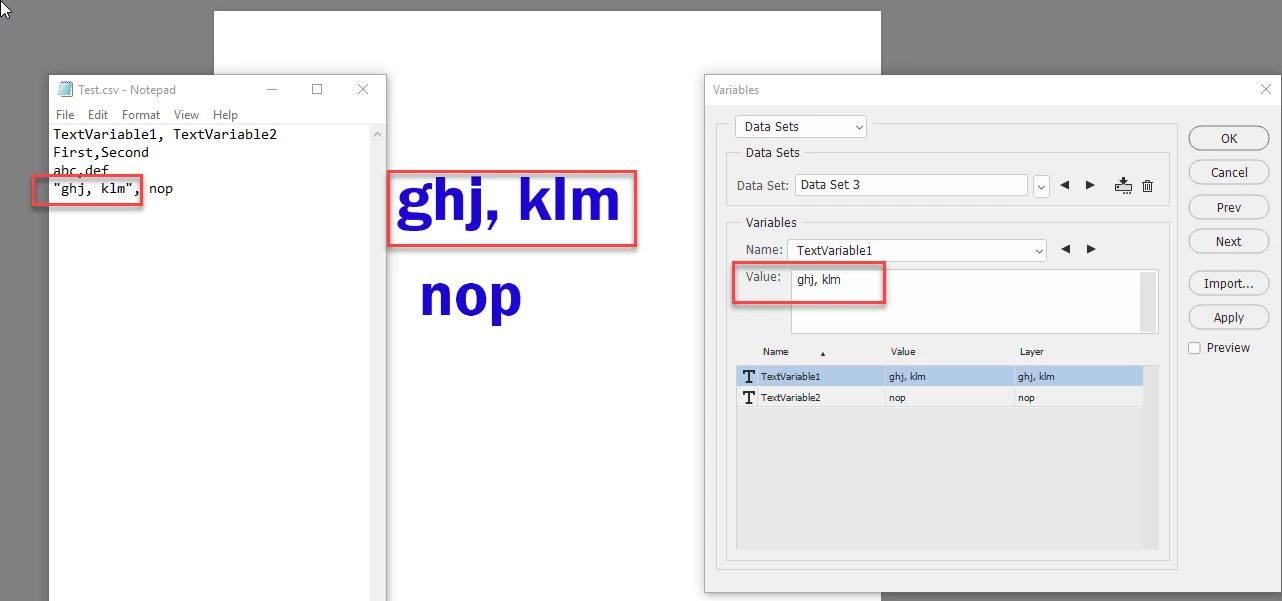
Put the text with commas in quotes. See below:

Dave

2 replies

Cobra Kai
Participating Frequently
November 22, 2021

I just output the spreadsheet as tab delimited. 

davescm
Community Expert
davescmCommunity ExpertCorrect answer
Community Expert
April 16, 2019

Hi

Put the text with commas in quotes. See below:

Dave

LosFX
LosFXAuthor
Participant
April 17, 2019

Dave,

Thank you!... I will credit you all the way.

I had tried this and many other ways ... but what I liked about your response was the simplicity of the test file, and that prompted me to mimic it and found that the way I was exporting the csv file was NOT properly formatted. I tried tab from scratch and all works now.

what I found out now, is that I lose my double quotes  ( " )   that are typical at the ends of a phrase. I am trying different ways to work with the csv format, but does not seem to work. IF I do it with tab-delimited way, then I can have double quotes ( " ) and commas ( , ) in the phrases. [BUT mind you, they must be double-double quotes. ""This, will work""]

Conclusion, use tab-delimited files instead, as they seem to have more flexibility and control. for commas and quotes.

THANK YOU.

davescm
Community Expert
Community Expert
April 17, 2019

You're welcome, I'm glad it helped solve your issue.

Dave