Participant
July 6, 2018
Answered

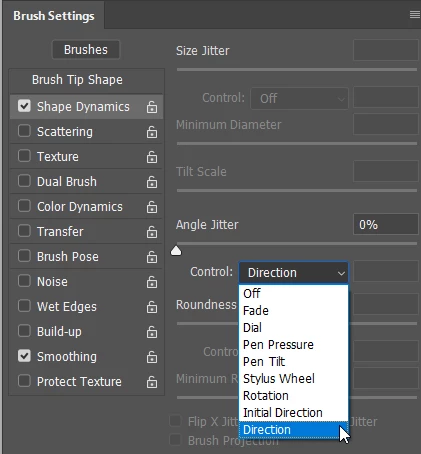
How to make brush rotate with direction its being drawn?

  • July 6, 2018
  • 3 replies
  • 11958 views

The brush I'm using is constantly in a flat 0, _ shape, and won't rotate and will only stay a single direction. Help?

    Correct answer Trevor.Dennis

    This is the usual way to achieve that, but I'd be interested to see what preset you are using.
    3 replies

    Trevor.Dennis
    Community Expert
    Trevor.DennisCommunity ExpertCorrect answer
    Community Expert
    July 7, 2018

    This is the usual way to achieve that, but I'd be interested to see what preset you are using.

    Participant
    April 7, 2025

    thanks 

    Semaphoric
    Community Expert
    Community Expert
    July 7, 2018

    Could you post a screenshot of the Brush Settings panel, with the Shape Dynamics section showing?

    Sahil.Chawla
    Adobe Employee
    Adobe Employee
    July 6, 2018

    Hi Uels,

    You can try rotating the canvas by using the Rotate View tool, Press the R key or click-and-hold the Hand tool at the bottom of the Toolbox and select the Rotate View tool. Click-and-drag on the document until you reach your desired placement. For precision and consistency, you can also enter rotation numerically in the Rotation Angle field in the Options Bar.

    Regards,
    Sahil