Participant
April 16, 2019
Answered

How to make custom mixer brush tool

  • April 16, 2019
  • 3 replies
  • 4279 views

I know how you can make a custom brush but I am wondering how to make a custom mixer brush with the wet and load menu things, I can't seem to find it anywhere

    This topic has been closed for replies.
    Correct answer davescm

    Hi

    Make your brush shape as normal using Edit - Define Brush Preset

    Then select it and switch to the mixer brush tool.

    Set your mixer brush settings in the options bar

    In the brushes panel go to the menu at the top right and choose New Brush Preset.
    Give the brush a name and ensure "Include Tool Settings" is checked
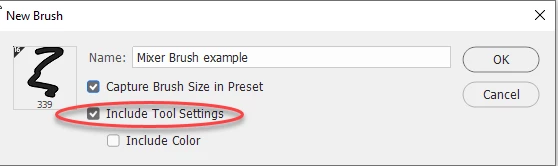
    Then press OK

    Dave

    3 replies

    Participant
    April 16, 2019

    thank you!

    davescm
    Community Expert
    Community Expert
    April 16, 2019

    You're welcome

    davescm
    Community Expert
    davescmCommunity ExpertCorrect answer
    Community Expert
    April 16, 2019

    Hi

    Make your brush shape as normal using Edit - Define Brush Preset

    Then select it and switch to the mixer brush tool.

    Set your mixer brush settings in the options bar

    In the brushes panel go to the menu at the top right and choose New Brush Preset.
    Give the brush a name and ensure "Include Tool Settings" is checked

    Then press OK

    Dave

    Participant
    March 9, 2023

    Thanks so much Dave, I am going up to the studio and try it out now!

    Sahil.Chawla
    Adobe Employee
    Adobe Employee
    April 16, 2019

    Hi there,

    As you're looking to create custom mixer brush tool in Photoshop, could you please have a look at this video and let us know if it helps?

    Creating Custom Mixer Brushes - YouTube

    You may also have a look at this article and see if it helps: Paint with the Mixer Brush in Photoshop


    Regards,
    Sahil