
Participant
July 11, 2018
Answered

How to Make PDF File Sizw Smaller. (Photoshop)

  • July 11, 2018
  • 1 reply
  • 3686 views

Hi all,

I have a PDF file that needs to be distributed to consumers. However the file size has to be 400 KB. I've tried making this my file size without compromising quality however it keeps looking terrible. Does anyone have any tips?
This topic has been closed for replies.
Correct answer Nancy OShea

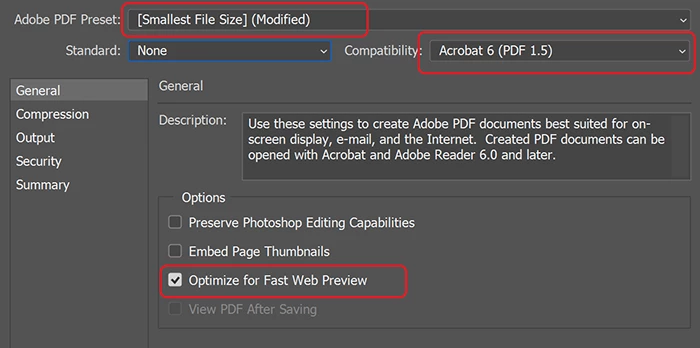
When you File > SaveAs > PDF, you're presented with a PDF options panel.  See screenshot below.   Use smallest file size preset, compatible with Acrobat 6 or higher and Optimize for Fast Web Preview.

1 reply

John T Smith
Community Expert
Community Expert
July 11, 2018

Your title includes Photoshop, but you posted in the generic Cloud forum

Exactly what program are you using to create the PDF, and what is the original file?

VanessaITAuthor
Participant
July 11, 2018

Oh sorry. It's my first time posting. I use Canva at first because they have a lot of stock photos and backgrounds to choose from. Then I move over to Photoshop to do a few other tweaks to the file. However when I save the file to a PDF it makes it over 4MB as the lowest ok looking quality size. However reading the guidelines at my job for their distribution they want the file at 400KB.

John T Smith
Community Expert
Community Expert
July 11, 2018

You do not provide any information on the original file, so I will GUESS that a file with a size of (as an example) 4000x4000 pixels simply can't be made into a small PDF