lovephotoshopCC
Known Participant
August 6, 2019
Answered

How to make this popup text effect in Photoshop?

  • August 6, 2019
  • 2 replies
  • 1912 views

Hi sir/madam,

I can't find the answer for this image, how to letter popup like this? i used Photoshop CC.
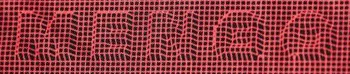
I'm grateful if anyone help.

thank you

Message was edited by: Sahil Chawla

This topic has been closed for replies.
Correct answer Norman Sanders

It is a technique called Displacement Mapping (with Bevel & Embossed type) and you will probably find a YouTube video that demonstrates it. The mapping makes the grid bend to the embossed lettering. If you would like a copy. of the PDF on Displacement Mapping that I wrote for my students, send me a personal message with your email address.

2 replies

Norman Sanders
Norman SandersCorrect answer
Legend
August 6, 2019

It is a technique called Displacement Mapping (with Bevel & Embossed type) and you will probably find a YouTube video that demonstrates it. The mapping makes the grid bend to the embossed lettering. If you would like a copy. of the PDF on Displacement Mapping that I wrote for my students, send me a personal message with your email address.

lovephotoshopCC
Known Participant
August 10, 2019

I'm waiting for you in PM.

Norman Sanders
Legend
August 10, 2019

I tried a third time and each email address bounced back to me.  I gave up.

If you can supply a valid address I will try again.

Sahil.Chawla
Adobe Employee
Adobe Employee
August 6, 2019

Hi there,

I believe this effect is created using the Layer Styles in Photoshop.
Please check out this article to know more about Layer Styles: Layer effects and styles in Adobe Photoshop

Regards,
Sahil

lovephotoshopCC
Known Participant
August 6, 2019

thanks but i already did them all , i trying everything but no good... i just want to know how to this image....like tutorial if possible. thanks