
Participant
August 1, 2020
Question

How to match the color of pasted layer to the background layer?

  • August 1, 2020
  • 3 replies
  • 729 views

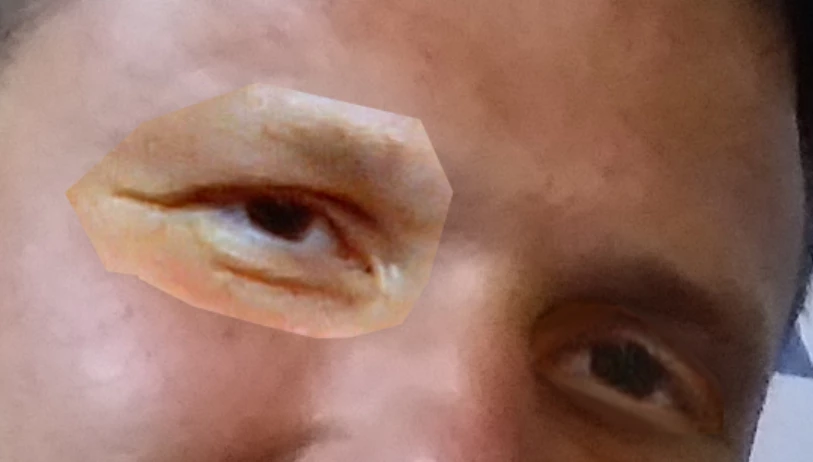
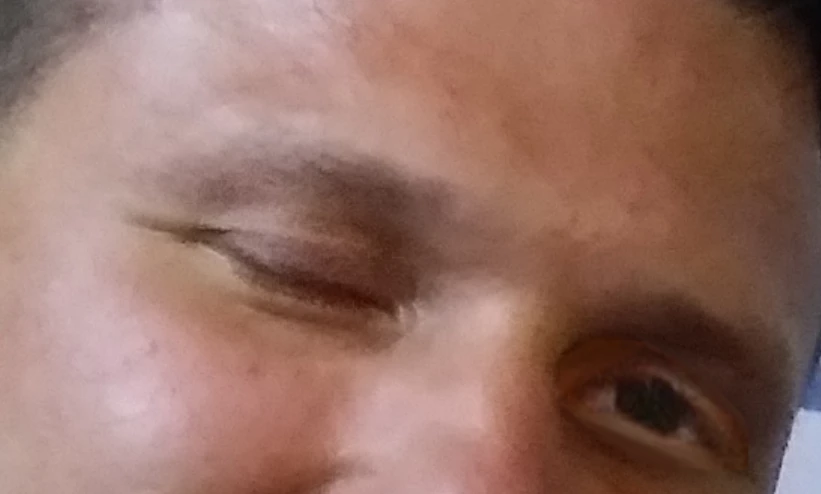
I am trying to open somebody's eyes in Photoshop by copying his open eyes from another photo and pasting them into the photo I need. The problem is the shades are different and I don't know how  I can handle that. I think that's an easy question for advanced Photoshop users. I attach both photos. Thanks for help in advance!
This topic has been closed for replies.

3 replies

c.pfaffenbichler
Community Expert
Community Expert
August 1, 2020

c.pfaffenbichler
Community Expert
Community Expert
August 1, 2020

And in my opinion you clipped the placed eye too close. 

c.pfaffenbichler
Community Expert
Community Expert
August 1, 2020

Clipping Mask the appropriate Adjustment Layer/s to the pasted Layer and apply a Layer Mask to it. 

Niko7301Author
Participant
August 1, 2020

Thank you for so fast response! I am a noobie in color adjustments, never used clipping masks, could you explain it step by step?

c.pfaffenbichler
Community Expert
Community Expert
August 2, 2020

Sorry, what do you mean by saying that I "clipped the eye too closely"? I followed your tips but I am still missing something huge (I am sure I just don't understand something) 😕😕
(btw thanks for patience ik it's annoying to help sb who doesn't get what you mean)


The selection you made before copying the eye is so close that a soft Layer Mask is likely to reveal the edges. 


The Layer Mask you applied does not seem to do anything much, try brushing black over the edges with a soft brush to hide the hard edges. 


What are the settings you used for the Hue/Saturation Layer?