Without creating a script for your specific personal workflow, I will suggest the following:
1) Take note of the adjustment layer settings and delete it.
2) Record a two-step action that changes the selected layer directly using hue/saturation or whatever you have done via the adjustment layer. The second step of this action will be to "Select backward layer", this step is recorded using the opt/alt [ keys (hold down the option or alt key while pressing the opening left square bracket key). Stop recording the action, you'll have something like this:
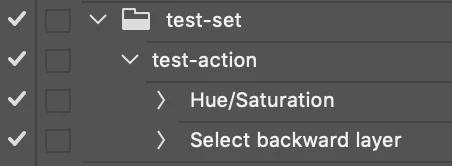
Attention: It is expected that the selected layers are contiguous for the action to work as intended and that the selected layers are layers that can be edited with an adjustment.
3) Copy the following JavaScript code and use the instructions linked below to save and run the JavaScript script. You will need to know exactly how many layers there are to change and enter that number into the script prompt:
// Repeat action N times GUI
// https://forums.adobe.com/thread/2649334
// https://forums.adobe.com/message/11234144#11234144

#target photoshop

// Loop the input prompt until a number is entered
var origInput;
while (isNaN(origInput = prompt("Enter a whole number:", "3")));
// Convert decimal input to integer
var inputToInteger = parseInt(origInput);

function main() {
    for (i = 0; i < inputToInteger; i++) // Variable prompt N times
    {
        // Change the action and action set as required
        app.doAction("test-action", "test-set");
    }
}

app.activeDocument.suspendHistory("Repeat action N times (history suspended)", "main()");
Downloading and Installing Adobe Scripts
The following script will automatically count the selected layers and play the nominated action the required amount of times for each layer. You will still need to use an action as previously described and change the action set and action name.
Attention: It is expected that the selected layers are contiguous for the action to work as intended and that the selected layers are layers that can be edited with an adjustment.
#target photoshop

function main() {

        makeDupe("", 5);
        var layerCount = app.activeDocument.layers.length;
        app.activeDocument.close(SaveOptions.DONOTSAVECHANGES);
        makeGroup("", 17, 18, "");
        deleteGroup(false);

        // Loop the action over contiguous selected layers
        for (i = 0; i < layerCount; i++) {
            // Change the name of the action and action set as required
            app.doAction("test-action", "test-set");
        }

        function makeDupe(name2, version) {
            // Dupe selected layers to temp doc
            // This is a quick hack method, not best practice code!
            var c2t = function (s) {
                return app.charIDToTypeID(s);
            };
            var s2t = function (s) {
                return app.stringIDToTypeID(s);
            };
            var descriptor = new ActionDescriptor();
            var reference = new ActionReference();
            var reference2 = new ActionReference();
            reference.putClass(s2t("document"));
            descriptor.putReference(c2t("null"), reference);
            descriptor.putString(s2t("name"), "", "TempLayerCountDoc", name2);
            reference2.putEnumerated(s2t("layer"), s2t("ordinal"), s2t("targetEnum"));
            descriptor.putReference(s2t("using"), reference2);
            descriptor.putInteger(s2t("version"), version);
            executeAction(s2t("make"), descriptor, DialogModes.NO);
        }

        function makeGroup(name2, layerSectionStart, layerSectionEnd, name3) {
            // Group selected layers
            // This is a quick hack method, not best practice code!
            var c2t = function (s) {
                return app.charIDToTypeID(s);
            };
            var s2t = function (s) {
                return app.stringIDToTypeID(s);
            };
            var descriptor = new ActionDescriptor();
            var descriptor2 = new ActionDescriptor();
            var reference = new ActionReference();
            var reference2 = new ActionReference();
            reference.putClass(s2t("layerSection"));
            descriptor.putReference(c2t("null"), reference);
            reference2.putEnumerated(s2t("layer"), s2t("ordinal"), s2t("targetEnum"));
            descriptor.putReference(s2t("from"), reference2);
            descriptor2.putString(s2t("name"), "", "groupHack", name2);
            descriptor.putObject(s2t("using"), s2t("layerSection"), descriptor2);
            descriptor.putInteger(s2t("layerSectionStart"), layerSectionStart);
            descriptor.putInteger(s2t("layerSectionEnd"), layerSectionEnd);
            descriptor.putString(s2t("name"), "", "groupHack", name3);
            executeAction(s2t("make"), descriptor, DialogModes.NO);
        }

        function deleteGroup(deleteContained) {
            // Delete group, not contents
            // This is a hack to target the top layer of the previous selection
            var c2t = function (s) {
                return app.charIDToTypeID(s);
            };
            var s2t = function (s) {
                return app.stringIDToTypeID(s);
            };
            var descriptor = new ActionDescriptor();
            var reference = new ActionReference();
            reference.putEnumerated(s2t("layer"), s2t("ordinal"), s2t("targetEnum"));
            descriptor.putReference(c2t("null"), reference);
            descriptor.putBoolean(s2t("deleteContained"), deleteContained);
            executeAction(s2t("delete"), descriptor, DialogModes.NO);
        }

    }

app.activeDocument.suspendHistory("Run script", "main()");
There are undoubtedly many better ways to do this, but this is what I came up with at my current knowledge level in the shortest amount of time to get the job done. I'd of course appreciate learning better methods to do what I hacked together here.
I couldn't get the following script to work, however, it is worth linking up the two topics for future reference:
Applying adjustment layer to multiple layers
Apply Adjustment Layers 2.0 Script for Photoshop
Apply Adjustment Layers 2.0 Script for Photoshop

 AdChoices